1
Making Printer Settings Using the Control Panel
❒ Default: 1 minute
❒ When the printer switches to the Energy Saver mode, the Power indicator goes off, while the Online indicator stays lit and [Energy Save Mode ]
appears.
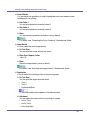
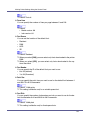
❖ Auto Reset Time
You can set On or Off and the time for the Auto Reset Timer.
❖ Auto Reset
• On
• Off
❒ Default: On
❖ Set Time
• 10 to 999sec by 1sec.
❖ Unit of Measure
You can specify the unit of measurement in “mm” or “inch” for the custom paper size.
• mm
• inch
❒ Default value is destination dependant.
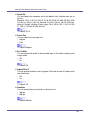
❖ B&W Page Detect
Specify whether to recognize black-and-white images. Use the black-andwhite recognition function to print all monochrome pages in monochrome
mode even if color printing is specified.
• On
• Off
❒ Default: On
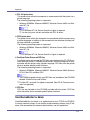
❖ Spool Printing
You can select whether all of the print data is spooled to the hard disk drive
before printing.
• Off
• On
❒ Default: Off
142
































































































































































![CSélectionnez une langue, puis cliquez sur [OK].](http://vs1.manualzilla.com/store/data/006317938_1-593541ea6460ab0ad2c00e00abd849cd-150x150.png)
![DHaga clic en [Siguiente =]. - Firmware Center](http://vs1.manualzilla.com/store/data/006219344_1-304051f971daee15dd0cbfb99af5f096-150x150.png)

![quindi fare clic su [OK]. - Firmware Center](http://vs1.manualzilla.com/store/data/006146493_1-a65fa0368bddccb764b2c8ac1eae6499-150x150.png)