
1
Personality Menu
8150 Technical Guide
Freeze/PassThru FS #2 Switch – toggles the state of Framestore 2 to
its opposite, just like toggling between the Framestore #2 Mode and
Framestore #2 Freeze softkeys in the Framestore menu.
F1, F2, F3 – executes the macro currently assigned to a User Key, just
like pressing one of these buttons (F1, F2, F3).
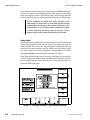
Aux 1 A/B Side Switch – triggers the Aux 1 A/B (front/back) switch.
This mode requires a simple state change as its input. A TTL high (or
open contact) designates the A or front side, and a TTL low (or closed
contact) designates the B or back side. Assign the sources for A and B
in the Miscellaneous menu.
Aux 2 A/B Side Switch – triggers the Aux 2 A/B (front/back) switch
as above.
Aux 3 A/B Side Switch – triggers the Aux 3 A/B (front/back) switch
as above.
Aux 4 A/B Side Switch – triggers the Aux 4 A/B (front/back) switch
as above.
Run Effect Forward – runs the current Timeline effect forward from
the start or its current position if paused, just like pressing the RUN
button.
Run Effect Reverse – runs the current Timeline effect in reverse from
the end or its current position if paused, just like pressing the REV
button.
Jog Effect Forward – steps the current Timeline effect forward one
field.
Jog Effect Reverse – steps the current Timeline effect backward one
field.
Rewind Effect – resets the current Timeline effect back to the first
keyframe, just like pressing the START (REW) button.
FastFwd Effect – sends the current Timeline effect ahead to the last
keyframe, just like pressing the END (FF) button.
Previous Keyframe – steps the current Timeline effect back to the
previous keyframe, just like pressing the PREVIOUS button.
Next Keyframe – steps the current Timeline effect ahead to the next
keyframe, just like pressing the NEXT button.
NOTE: The time delay between receipt of a GPI and its
execution is one frame.
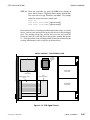
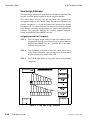
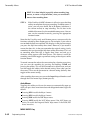
Using the A/B Side (Front/Back) Switch Function
5-36
Engineering Setup
9100-0212-04 - May 2000
















































































![User's Manual[FBD1] ProMax ProMedia Converter](http://vs1.manualzilla.com/store/data/006881326_1-9e3a0042b45fc9f5f8ff38953ecf78a2-150x150.png)