1
XR200-485 Command ProcessorTM Panel User's Guide
Table of Contents
Introduction ..................................................... 1
About Your Security System ...............................
Emergency Evacuation Plans ..............................
The Security Command Keypad ...........................
Special Security Command Tones .........................
Special Security Command Displays ......................
Special Wireless Displays ..................................
Understanding Security System Terms ...................
General Arming Operation .................................
System Arming ..............................................
1
2
2
4
4
5
6
8
9
Arming the System ............................................. 9
Outputs On Off ............................................ 15
Turning the Outputs ON and OFF ......................... 15
Zone Status ................................................. 16
Using the Zone Status Function .......................... 16
Bypass Zones ............................................... 17
Using the Bypass Zones Function ......................... 17
Zone Monitor ............................................... 17
Using the Zone Monitor Function ........................ 18
System Status .............................................. 18
Using the System Status Function ........................ 18
System Test ................................................. 19
Using the System Test Function ........................... 19
General Disarming Operation ............................ 10
Disarming the System from the keypad ................ 11
Extending Schedules ....................................... 11
XR200-485B Panic Test .................................... 19
User Profiles ................................................ 20
Security Command User Menu ...................... 12
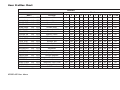
User Profiles Chart ......................................... 21
User Codes .................................................. 23
Forgive Failure to Exit .................................... 25
Ambush Codes .............................................. 25
Schedules .................................................... 26
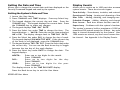
Setting the Date and Time ................................ 31
Alarm Silence ............................................... 13
Using the Alarm Silence Function ......................... 13
Sensor Reset ................................................ 13
Resetting the Sensors ....................................... 13
Door Access ................................................. 14
Using the Door Access ...................................... 14
Armed Areas Display ....................................... 14
Using the Armed Areas Function .......................... 14
Adding User Profiles ......................................... 20
Setting the System’s Date and Time ...................... 31
Display Events .............................................. 31
Service Request ............................................ 33
Fire Drill ..................................................... 33