1
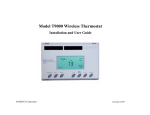
T9000 — MODEL 124 Operation Guide
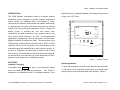
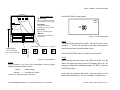
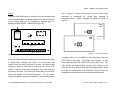
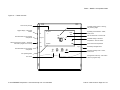
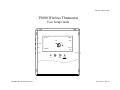
Figure 13 — T9000 Overview
Time and day of week
Indicates program period – Morning,
Day, Evening, Night
Toggles display - Fahrenheit
Celsius
11: 20 AM
F/C
Puts thermostat into the program
setup mode
Starts and stops the program – Holds Set
Point when program is not running
OFF
Day
RF connection with a control node
O
Program
Run
Operating mode indication - HEAT,
COOL, OFF
COOL
Th
Indicates holding of Set Point
temperature – See Run button
Hold
Set Point
Fan Auto
70 O
Current Set Point temperature
Light
Clock
Puts thermostat into the program
setup mode
Fan
Up
Down
Heat
Cool
Momentary backlight button
Changes operating mode – HEAT,
COOL, OFF
Fan operating status
Fan control
© 2010 ENERNET Corporation • www.enernetcorp.com • 315-449-0839
Changes Set Point temp - Also used in
clock and program setup
Pub No. 12401-012210 / Page 16 of 16