1
T9000 — MODEL 124 Operation Guide
Step 5
note on page 9.)
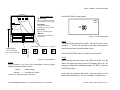
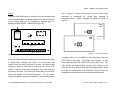
Press the SW9-LINK button on the back of the thermostat printed
information is exchanged, the “Please Wait” message is
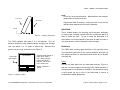
circuit board and within 5-seconds activate a Link Service Request
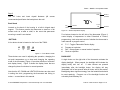
extinguished and a “Good” message will appear as shown in
on the control node you are installing by applying power or
Figure 11.
Once the thermostat finds its node, linking
pressing the PB3, RESET / LINK button (Figure 10).
Install
Node
Network
Microcontroller
916.5 MHz
PB3
Transceiver
HEAT
COOL
D5
RESET
/ LINK
G1
D3
D4
PB1
G2
HEAT
COOL
G3
O/B
W
Please Wait
Y
Install
Node
Good
Output Indicators
PB2
CONFIG
G1
G2
G3
W
O/B
Y
C
R
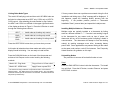
Figure 11 – Install - Link Display
Figure 10 – Model 122 PTAC Wireless Control Node
If another node is to be installed to this thermostat, press the
When the SW9-LINK button is pressed, the thermostat will display
HEAT/COOL button again. The ‘Install’ icon will flash. As was
a “Please Wait” message (see Figure 11) in the bottom right
done previously press the HEAT/COOL button (Step Two). The
corner of the LCD while it searches for a node. You have several
node number will begin blinking, increment the number by one
seconds to initiate a Link Service Request at the control node.
using the UP button and continue with the remaining steps. When
Often it is easiest to have the thermostat in your hand while you
all nodes are installed press the SW4-INSTALL button to close the
are near by the node. The thermostat will link with the first node it
installation session and return to normal thermostat operation.
hears that initiates a Link Service Request.
For this reason,
multiple installations must be coordinated. (See Installing Nodes
© 2010 ENERNET Corporation • www.enernetcorp.com • 315-449-0839
Pub No. 12401-012210 / Page 11 of 16