1
118
gnuplot 4.4
75
SET-SHOW
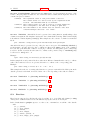
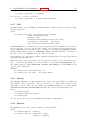
slightly. This option is used by default for placing labels in mouse enhanced terminals. Use nopoint
to turn off the drawing of a point near the label (this is the default).
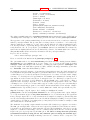
The displacement defaults to 1,1 in pointsize units if a <pointstyle> is given, 0,0 if no <pointstyle> is
given. The displacement can be controlled by the optional offset <offset> where <offset> is specified
by either x,y or x,y,z, and may be preceded by first, second, graph, screen, or character to select
the coordinate system. See coordinates (p. 20) for details.
If one (or more) axis is timeseries, the appropriate coordinate should be given as a quoted time string
according to the timefmt format string. See set xdata (p. 150) and set timefmt (p. 147).
The EEPIC, Imagen, LaTeX, and TPIC drivers allow \\ in a string to specify a newline.
Label coordinates and text can also be read from a data file (see labels (p. 51)).
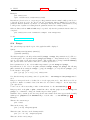
Examples:
To set a label at (1,2) to "y=x", use:
set label "y=x" at 1,2
To set a Sigma of size 24, from the Symbol font set, at the center of the graph, use:
set label "S" at graph 0.5,0.5 center font "Symbol,24"
To set a label "y=x^2" with the right of the text at (2,3,4), and tag the label as number 3, use:
set label 3 "y=x^2" at 2,3,4 right
To change the preceding label to center justification, use:
set label 3 center
To delete label number 2, use:
unset label 2
To delete all labels, use:
unset label
To show all labels (in tag order), use:
show label
To set a label on a graph with a timeseries on the x axis, use, for example:
set timefmt "%d/%m/%y,%H:%M"
set label "Harvest" at "25/8/93",1
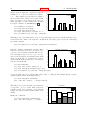
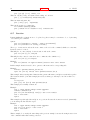
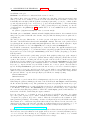
To display a freshly fitted parameter on the plot with the data and the fitted function, do this after the
fit, but before the plot:
set label sprintf("a = %3.5g",par_a) at 30,15
bfit = gprintf("b = %s*10^%S",par_b)
set label bfit at 30,20
To display a function definition along with its fitted parameters, use:
f(x)=a+b*x
fit f(x) ’datafile’ via a,b
set label GPFUN_f at graph .05,.95
set label sprintf("a = %g", a) at graph .05,.90
set label sprintf("b = %g", b) at graph .05,.85
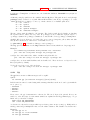
To set a label displaced a little bit from a small point:
set label ’origin’ at 0,0 point lt 1 pt 2 ps 3 offset 1,-1
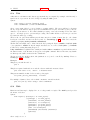
To set a label whose color matches the z value (in this case 5.5) of some point on a 3D splot colored
using pm3d:
set label ’text’ at 0,0,5.5 tc palette z