1
172
gnuplot 4.4
83
COMPLETE LIST OF TERMINALS
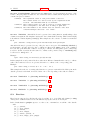
Example:
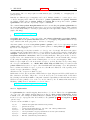
set terminal cgm ’Old English’
set terminal cgm ’Tengwar’
set terminal cgm ’Arabic’
set output ’myfile.cgm’
plot ...
set output
You cannot introduce a new font in a set label command.
83.9.2
Cgm fontsize
Fonts are scaled assuming the page is 6 inches wide. If the size command is used to change the aspect
ratio of the page or the CGM file is converted to a different width, the resulting font sizes will be scaled
up or down accordingly. To change the assumed width, use the width option.
83.9.3
Cgm linewidth
The linewidth option sets the width of lines in pt. The default width is 1 pt. Scaling is affected by the
actual width of the page, as discussed under the fontsize and width options.
83.9.4
Cgm rotate
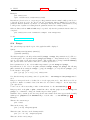
The norotate option may be used to disable text rotation. For example, the CGM input filter for Word
for Windows 6.0c can accept rotated text, but the DRAW editor within Word cannot. If you edit a
graph (for example, to label a curve), all rotated text is restored to horizontal. The Y axis label will then
extend beyond the clip boundary. With norotate, the Y axis label starts in a less attractive location,
but the page can be edited without damage. The rotate option confirms the default behavior.
83.9.5
Cgm solid
The solid option may be used to disable dashed line styles in the plots. This is useful when color is
enabled and the dashing of the lines detracts from the appearance of the plot. The dashed option
confirms the default behavior, which gives a different dash pattern to each line type.
83.9.6
Cgm size
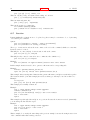
Default size of a CGM plot is 32599 units wide and 23457 units high for landscape, or 23457 units wide
by 32599 units high for portrait.
83.9.7
Cgm width
All distances in the CGM file are in abstract units. The application that reads the file determines the
size of the final plot. By default, the width of the final plot is assumed to be 6 inches (15.24 cm). This
distance is used to calculate the correct font size, and may be changed with the width option. The
keyword should be followed by the width in points. (Here, a point is 1/72 inch, as in PostScript. This
unit is known as a "big point" in TeX.) Gnuplot expressions can be used to convert from other units.
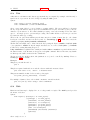
Example:
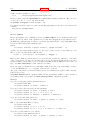
set terminal cgm width 432
set terminal cgm width 6*72
set terminal cgm width 10/2.54*72
# default
# same as above
# 10 cm wide