1
SETTING and TESTING INPUTS - HOMES
BladeRunner
Hardware
G
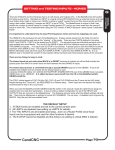
Using an Optional Salve
Side Home Switch;
Typical rectangular
table setup
It is advantageous to use a
HOME on the slaved axis
(in this case A). There is an
input for an A HOME. If you
set your inputs to have an A
HOME in INPUT SIGNALS
then slave the A axis the
gantry will move towards
the switches and stop the
motor on the first one to
make contact. The other
axis will continue to run unitl
it contacts it;s swtich . If the
two sides have gotten out of
sync the XY REF will let the
gantry “Auto-square” itself.
Y axis
4 motor setup (dual drive
on the gantry)
X Home
SWITCH
If you make the bracket on
one side or the other
adjustable you and fine
tune the position and
square the gantry with the
table.
CandCNC
X, Y Homes
A Home
SWITCH
Z axis w/ torch holder
Z HOME
Y Home
SWITCH
If you elect NOT to use a
slave axis HOME (in case
you need the input for
something else). You
must still enable A home
in the MACH Profile but
map the A home to the
same Port and PIN as the
Master Home (Y in this
example)
GANTRY
X axis
0, 0
If you stand here to run the machine
then 0, 0 is lower left corner from your
location. X is cross axis (short axis)
Make this
Switch Bracket
Adjustable
Page: 106