1
3. DAY & NIGHT
This feature allows for setting appropriate color in various color temperature conditions :
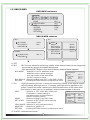
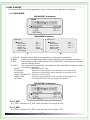
3-1. D&N MODE
DAY&NIGHT mainmenu
COLOR
D&N MODE
C_SUP
A_SUP
RETURN
AUTO
020 --l--020 --l---
D&N MODE submenu
D&N EXT.
BURST
DAY>NIGHT
NIGHT>DAY
SMART IR
DWELL TIME
REUTURN
OFF
030 --l--018 --l--AUTO
MASK1
D&N AUTO
BURST
DAY>NIGHT
NIGHT>DAY
DWELL TIME
REUTURN
OFF
030 --l--018 --l--001 --l---
D
C
A. COLOR : It will be fixed to DAY mode regardless of the ambient conditions.
B. B&W
: It will be fixed to Black-and-White mode regardless of the ambient conditions.
C. EXT.
: This enables an auto switch between DAY and NIGHT mode using the interface
with the external sensor.
D. AUTO : The camera will automatically switch between DAY and NIGHT mode, according
to the lighting condition.
BURST
: Selection of OFF, ON
DAY>NIGHT
: Selection of DAY>NIGHT value manually in the range 0~30.
NIGHT>DAY
: Selection of DAY>NIGHT value manually in the range 0~29.
SMART IR(D&N EXT.) : Selection of OFF, AUTO
DWELL TIME
: Selection of DAY>NIGHT value manually in the range 0~15.
RETURN
: Pressing RETURN moves to a higher-level menu.
DAY&NIGHT mainmenu
COLOR
D&N MODE
C_SUP
A_SUP
RETURN
AUTO
020 --l--020 --l---
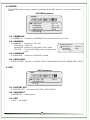
3-2. C_SUP
A. C_SUP : Selection of C_SUP value manually in the range 0~100.
3-3. A_SUP
A. A_SUP : Selection of A_SUP value manually in the range 0~100.
10