1
4. FUNCTION
This feature allows for setting appropriate color in various color temperature conditions :
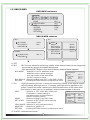
FUNCTION mainmenu
FUNCTION
MIRROR
SHARPNESS
LAC
RETURN
OFF
019 --l--ON
4-1. MIRROR
A. MIRROR : Selection of OFF, ON
4-2. SHARPNESS
A. SHARPNESS : Selection of SHARPNESS value manually in the range 0~30.
4-3. LAC
A.LAC : Selection of OFF,ON
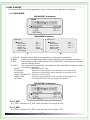
5. MOTION
The MOTION menu is used to adjust the strength of the AGC level for a control of the camera
motion.
MOTION mainmenu
MOTION
MOTION
AREA SEL
SENSITI.
DISPLAY
HODD TIME
ALARM
RETURN
OFF
AREA1
025 --l--TRACE
003 --l--OFF
5-1. MOTION
A. MOTION : Selection of OFF, ON
5-2. AREA SEL
A. AREA SEL : Selection of AREA1~4
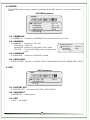
AREA1
MASK MODE : Selection of OFF, ON
TOP
: Selection of TOP value manually in
MASK MODE
the area 0~144
TOP
BOTTOM : Selection of BOTTOM value manually
BOTTOM
in the area 0~146
LEFT
LEFT
: Selection of LEFT value manually in
RIGHT
the area 0~146
REUTURN
RIGHT
: Selection of RIGHT value manually in
the area 0~146
RETURN : Pressing RETURN moves to a higher-level menu.
11
OFF
020 --l--060 --l--030 --l--080 --l---