1
7. SETUP
The MOTION menu is used to adjust the strength of the AGC level for a control of the camera
motion.
SETUP mainmenu
MOTION
TITLE
DPC AUTO
DCP MANUAL
OLPF
MONTOR
GAMMA
RETURN
ON
AUTO
MANUAL
FILTER1
CRT
0.45
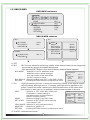
7-1. TITLE
A. TITLE : Selection of OFF, ON
USER TITLE
ABCDEFGHIJKLMNOP
QRATUVWXYZ 012345
6789 ! “ #$%&’( )*+
, - . / : ;<=>?@ [ \ ] ~ _
CLR
POS RET
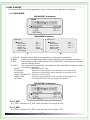
7-2. DPC AUOT
A. DPC AUTO : Selection of OFF, AUTO
WHITE THR : Selection of WHITE THR value manually
in the area 0~255.
BLACK THR : Selection of BLACK THR value manually
in the area 0~255.
DPC LEVEL : Selection of BLACK THR value manually
in the area 0~255.
RETURN : Pressing RETURN moves to a higher-level
menu.
DPC-AUTO
WHITE THR
BLACK THR
DPC LEVEL
REUTURN
150 --l--030 --l--030 --l---
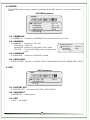
7-3. DPC MANUAL
A. DPC MANUAL : Selection of OFF, MANUAL
DPC LEVEL : Selection of WHITE THR value manually
in the area 0~30.
DPC RUN : AUTO DECTION
RETURN
: Pressing RETURN moves to a higher-level
menu.
7-4. OLPF
A. OLPF : Selection of FILTER1, FILTER2
7-5. MONTOR
A. MONTOR : Selection of CRT, LED
7-6. GAMMA
A. GAMMA : Selection of O.45, 0.6,1.0, USER
13
DPC-MANUAL
DPC LEVEL
DPC RUN
REUTURN
010 --l---