1
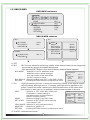
1-2. HBLC/D-WDR
EXPOSURE mainmenu
EXPOSURE
LENS
HBLC/D-WDR
AGC
3D DNR
SENS-UP
RETURN
ELC
OFF
MID
LOW
X16
HBLC/D-WDR submenu
BLC
HLI
BLC MODE
BLC WEIGHT
REUTURN
AUTO
MID
HBLC
MODE
SET LEVELL
GRAY MODE
MASK SET
SET LEVELL
REUTURN
B
D-WDR
D-WDR LEVEL
REUTURN
NIGHT
010 --l--BLACK
MASK1
010 --l---
005 --l---
D
C
A. OFF
B. BLC
: BLC function allows for enhancing visibility of the objects located in the foreground,
surrounded by strongly illuminated background.
After pressing SET button in this mode submenu depicted below appears.
BLC MODE : Selection of AUTO, MANUAL mode.
BLC-MANUAL
MANUAL mode, it allows setting of
TOP
005 --l--size and rocation of the area where
BOTTOM
010 --l--the BLC function is active.
LEFT
005 --l--RIGHT
010 --l--BLC WEIGHT : Selection of BLC level.(OFF / LOW /MID / HIGH)
REUTURN
RETURN
: Pressing RETURN moves to a higher-level menu.
C. HLI
: High light masking function. It allows for enhancing visibility of the objects located
near the strong, point light source. If a strong, point light source appears on the
screen, function will mask it allowing for effective observation of the scene itself
(this function is best used to, for example, observe licence-plates of the cars).
HBLC
: Selection of OFF, LOW, MID, HIGH level.
HBLC
Furthermore, it allows setting of
HBLC LEVEL
MID
size and rocation of the area where
TOP
010 --l--the BLC function is active.
BOTTOM
015 --l--MODE
: Selection of NIGHT, ALL DAY mode.
LEFT
005 --l--RIGHT
010 --l--SET LEVEL : Selection of SET LEVEL value manually
REUTURN
in the range 0~100
GRAY MODE : Selection of HLC background color.
MASK SEL : Selection of MASK1~4.
RETURN
: Pressing RETURN moves to a higher-level menu.
D. D-WDR : Automatic lens mode.
7