1
2. COLOR
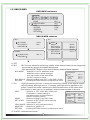
This feature allows for setting appropriate color in various color temperature conditions.
2-1. WB MODE
COLOR mainmenu
COLOR
WB MODE
R-Y GAIN
B-Y GAIN
RETURN
ATW
085 --l--085 --l---
A. ATW
: Auto tracking white Balance.
B. MANUAL
: Manual White Balance.
WB-MANUAL
M.WB R : Selection of SET LEVEL value manually in the
M.WB R
range 0~128.
M.WB B
M.WB B : Selection of SET LEVEL value manually in the
REUTURN
range 0~128.
C. AWC>PUSH : Manual tracking White Balance
(Green Screen will be showing during recognizing)
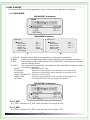
2-2. R-Y GAIN
COLOR mainmenu
COLOR
WB MODE
R-Y GAIN
B-Y GAIN
RETURN
ATW
085 --l--085 --l---
A. R-Y GAIN : Selection of Red color value manually in the range 0~255.
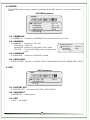
2-3. B-Y GAIN
COLOR mainmenu
COLOR
WB MODE
R-Y GAIN
B-Y GAIN
RETURN
ATW
085 --l--085 --l---
A. B-Y GAIN : Selection of Blue color value manually in the range 0~255.
9
042 --l--050 --l---