1
CoPilot User’s Manual
Menus
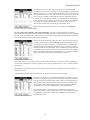
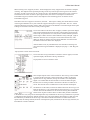
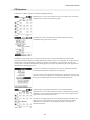
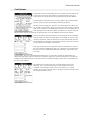
There are several menus used by CoPilot. The key one is the Record menu.
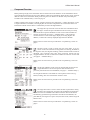
The Record menu has items to add/edit aircraft, pilots, and waypoints. These
menu items open the associated database entry forms. The database entry
forms are described in detail in the ”Database Entry” section on page 4.
The edit items open forms with a list of the items in the database. For
example, the Edit Aircraft… item opens a form with a list of all the aircraft in
the aircraft database. When an aircraft is selected, the data entry form for the
specified aircraft opens.
The Record menu also has items to send an aircraft, pilot, or waypoint to
another Palm handheld. The method of sending depends on the configuration of the Palm handheld, but
beaming via the infrared port is usually available.
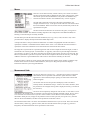
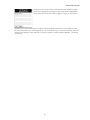
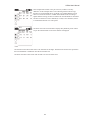
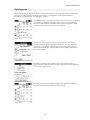
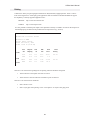
The Edit menu provides the basic Palm edit commands (Cut, Copy, Paste, Undo, and Select All). It also
provides items to display the keyboard and the Graffiti help screen.
A simple calculator is also provided on the Edit menu. If a number is highlighted when the calculator is
opened, the calculator is initialized with that number. If the cursor is in a data field when the calculator is
opened, the result of the calculation can be entered into the field with the Paste button.
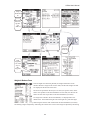
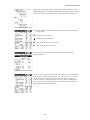
The Flight Description form has a special Flight menu with an item to duplicate the entire flight, an item to
estimate the cost of the flight (see “Cost Estimates” on page 20), and an item to print the flight information
(see “Printing” on page 21). The Route form has a special Route menu with an item to reverse the route. The
Edit Aircraft form has a special Aircraft menu with an item to duplicate the entire aircraft entry. The Weight
& Balance form has a special W&B menu with an item to show the fuel summary for the route.
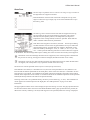
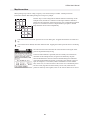
The Options menu contains an About CoPilot item that shows the CoPilot version number, a Database Info
item that shows the size of all the CoPilot databases, and a System Waypoint Info item that displays
information about the system waypoint database.
Measurement Units
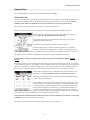
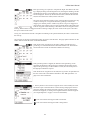
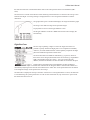
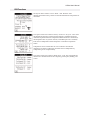
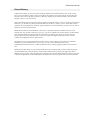
The Options menu has a Preferences… item that opens a form on which the
measurement units are specified. This form also opens when the CoPilot
application is first launched (it keeps opening on each launch until the OK
button is tapped).
The chosen units are used to input data and display results. The data is
actually stored in the databases using a “neutral” set of units; therefore, when
the preferences are changed, existing data is displayed correctly (converted to
the new units).
The units can be temporarily changed in order to enter or view data in a set of
units that are not normally used. For example, if aircraft speed is normally measured in knots, the A/C Speed
Units would be set to knots in the Preferences form. In order to enter data for an aircraft that has speed
measured in miles per hour, simply set the preferences form to miles per hour (A/C Speed Units), enter the
data into the aircraft database, and then set the preferences form back to knots.
The fuel measurement unit is set in the aircraft database rather than the Preference form. Since some aircraft
measure fuel by volume (e.g. gallons or litres) and some aircraft measure fuel by weight (e.g. pounds or
kilograms), the fuel measurement unit is specified for each aircraft.
3