1
Flattening Embedded Documents
Flattening Embedded Documents
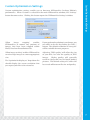
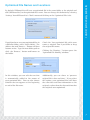
If NXPowerLite Desktop Edition finds embedded documents within your Word, Excel® or
PowerPoint® files, it will ask whether you want to flatten them:
Embedded documents are items created
by another application that have been
embedded within a document, spreadsheet
or presentation.
Flattening embedded documents will
reduce the size of your files considerably,
but the embedded documents will no
longer be editable.
For example, if you paste an Excel® chart
into PowerPoint®, the Excel® chart is
embedded within your presentation.
Checking the 'Don't ask me this question
again' box will prevent NXPowerLite
from asking you whether you want to
flatten embedded documents in future.
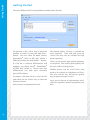
NXPowerLite will remember whether you
selected 'Yes' or 'No' and use this as the
default setting. You can change the default
setting at any time by selecting 'Settings'
from NXPowerLite's 'Tools' menu and
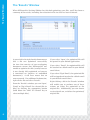
clicking on the 'Embedded Documents' tab:
Double-clicking on an embedded document
will allow you to edit it with the application
in which it was created.
NXPowerLite is able to flatten embedded
documents by converting them into
pictures.
6.