Download CUE Rules

Transcript
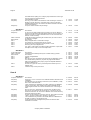
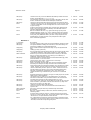
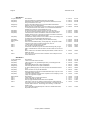
TaskTimer Jan’98
Post #1
Post #2
Post #3
Post #4
Post #5
Overall comments.
Overall comments
Page 25
It was easy.
I have four entries and it printed out four pieces of paper. I would like the
default to be that there be no page breaks between letters of the
alphabet. Also, where's my note about George's manager? That's lame,
why else would I have typed it.
Little bigger or bolder font. It needs to stand out a bit more, a bigger font
would help. It's those icons again too. They are hard to tell apart.
It's easier than accessing online references. For addresses it meets my
needs, but I wouldn't use it.
No.
I want alarms in my schedule program. Address book for me is hard copy
and I don't need to go online. It's the most convenient and fast way of
accessing addresses. It's good for scanning addresses, when I'm not
sure what I'm looking for. If I were to keep a journal, I doubt I would do it
online because diaries are personal and it seems that too many people
can access it.
I would stick with Outlook because I know how to use it and it meets my
needs.
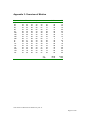
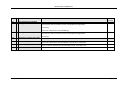
2
2
0:22:15
0:22:34
0:22:32
0:23:36
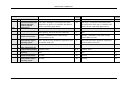
2
0:23:38
0:24:20
2
0:24:25
0:24:44
2
2
0:24:46
0:26:21
0:24:55
0:28:33
2
0:28:55
0:29:16
2
2
0:29:30
0:32:57
0:29:30
0:34:14
2
2
0:36:45
0:36:49
0:36:46
0:38:51
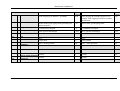
2
2
0:38:53
0:41:56
0:41:53
0:42:20
2
0:42:28
0:43:36
2
0:43:40
0:45:08
2
2
0:45:09
0:47:57
0:45:09
0:49:05
2
0:51:30
0:52:32
2
0:53:37
0:54:06
2
2
0:56:18
1:04:38
0:58:01
1:06:24
2
2
1:07:55
1:07:57
1:07:55
1:10:31
2
1:11:09
1:11:51
2
1:11:52
1:12:33
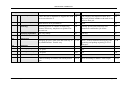
User 3
Scenario 0

0: Explore TaskTimer
GUI (User)
End Scenario
Post 1
GUI (User)
Post 2
Post 3
Post 4
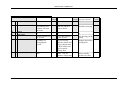
No comment
"Zoiks." (When he first sees the interface.) I haven't used the schedule
part of Outlook, so I don't really know what this is.
No comment
It looks pretty straightforward when you take a good hard look at it. I
guess these are hours across the top, if so I guess they are in military
time. Consider using a 12-hour time clock. I'm not positive it's a time bar,
but I would guess that.
I just saw the Help menu.
I don't know because I don't use these features too much in my current
online tool.
I expected to see tooltips, but I got them in the status bar. I'd prefer MS
tooltips so I don't have to look at the bottom of the screen and look back
up. I would expect Help menu to be next to the Window menu.
Installation seemed straightforward. The billboards went way too quickly.
I didn't have time to read them. Consider making them larger and giving
people more time to read them. You're defeating the purpose of using that
medium to give info to your users. Or you could hone down the
information to present only that informaiton users need.
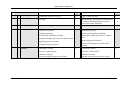
Scenario 1
1: Input Diary
Help (User)
GUI (User)
Admin Comment
GUI (User)
GUI (User)
End Scenario
Post 1
Post 2
Post 3
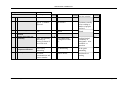
No comment
looked for the following keywords -- Journal, diary, electronic diary can't find help on this.
I'd expect diary entries to be on a per day basis, specific to every day.
However, I don't know if it's part of the daily calendar or separate from it.
File>Note>Open dialog fills list boxes with gray. Makes control look
grayed out.
I don't see how to keep a diary.
So I saved my note, is it attached to a particular contact? I would hope it
is. With nothing checked in the contract line I would assume it's not
attached to a particular contact.
No comment
I don't think I got to the point where I kept a diary. Because it's not
attached to a day. I was thinking I'd input a long task descriptor and when
I went to read it, it would expand downward so I could read prose.
Seemed like I was opening too many dialogs to get done what I wanted.
Also, the note isn't attached to the event I had highlighted.
I ventured into it. This whole format seems odd to me, but that's probably
because I'm used to looking at our stuff. I guess I'd expect stuff to be
Company Name Confidential