1
Work with Actions
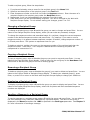
Work with Actions
Position to . . . . . .
Starting characters
Type options, press Enter.
1=Add 2=Change 3=Copy 4=Remove
Opt Action
BYTEST
CHECKJOB
LANCE
LBSNETF
LBSTEST
LBSTEST2
LBSTEST3
NETMSG
REPLYTEST
SAMPLE
5=Display
7=Change command list
Rcp
Type
Recipient
Reply
Cmd
Text
*RCP
*RCP
*RCP
*RCP
*RCP
*RCP
*RCP
*RCP
*RCP
*RCP
BYEMAIL
*NONE
*NONE
*NONE
*NONE
*NONE
*NONE
NETMSG
LANCE
SAMPLE
*NONE
*NONE
*NONE
*NONE
*NONE
*NONE
*NONE
*2WAY
*NONE
*NONE
*NO
*YES
*YES
*YES
*YES
*YES
*YES
*NO
*NO
*NO
*NONE
*NONE
*NONE
*NONE
*NONE
*NONE
*NONE
*NONE
*NONE
Sample action
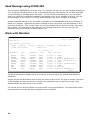
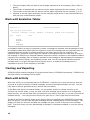
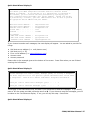
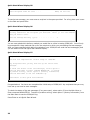
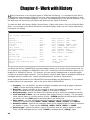
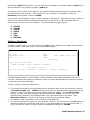
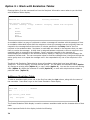
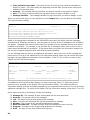
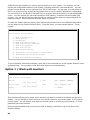
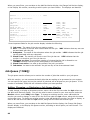
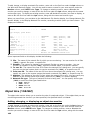
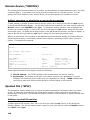
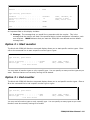
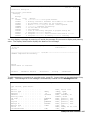
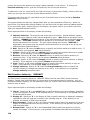
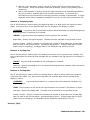
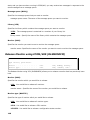
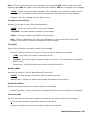
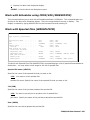
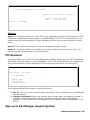
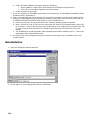
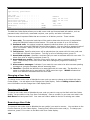
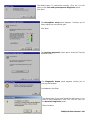
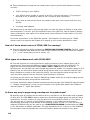
The Work with Actions display shows all entries for Actions which are defined to ICOM/400.
Action entries are parameters which include such items as the name of the Action, the type of
recipient, the name of the recipient you want the Action to affect, the message reply, whether a
command needs to be executed and a text description of the Action.
You can set up an unlimited number of Actions with varying specifications.
Add Action
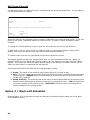
Add Action
Type choices, press Enter.
Action . . . . . . . . . . . . . .
Send type . . . . . . . . . . . . .
Recipient/Group . . . . . . . . . .
Selected recipients . . . . . . . .
Message detail . . . . . . . . . .
Pre-defined message ID . . . . . .
Escalation table . . . . . . . . .
Message reply . . . . . . . . . . .
Use recipient pre/post information.
Delivery type . . . . . . . . . . .
*RCP
*ALL
*JOBINF
*NONE
*RCP
*2WAY
*NO
*RCP
Name
*RCP, *GRP
Name, *ALL, *NONE, F4 ...
*ALL, *ONCALL
*NONE, *JOBINF, *SECLVL..
Name, *NONE, F4 for list
Name, *NONE, *RCP, F4 ...
Reply, *2WAY, *DFTRPY...
*NO, *YES
*RCP, *EMAIL, F4 for list
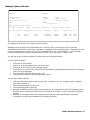
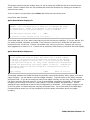
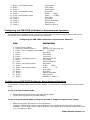
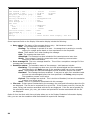
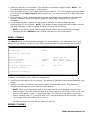
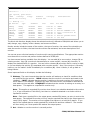
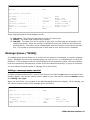
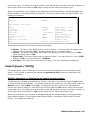
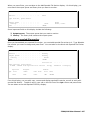
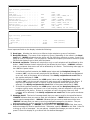
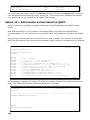
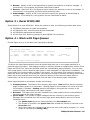
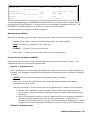
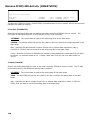
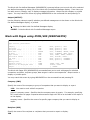
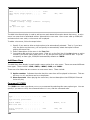
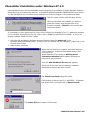
The Add Action display allows you to add an Action and specify the parameters for the Action you want
to add.
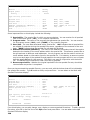
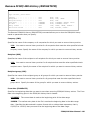
When adding an Action, you will be asked to specify:
•
•
•
•
•
12
The name of the Action
Whether the Action is to notify a single recipient or a group of recipients
The name of the recipient or group that the Action will notify
Whether all recipients or only on-call recipients will be notified by this Action
The level of message detail that you want to send for the specified Action