1
SIMPROCESS Terminology and Menus
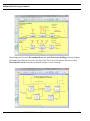
Hide All
Local
makes all Pad names invisible throughout the model.
shows or hides Pad names based on their individual properties (set with the properties dialog
checkbox). This is the default setting when a model is opened.
Show Name
Zoom In magnifies a section of the layout to see more detail. Select Zoom In and click and drag the mouse
to define the area on the layout to zoom.
Zoom Out
is the reverse of Zoom In.
View (1:1)
returns the layout window to its original size.
Refresh
redraws the current screen.
Create Menu
provides an alternative way of creating Activities, rather than graphically dragging and
dropping them from the Layout Toolbar.
Activities
Activities added to a Library can be added to this menu and/or added to the Library Toolbar.
Processes
provides an alternative way of creating Processes.
Processes added to a Library will be added to this menu.
BackgroundText
provides an alternative way of creating static or dynamic labels.
BackgroundGraphic
provides an alternative way of changing the background.
SIMPROCESS User’s Manual
60