1
$3.00
No. 17
April 1984
TABLE OF CONTENTS
Big Voice For The BB I
0
0
0
0
0
0
0
0
0
0
0
The Xerox 820..II and the Dynadisk
Pascal Procedures
0
0
0
0
0
0
0
0
0
0
0
0
0
0
0
0
0
0
0
0
0000000000000000000000000
0
0
0
000
000
0
0
0
0
0
000
0
0
0
0
0
0
0
0
0
0
0
0
0
0
0
0
0
0
0
0
0
0
0
0
0
0
0
0
0
0
0
0
0
0
0
0
0
0
0
0
0
0
0
0
0
0
0
0
0
0
0
0
0
0
0
0
0
0
0
0
0
0
0
0
0
0
0
0
0
0
0
0
0
0
0
0
0
0
0
0
0
0
0
0
0
0
0
0
0
0
0
0
0
0
0
0
0
0
0
0
0
0
0
0
0
0
0
0
0
0
0
0
0
0
0
0
0
0
0
0
0
0
0
0
0
0
0
0
0
0
0
0
0
0
0
0
0000000000
0
0
0
0
0
0
0
0
0
0
0
0
0
0
0
0
0
0
0
0
00000000000000
0
0
0
0
0
0
0
0
0
0
0
0
0
0
0
0
0
0
0
0
0
0
0
0
0
0
0
0
0
0
0
0
0
0
0
0
0
0
0
0
0
0
0
0
0
0
0
0
0
0
0
0
0
0
0
0
0
0
0
0
0
0
0
0
0
0
0
0
0
0
0
0
0
0
0
0
0
0
0
0
0
0
0
0
0
BBI Dual Density: New Version From SWP
A Very Calculating BB II
0
0
0
0
0
0
0
0
0
0
0
0
Morse Code Interface For The Kaypro
Technical Tips
0
0
Xerox 820 and Up
On Your Own
0
0
CP1M 86: A Close Look
0
0
0
SBASIC Column
C'ing Clearly
0
0
Kaypro Column
FORTHwords
0
0
0
0
0
000000000000000000
0
0
0
0
0
0
0
0
0
0
0
0
0
0
0
0
0
0
0
0000000
0
0
0
0
0
0
0
0
0
0
0
0
0
0
0
0
00000000000000000000000000000000000000000000
0
0
0
0
0
0
0
0
0
0
0
0
M68K Single Board Computer
0
0
0
0
0
0
0
0
0
0
0
0
0
0
0
0
0
0
0
0
0
0
0
0
0
0
0
0
0
000000
0
0
0
0
0
0
00000000
0
0
0
0
0
0
0
0
0
0
4
10
14
18
22
26
28
30
34
37
38
40
44
46
o. 48
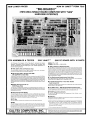
"THE ORIGINAL BIG BOARD"
OEM - INDUSTRIAL - BUSINESS - SCIENTIFIC
SINGLE BOARD COMPUTER KIT!
Z-80 CPU!
64K RAM!
(DO NOT CONFUSE WITH ANY OF OUR FLATTERING IMITATORSI)
...:
en
w
::J
o
w
a:
z
o
>
D-
O
o
w
w
a:
~
~
z
oCt
a:
a:
;
c
!::
w
~
:i
~
c
o
en
a:
::J
o
~
o
en
~
a:
w
I-
THE BIG BOARD PROJECT: With thousands sold worldwide and over two years of field experience, the Big
Board may just be one of the most reliable single board computers available today. This is the same design that
was licensed by Xerox Corp. as the basis for their 820 computer.
The Big Board gives you the right mix of most needed computing features all on one board. The Big Board was
designed from scratch to run the latest version of CP/M·. Just imagine all the off-the-shelf software that can be
run on the Big Board without any modifications needed.
FULLY SOCKETED!
FEATURES: (Remember, all this on one board!)
o
lI-
o
..,w
m
::J
en
w
C
oCt
~
en
w
(64KKIT
BASIC I/O)
SIZE: 8'12 x 133/. IN.
SAME AS AN 8 IN. DRIVE.
REQUIRES: +5V @ 3 AMPS
+ - 12V @.5 AMPS.
r---------------------~2~4-x~8~0~C~H~A~R~A~C:T=E=R~V~ID~E~0=---------------------~
64K RAM
Uses Industry standard 4116 RAM's. AII64K Is available to the user, our VIDEO
and EPROM sections do not make holes In system RAM. Also, very special care
was taken In the RAM array PC layout to eliminate potential noise and glitches.
W
::I:
I-
**
$259 00
Z-80 CPU
With a crisp, flicker-free display that looks extremely sharp even on small
monitors. Hardware scroll and full cursor control. Composite video or split video
and sync. Character set Is supplied on a 2716 style ROM, making customized
fonts easy. Sync pulses can be any desired length or polarity. Video may be
inverted or true. 5 x 7 Matrix - Upper & Lower Case.
Running at 2.5 MHZ. Handles all 4116 RAM refresh and supports Mode 2
INTERUPTS. Fully buffered and runs 8080 software.
FLOPPY DISC CONTROLLER
SERIAL 1/0 (OPTIONAL)
Uses WD1771 controller Chip with a TTL Data Separator for enhanced reliability.
IBM 3740 compatible. Supports up to four 8 inch disc drives. Directly compatible
with standard Shugart drives such as the SA800 or SA801. Drives can be
configured for remote AC off-on. Runs CP/M" 2.2.
Full 2 channels using the Z80 510 and the SMC 8116 Baud Rate Generator. FULL
RS2321 For synchronous or asynchronous communication. In synchronous
mode, the clocks can be transmllted or received by a modem. Both channels can
be set up for either data-communication or data-terminals. Supports mode 2lnt.
Price for all parts and connectors: $39.95
BASIC 1/0
Consists of separate parallel port (Z80 PIO) for use with an ASCII encoded
keyboard for Input. Output would be on the 80 x 24 Video Display.
TWO PORT PARALLEL 1/0 (OPTIONAL)
Uses Z-80 PIO. Full 16 bits, fully buffered, bl-dlrectlonal. Uses selectable hand
shake polarity. Set of all parts and connectors for parallel I/O: $19.95
REAL TIME CLOCK (OPTIONAL)
Uses Z-80 CTC. Can be configured as a Counter on Real Time Clock. Set of all
parts: $9.95
...J
oCt
en
...J
...J
oCt
BLANK PC BOARD -
CP/M* 2.2 FOR BIG BOARD
$99.95
The blank Big Board PC Board comes 'complete with full
documentation (including schematics), the character ROM,
the PFM 3.3 MONITOR ROM, and a diskette with the source
of our BIOS, BOOT, and PFM 3.3 MONITOR.
PFM 3.3
The popular CP/M" D.O.S. to run on Big Board Is available for $139.00.
DOUBLE DENSITY ADAPTER BOARD -
$149.95 (A&T~
Requires no cuts or MODS to an existing Big Board. Gives up to 670K storage on
a single sided 8 in. diskette. With software to patch your CP/M· 2.2.
2K SYSTEM MONITOR
The real power of the Big Board lies In Its PFM 3.3 on board monitor. PFM commands Include: Dump Memory, Boot CP/M", Copy, Examine, Fill Memory, Test Memory, Go To,
Read and Write I/O Ports, Disc Read (Drive, Track, Sector), and Search PFM occupies one of the four 2716 EPROM locations provided. Z-80 Is a Trademark of Zilog.
Digital Research Computers
(OF TEXAS)
P.O. BOX 461565 • GARLAND, TEXAS 75046 • (214) 271-3538
TERMS: Shipments will be made approximately 3 to 6 weeks after we
receive your order. VISA, MC, cash accepted. We will accept COD's (for the
Big Board only) with a $75 deposit. Balance UPS COD. Add $4.00 shipping.
USA AND CANADA ONLY
*TRADEMARK OF DIGITAL RESEARCH. NOT ASSOCIATED WITH DIGITAL RESEARCH OF CALIFORNIA, THE ORIGINATORS OF CPM SOFTWARE
··1 TO 4 PIECE DOMESTIC USA PRICE.
MICRO CORNUCOPIA
P.O. Box 223
Bend, Oregon 97709
503-382-8048
IICID CDIRUCDrll
April 1984
The Single Board Systems Journal
Editor & Publisher
David]. Thompson
Assistant Editor
Eric Belden
Graphic Design
Sandra Thompson
Technical Department
Dana Cotant
Advertising Director
Alice Holbrow
Staff Assistants
Dorcas Dsenis
Tracey Braas
Typography
Patti Morris & Martin White
Irish Setter
MICRO CORNUCOPIA is the
single board systems journal supporting systems programming languages and single board systemsincluding the Big Board, Big Board
II, Xerox 820, Kaypro, and Slicer.
MICRO CORNUCOPIA is published six times a year by Micro Cornucopia -of Oregon, P.O. Box 223,
Bend, Oregon 97709.
SUBSCRIPTION RATES:
1 yr.(6 issues)
$16.00
1 yr. (first class)
$20.00
1 yr. (Canada & Mexico)
$20.00
1 yr. (other foreign)
$26.00
Make all orders payable in U.S.
funds on a U.S. bank, please.
ADVERTISING RATES: Available
on request.
CHANGE OF ADDRESS: Please
send your old label and new address.
SOFTWARE, HARDWARE, AND
BOOK VENDORS: We would very
much like to review your CP/M &
MSDOS compatible products. Send
materials to the Review Department, Micro Cornucopia.
CP/M is a trademark of Digital Research, Inc.
Copyright © 1983 by Micro Cornucopia
All rights reserved
Read
AGood
CP/M
Book
Lately?
You may have noticed that the e"ditorial is often a collection of things that
probably should have been put elsewhere in Micro C, but I just didn't get
around to prettying them up enough for
a formal presentation. This editorial is no
exception for herein is a book review and
a plea for help (a little self-help, that is).
Book
I purchased a book called A Programmer's Notebook by David Cortesi at my local bookstore. This is a bit unusual for me
because publishers are constantly offering to send me every imaginable (and
unimaginable) kind of book, free. I
should have saved some of the more "interesting" titles such as A Review of Business Programs for the VIC 20. (I'm sorry,
that was a bit facetious.)
Anyway, I bought the book and, with
it, an 8" disk containing the programs
developed in the book, and I'rn delighted with it. Cortesi is a first rate programmer and writer. You get to participate as
he works his way through the designing,
coding, and debugging of a number of
complete CP/M utilities in 8080 code.
You'll learn really good assembly language programming methods, you'll
learn a lot about interfacing with CP/M,
and you'll feel like you've gotten to
know a very interesting person.
You'll need to have some programming experience first, for he notes at the
beginning, "If you are a complete novice
at programming you might enjoy reading this book, but you will learn little
from it. It will probably seem that we are
continually leaping from problem to
conclusion without any intermediate
steps. The programs will seem to grow
up of their own volition, like plants. If
No. 17
you have some experience with programming, perhaps in BASIC or Pascal,
things will make more sense."
The only complaint I have about the
book is that Cortesi is writing in 8080 assembly language rather than Z80. I
mean, who has an 8080? Of course anything written for the 8080 will run on the
Z80 but Z80 nmemonics are much easier
to learn and the Z80 instruction set is
more powerful. However, with my
trusty little 8080-Z80 translator, I can
change all those source files into something more intelligible.
Meanwhile, this is a super book and
Cortesi has another book called System
Programming Under CP/M-80 which
sounds very interesting. After all, The
Programmer's Notebook is better reading
than most novels.
A Programmer's Notebook
David Cortesi
Reston Publishing Company
Reston Virginia
$16.95 (without disk)
Self-Help Anyone?
Support has turned into a real problem here at Micro C. You see, Dana and I
have been scrambling to keep systems
running, build new systems (the Little
Board and the Latest Slicer), modify our
present systems (the Big Board, the Big
Board II, the new Kaypro 4, and old Kaypro II), and tryout all those software and
hardware packages (the PROM programming packages for the BB II, for instance) that people send us and plead
wi th us to review.
Meanwhile, we are spending well
over half of our working hours answering calls for help. Mondays and Fridays
are the worst with Tuesday, Wednesday,
and Thursday a little lighter (usually).
Some people have suggested that we
set specific hours when we will handle
technical calls, say, afternoons on Tuesdays and Thursdays. Others have suggested that we limit each call to 3 minutes.
I don't like either of these options. Micro C is at its best when it helps people
(continued on page 52)
LITTIRS
Dear Editor,
With a few minor problems I got my
BB I running.
First, there weren't any display sync.
signals, vertical or horizontal. A 74S04
for un got the 14.318mhz oscillator running, instead of a 74LS04. Still no sync.
I found the C external pins on the
74LS123 one shots grounded. Even on
the schematic it showed this. Most applications I found didn't ground them. After cutting away the Pc ground path, the
display took right off.
My ORBIS 76 Disk drive wanted to see
10ms step rate. So I had to change location FF6A from 00 to 02.
When interfacing the centronics 700
printer to channel a PIO, a oneshot had
to be added on the "Ready out Line." It
seems the 700 wanted to see the positive
going trailing edge, before it would send
back the ACK or strobe.
Chris Gentile
3256 Roxborough Ave. N.
Clearwater FL 33520
Dear Editor,
I noticed in issue #15, page 2, editor's
note to Chris Paulson, the installation of
the IFORTH monitor (user disk #18) was
not in the recommendation. Everyone I
know who has used this monitor has
considered, it a big improvement over
PFM so why was it not included in the
list?
I have considered sending in some improvements to IFORTH but I have seen
little feedback on it in recent issues of Micro C so I wonder if it is worth my time?
Raymond L. Buvel
Box 3071
Moscow ID 83843
208-885-8818
Editor's note:
Sorry, Ray. I guess we are as guilty of no
feedback as anyone. Yes there has been a lot of
interest in IFORTH. We have been recommending it to many BB owners. You should
take a look at making it available on the 820. I
think that would be very popular. Especially
since you are offering inexpensive ROM programming for f~lks.
Since I don't program in FORTH I haven't
put it on my system though it is a very nice
extension to the PFMmonitor.
2
Dear Editor,
Wow! the gang at Micro C is making
the humble little Kaypro into one hot
machine. First 5MHz and now 800K per
drive. Those PC clones better watch out!
There is one modification that many of
us would love to see on the Kaypro-a
256K RAM disk. It ought to make PW
swap files and TW work like a dream.
Why not get together with Tony Ozrelic of LA Software and produce a DynaDisk for the Kaypro at a reasonable price.
I'm sure you'd have a lot of interestespecially those of us who can't afford
(and see little need for) a full blown coprocessor.
One question ... will the Pro-Monitor
ROM's (II, 4 and 8) work with the Uniform software and still enable the Kaypro to read and write disks formatted for
other machines?
Mike Perry
6035 40th Ave NE
Seattle WA 98115
Editor's note:
Check with MicroSphere for an inexpensive RAM disk for the Kaypro.
Uniform (as shipped by Kaypro) requires
that both A and B drives be correct for that
version of Uniform. Since we are also supporting two additional drives, you can make
C and D be 96 trackers and still have full use
of Uniform.
.
Also, the CO-power board expects to see
Kaypro II or 4 drives as A and B. So by putting 96 track drives on C and ITyou willstiTlbe totally compatible with these add-ons.
Dear Editor,
My sons and I are at an impasse with
Adventure. We can accumulate 262
points, but have not learned to kill the
ogre or to avoid paying an onerous tax to
the troll.
Since there aren't any user groups in
our town, we saw your note in Micro C
and thought you might be willing to exchange some hints. The advice on what
to with the food is in the last paragraph
in case you wouldn't want to sully the
purity of your one man Adventure.
There can be many saved games, not
just one, as your column indicated. Just
type "SAVE OGRE", or any other four
letter name, and the name will be appended to the ADVD.SAV file, making it
ADVDOGRE.SAV.
As you recommended, that file can be
made durable by PIPing it under a new
name to the same or different disk to be
re-PIPed as needed.
Anyway, we're stuck and getting frus-
trated after running out of ideas of what
to try. Of course, the solution will seem
obvious, and we'll wonder why we never thought of it.
(The food is for quieting the fierce cave
bear. Be sure to bring the keys along.
Have you wondered why the emerald is
the size of a "plover's" egg? Don't be
afraid of whirlpools. WD-40 is nice, but
oil still works.)
David A. Satchell
Manitowoc Surgical Association
600 York Street Suites 5 and 6
Manitowoc WI 54220
Editor's note:
I've been trying to tread the fine line between saying too much and not saying anything about Adventure. For some people the
goal is the struggle, for others, the goal is 550
points.
I'm tempted to include hints (such as
yours) in Micro C and mark them plainly so
that people can avoid them if they wish. You
need the sword to get past the ogre, by the
way.
I'd like to know what to do with the broken
up skiff.
Dear Editor,
I dropped you this note just to let you
know that I am happy to renew my subscription to Micro C.
I have installed the 256K RAM on my
BB I as described in issue #12 and it
works fine.
At the same time, I installed the 4 MHz
modification described in issue #1. It
works fine too.
One thing readers should know about
the 256K mod. is that you must install all
256K RAM chips in order to run just as
before. It took me awhile to realize this.
One 64K segment is spread over the 4
rows.
R. Warichet
Av. de la Jeunesse 4
1030 Bruxelles
Belgium
Dear Editor,
I would like to correct some information in the letter from Charles Woodard
published in issue #15.
Yes, I can supply parts and information on MFE 8" floppies. However, the
correct daytime phone is 603-893-1921.
The evening phone (preferred calling
time) is 603-329-5838. Please see my
Want Ad in this issue.
Richard H. Breinlinger
51 Wash Pond Rd.
Hampstead NH 03841
Micro Cornucopia, Number 17, April 1984
Dear Editor,
I have been salivating at the possibility
of having a 5 MHz Hotrod-Kaypro since
I received the issue of Micro C (June
1983) with your column describing the
speed-up modificatioI}.
First, let me say that since performing
the speed-up operation two weeks ago, I
have been much happier with my computer. The performance at 4 MHz with
all my programs has been substantially
improved. But I would sill like to increase the speed to 5 MHz if possible.
However, I was not able to increase
the speed to 5 MHz. When I switched the
toggle to the 5 MHz position, garbage
characters filled the screen and the system would neither boot nor would keyboard commands have any effect. I assumed that although I checked the
connections and wires that I added, I
had made an error in following the instructions.
At this month's user's meeting, I met
another gentleman that had also followed the instructions in your column
and likewise was not able to get beyond 4
MHz. So I am writing to you.
I purchased an 'SGS' brand Z80B and
'SGS' brand monitor ROM. I inserted
the Z80B into the socket at U63 and the
ROMatU43.
Next, rather than soldering to the pins
on U66 (as I was advised not to by a good.
friend who is also an electronics tech.
and the half-willing overseer of the job) I
cut the leads in the board to pins 4 and 5,
and ran trace wires to the destination
pins.
As I noted above, the 4 MHz speed-up
is great. I cannot imagine doing anything
on my computer at the slower speed. Also I have been very pleased that I have
not found a single program that would
not work at the faster speed. Even without 5 MHz I am a much happier Kaypro
owner.
Matthew Kesner
6345 Lochmoor Drive
San Diego CA 92120
BIG BOARD
•
• COLOR GRAPHICS •
*
$2995:~~~d
•
Based Graphics System
• TMS 9918A
*
256H-192V * 16 Colors
*
•
•
•
•
*
•
•
*32 Simultaneous Fast Moving Sprites
* Composite Video Output
*Highest Quality PC Construction
* Software Includes Character & Sprite Editor
Demo Program In Pascal & Basic
* Drivers Are Above The Monitor For Use
With High Le·.Jel Languages
*
Requires 1 trace cut and 1 jumper (see adding 6K of Ram MicroC#7)
Plugs Into U70 (U70 Still Available for Prom with Jumper)
* E
*
*
TMS9918A Graphics Chip '3495
Check
Money Order
COD
*
Micro Cornucopia, Number 17, April 1984
*
:~j
GRAPHTECH
P.o. Box 1185, Mcpherson, KS 67460 - (316) 241-6330
Call for Availability & Price of Parts Kit
Kansas Residents Add 4% Tax/Include $3 For Postage & Handling
Allow Four to Six Weeks for Delivery
*
*• • • • • • • • • •
Dear Editor,
I am impressed. I expected the usual 4
to 6 week waiting period between the
time when you order a magazine and
when you receive the first issue and was
really surprised, as well as pleased,
when I received my first issue within two
weeks.
It came yesterday and I have already
read it once. I am assuming this is a statement of the quality of services you strive
to provide to your subscribers. Keep up
the good work.
I am a newcomer to the computer
world and am basically an illiterate with
lots of questions. What is an EPROM? Is
it edible? It's OK with tabasco sauce if you
watch out for the legs.
Editor's note:
Some SGS parts have been slow, especially
the ROMs. Get a 250 ns 2732 and burn the
ROM data into the top half. Then plug that
in place of the 2716-1-that's what we are doing and it has solved the ROM problem completely.
Also, some sources of SGS Z80Bs have
been shipping poor quality parts. I haven't
tracked down the culprits but some of the
SGS's people are getting won't run 5 MHz.
•
After reading what my manuals had to
say about HEX I felt as though I had been
hexed. Is a Slicer any good for cutting
tough tomato skins? Yes, and it is fast.
One reader, in your letters column in
issue #15, talked about stepping in and
stepping out at 3ms on a 1771 while
forcefully interrupting. Is that a new
dance where you try to make more noise
than the band?
Is a MONOSTABLE a place where
they keep one legged horses?
Seriously, I realize that these things
will become clearer as I go along but I can
*
•
*
•
•
• • • •*
also appreciate why some people are put
off by the bewildering array of strange
items, jargon and concepts that they are
confronted with when they peek into
this field.
I would like to know where I can get
some good resource material that is comprehensible to the lay person? I would
appreciate any contacts from Kaypro users in my area.
What are the advantages of turning
my Kaypro 4 into an 8? If I purchase your
Pro-set 4 (or 8) do I need to upgrade my
machine first? What needs to be done?
How is it done? How much will it cost?
Larry D. Ruddell
214 E. Euclid
Spokane WA 99207
Editor's note:
You can pop our PRO-8 monitor into your
Kaypro 4 without making any changes. You
will get faster disk accesses and the setable
cursor. You can, of course, alsq do the speed
up to 5 MHz. You will need a copy of issue
#12, a Z80B, some wire-wrap type wire and
a switch.
With the PRO-8 monitor you can go to the
quad density drives if you wish but you certainly don't have to.
(Letters continued on page 50)
3
Big Voice For The BB I
By James R. Thompson
Communications with the computer-touch sensitive screens, high resolution crt's and graphics printers, voice
pattern recognition, speech synthesis,
etc.-are the predominant pushin the
computer industry these days. Along
with these come a trend to reduce the
peripheral control burden on the CPU
and memory and offload it onto the peripheral.
Big Voice
One peripheral for the Big Board that
retains most of its control and storage in
hardware (thus freeing the CPU and
memory for more important work) is the
Big Voice speech synthesizer.
The board, based on the Votrax (R)SC01 phoneme speech synthesizer, contains approximately 1400 English words
plus the 64 basic phonemes all in a compressed data format in two 32k EPROMS
with expansion capability t9 two 64k
EPROMS (up to about 2800 words). Each
spoken word or phoneme requires a two
byte code to specify the word and its
pitch.
The synthesizer module stacks on top
of the Big Board and plugs into its general purpose parallel port. The forty-pin
plug is extended above the board for
those using the GPI/O for printers or
whatever. The only restriction is that the
Port A handshake not be used. Port A
may be used in Mode 3 and Port B may
be used in any mode.
Even though the speech synthesizer
was designed primarily for the Big
9910 Leawood Blvd.
Houston TX 77099
Board, it could easily be interfaced to any
microcomputer with an eight-bit parallel
output port and handshake signals.
Software
Speech can be initiated in two ways:
word-at-a-time (Word Mode) or phoneme-at-a-time (Phoneme Mode). From
the standpoint of communications to the
module, these two modes differ only in
data rate and address. The following are
the protocols for each mode.
1) low byte of the word or phoneme is
sent to Port A
2) voice module loads low byte and returns handshake
3) GPIO interrupts CPU requesting
high byte
4) CPU responds by sending high byte
to PortA
5) module starts speaking
6) upon completion, module returns
handshake
7) GPIO again interrupts CPU signaling end of speech
8) Repeat 1-7 for each word or phoneme
One hardware requirement that the
software must recognize is that the ready
signal must load the high byte within 40
milliseconds after loading the low byte
or the chip will do an internal RESET.
Since the module uses only Port A to
load successive bytes, some means of
automatic reset must be built into the
chip to keep the phoneme generator and
the computer from getting out of sync.
Figure 7 - Word Mode Data
high byte
msb
MMA A A A A A
where,
low byte
lsb
AAAAAAAA
M = 00 (low pitch) through 11 (high pitch)
A = 0 through 3FBF hex (word starting address)
Figure 2 - Phoneme Mode Data
msb
MM111111
where,
4
lsb
1 1 P P P P P P
M = 00 (low pitch) through 11 (high pitch)
P = 0 through 3F hex (phoneme code)
Word Mode
The word mode data rate averages
about 3.5 bytes per second (1.7 words
per second). Word Mode data (i.e., the
pitch and starting address of the word in
the module's EPROM) is shown in Figure1.
Phoneme Mode
Phoneme mode data rate averages
about 23 bytes per second (11.5 phonemes per second). Phoneme Mode data
(Le., the pitch and address of the phoneme in the module's EPROM) is shown
in Figure 2.
The two programs labeled SPEAK.Z80
and BSPEAK.Z80 are combination driver and interrupt service routines. They
are written in assembly language.
The first is used to setup the Big Board
for word or phoneme speech with assembly language programs. The second
is used with BASIC when speaking phonemes. Even BASIC at 5 MHz can't feed
phoneme data fast enough to keep the
speech from sounding strung out, so
words are POKEd into memory by BASIC and then spoken by CALLing the
driver. BASIC is easily fast enough for
continuous WORD speech.
SPEAK, when assembled and executed, programs the GPI/O Port A in the
output mode, moves the driver and interrupt service routines into memory at
FA40H (above PFM), resets the SC-01
and speaks the word "ready." To use
this driver routine, load the HL register
pair with the address of the word or phoneme to be spoken (formats described
above) then CALL FA40H. See Figure 3.
The program DEMO. COM demonstrates the driver SPEAK when used
with an assembly language program (see
Figure 4).
BSPEAK (see Figure 5) performs essentially the same way as SPEAK except
that phoneme codes are loaded into
memory in sequence starting at FA7AH
(up to 127 phonemes) and terminating
the sequence with 40H. A CALL to
FA40H will initiate speech. A byte
POKEd at FA79H sets the pitch for the
entire sequences as shown:
3FH = low pitch
7FH = medium low
BFH = medium high
FFH = high pitch .
(continued on page 6)
Micro Cornucopia, Number 17, April 1984
Figure 3 - Big Voice Interrupt Routine
; INTERRUPT FLAG IN MEMORY IS LOCATED AT FA78H
ORG
100H
;PROGRAM THE BIG BOARD GP I/O PORT A
LD
A,OFH
PROGRAM THE GP I/O PORT A
OUT
(09),A
IN THE OUTPUT MODE
LD
A,1EH
LOAD THE PORT A
OUT
(09),A
INTERRUPT VECTOR
LD
A,87H
INITIALIZE INTERRUPTS
OUT
(09),A
; ON PORT A
;PUT INTERRUPT SERVICE ROUTINE ADDRESS IN PFM
LD
HL,INT-SPK+OFA40H ;ADDRESS FOR INTERRUPT ROUTINE
LD
(OFF1EH),HL
PORT A INTERRUPT ADDRESS IN PFM
LD
A,OFFH
ANY NON ZERO TO A
LD
(INTPND),A
DECLARE NO INTERRUPTS PENDING
MOVE ROUTINE TO FA40H
LD
HL,SPK
MOVE THE DRIVER AND THE
LD
DE,OFA40H
INTERRUPT SERVICE ROUTINE
LD
BC,END-SPK
TO FA40H
DI
LDIR
EI
;RESET THE SC-01 AND SAY "READY"
LD
HL,3FFEH
SEND OUT ANY CODE (STOP C,ODE) TO
CALL
SPK
START THE SC-01 CLOCK
DELAY LD
A,80H
84 HS TIME DELAY WITH 5 HZ CLOCK
D1
LD
B,OFFH
TO RESET THE SPEECH SYNTHESIZER
D2
DJNZ
D2
DEC
A
JR
NZ,D1
LD
HL,3FFFH
SEND OUT A STOP CODE JUST
CALL
SPK
IN CASE THE SC-01 COMES UP TALKING
LD
HL,OC17H
EPROM CODE ADDRESS FOR "READY"
CALL
SPK
JP
0
; RETURN TO CP/M
; TO USE DRIVER ROUTINE EPROM ADDRESS MUST BE IN THE HL REGISTER PAIR
SPK
PUSH
AF
SAVE THE AF REGISTERS
SP1
LD
A, (INTPND)
CHECK FOR INTERRUPT
OR
A
JUMP BACK IF INTERRUPT
JR
Z,SP1
FLAG IS SET
XOR
A
,
ZERO TO A REGISTER
LD
(INTPND),A
SET INTERRUPT FLAG
LD
A,L
SEND LEAST SIGNIFICANT ADDRESS BYTE
OUT
(08),A
TO SPEECH SYNTHESIZER
SP2
LD
A, (INTPND)
CHECK INTERRUPT FLAG
OR
A
JUMP BACK IF INTERRUPT
JR
Z,SP2
FLAG IS SET
XOR
A
ZERO IN A
LD
(INTPND),A
SET INTERRUPT FLAG
LD
A,H
SEND MOST SIGNIFICANT ADDRESS BYTE
OUT
(08),A
TO SPEECH SYNTHESIZER
POP
AF
RESTORE THE AF REGISTERS
RET
; INTERRUPT SERVICE ROUTINE
INT
PUSH
AF
SAVE THE AF REGISTERS
LD
A,OFFH
NON ZERO IN A
LD
(INTPND),A
CLEAR INTERRUPT FLAG
POP
AF
RESTORE AF REGISTERS
EI
INABLE INTERRUPTS
RETI
RETURN FROM INTERRUPT
;
INTPND EQU
END
END
OFA7AH
100H
MEMORY ADDRESS FOR INTERRUPT FLAG
Figure 4 - Example Speech Routine
;DEHONSTRATION PROGRAM TO HAKE THE SPEECH SYNTHESIZER SAY
;"HELLO MY NAME IS WILBER I AM A TALKING COMPUTER"
;THE 3FFEH AND THE 3FFFH EPROM ADDRESSES ARE 185 AND 47 MS TIME DELAYS
SPEEK EQU
OFA40H
;ADDRESS FOR THE SPEECH SYNTHESIZER
ORG
100H
;DRIVER ROUTINE
LD
IX, DATA
;LOAD IX WITH EPROM DATA ADDRESS
LOOP
LD
A,(IX)
;LOAD A WITH EPROM ADDRESS LOW BYTE
CP
40H
;TEST TO SEE IF LAST BYTE
JR
Z,END
;END IF STOP BYTE
LD
L,A
;PUT LOW BYTE IN REGISTER L
INC
lX
;INCREHENT COUNT
LD
H,(IX)
;LOAD H WITH EPROM ADDRESS HIGH BYTE
INC
IX
;INCREHENT COUNT
CALL
SPEEK
;CALL DRIVER ROUTINE
JR
LOOP
;GET NEXT BYTE
END
JP
0
.
DATA
DEFW
DEFW
DEFW
DEFB
073EH,3FFEH,OA1DH,OA25H,083FH
OF3DH,3FFEH,0788H,0076H
0000,3FFFH,OD9AH,02EOH
40H
END
Micro Cornucopia, Number 17, April 1984
Digital Dynamics'
SPEEDPRO-5RTC
It's
time for your Kaypro.
Be the master of your time by equipping
your Kaypro II or 4 with our SPEED PRO
5RTC accessory board and TIMEPRO
software. Offering the high speed
performance of our popular SPEED PRO·
5+, the SPEEDPR05RTC adds the fourt!1
dimension to your computing
capabilities - TIME! with its built·in,
battery backed·up clock/calendar and
powerful appointment tracking software,
the SPEEDPRO'5RTC makes your
Kaypro work like no Kaypro has before.
TIMEPRO
To compliment the clock/calendar of the
SPEEDPRO'5RTC, Digital Dynamics has
developed TIMEPRO, a complete
software system designed to exploit the
capabilities of the clock/calendar.
TIMEPRO includes SEE·TIME, Wl1icl1
displays the time and date on the screen
whenever your Kaypro is operating - no
matter wl1at software you may be using.
APPT is Digital Dynamics' powerful
appointment management software
containing features like:
Appointment schedulinu and
maintenance;
Automatic worninu of impendinu
oppointments, and perenniol events;
Time in other places;
Messaoe stomne ond retrieval, and;
Mony other useful copalJilities.
TIMEPRO also includes source code in
several popular computer programming
languages for all of the clock/calendar
reading and setting routines so that you
can easily incorporate time and date
functions into your own programs.
SPEED
Tl1e SPEEDPRO'5RTC, of course, shares
the performance heritage of its little
brother, the SPEEDPRO·5+. Eit!1er one of
our boards will give your computer
nearly twice the standard processing
performance.
Our SPEEDPROs soup up your Kaypro
wit!1 a new Zilog Z80B 11igh speed miCro·
processor and support circuitry.
Externally mounted toggle switches
provide the ability to switch from
standarci speed to 11igh speed and to turn
the wait state on and off.
Who says you can't own a time machine?
The SPEEDPR05RTC is here, now. If you
don't need the clock/calendar, but do
want increased processing speed, then
order the SPEEDPRO·5+. Both
SPEED PROs are available from Kaypro
dealers nationwide. And, the prices are
right - just $99.95 for the SPEEDPRO·5+
and $ 199.95 for t!1e SPEEDPRG'5RTC
wit!1 TIME PRO software.
NOW IS THE TIME!
DIGITAL DYNAMICS
performance prod ucts
for Microcomputers
(206) 627-0797
P.O. Box 5653
Tacoma, WA
98405
5
Figure 5 - BSPEA K Program
jTHE INTERRUPT FLAG BYTE IN MEMORY IS LOCATED AT FA78H
ORG
100H
PROGRAM THE GPIIO PORT A FOR SPEECH SYNTHESIZER
LD
A,OFH
jPROGRAM THE GP 1/0 PORT A
OUT
(09),A
jIN THE OUTPUT MODE (MODE 0)
LD
A,1EH
jLOAD THE PlIO PORT A
OUT
(09),A
jINTERRUPT VECTOR
LD
A,87H
jINITIALIZE INTERRUPTS
OUT
(09),A
JON PORT A
jPUT INTERRUPT SERVICE ROUTINE ADDRESS IN PFM
LD
HL,INT-SPK+OFA40H jADDRESS FOR INT. SERVICE ROUTINE
LD
(OFF1EH),HL
jINTERRUPT VECTOR ADDRESS IN PFM
MOVE ROUTINE TO FA40H
LD
HL,SPK
jMOVE THE DRIVER AND THE
LD
DE,OFA40H
jINTERRUPT SERVICE ROUTINE
LD
BC,END-SPK
JTO ADDRESS FA40H
DI
LDIR
EI
LD
A,OFFH
JNONE ZERO TO A
LD
(INTPND),A
jDECLARE NO INTERRUPTS PENDING
LD
A,3FH
jLOAD THE EPROM MOST SIGNIFICANT
LD
(PITCH),A
jBYTE TO MEMORY LOCATION PITCH
jRESET THE SC-01 AND SAY "READY"
LD
HL,DATA
jLOAD MEMORY LOCATION DATA
LD
A,OFEH
jWITH A STOP CODE PHONEME
LD
(HL),A
jAND A 40H STOP BYTE
INC
HL
LD
A,40H
LD
(HL),A
CALL
SPK
jSTART SC-01 CLOCK
DELAY LD
A,80H
j85 MS TIME DELAY WITH 5 HZ CLOCK TO
D1
LD
B,OFFH
jALLOW THE SPEECH SYNTHESIZER TO RESET
D2
DJNZ
D2
DEC
A
JR
NZ,D1
LD
HL,DATA
jLOAD MEMORY LOCATION DATA
LD
A,OFFH
jWITH A STOP PHONEME AND
LD
(HL),A
jA STOP BYTE
INC
HL
LD
A,40H
LD
(HL),A
CALL
SPK
jSEND THE STOP PHONEME TO SC-01
LD
HL,DATA1
jMOVE THE PHONEME CODE TO SAY READY
LD
DE, DATA
JTO MEMORY LOCATION "DATA"
LD
BC,7
DI
LDIR
EI
CALL
SPK
JSAY "READY"
JP
0
j DRIVER ROUTINE LOCATED AT MEMORY ADDRESS FA40H
SPK
PUSH
AF
jSAVE THE AF REGISTER PAIR
PUSH
HL
jSAVE THE HL REGISTER PAIR
LD
HL,DATA
jADDRESSOF SINGLE PHONEME DATA
SP1
LD
A, (INTPND)
JTEST THE INTERRUPT FLAG
OR
A
jIF <> ZERO DATA CAN GO OUT
JR
Z,SP1
jLOOP BACK IF ZERO
LD
A,(HL)
CP
40H
j CHECK FOR LAST PHONEME CODE
JR
Z,ENDIT
jIF NO MORE CODE END
XOR
A
JZERO IN REGISTER A
LD
(INTPND),A
jSET INTERRUP FLAG
LD
A, (HL)
jIF NOT END GET PHONEME CODE BACK IN A
OR
A,OCOH
jADD OFFSET FOR EPROM ADDRESS
OUT
(08),A
jSEND LOW BYTE TO SPEECH SYNTHESIZER
INC
HL
jINCREMENT INDEX REGISTER
SP2
LD
A, (INTPND)
jSEE IF HIGH BYTE CAN GO OUT
OR
A
jSEE IF ZERO
JR
Z,SP2
jLOOP BACK IF ZERO
XOR
A
jGET ZERO IN A REGISTER
LD
(INTPND),A
jSET INTERRUT FLAG
LD
A, (PITCH)
jGET HIGH BYTE ADDRESS FOR SINGLE PHONEME
OUT
(08),A
jSEND HIGH BYTE ADDRESS TO SYNTHESIZER
JR
SP1
jGET NEXT PHONEME CODE
END IT
POP
HL
jRESTORE THE HL REGISTER PAIR
POP
AF
jRESTORE THE AF REGISTER PAIR
RET
.
j INTERRUPT SERVICE ROUTINE FOR SPEECH SYNTHESIZER
INT
PUSH
AF
jSAVE THE AF REGISTER PAIR
LD
A,OFFH
JNON ZERO IN A REGISTER
LD
(INTPND),A
jCLEAR THE MEMORY INTERRUPT FLAG
POP
AF
j RESTORE AF
EI
jENABLE INTERRUPTS
RETI
jRETURN FROM INTERRUPT
J
INTPND
PITCH
DATA
DATAl
END
6.
EQU
EQU
EQU
DEFB
END
$+OFA40H-SPK
jMEMORY INTERRUPT FLAG LOCATION
INTPND+1
jMEMORY LOCATION FOR SC-01 PITCH CONTROL
PITCH+1
jADDRESS FOR PHONEME CQDE
2BH,02,OO,1EH,29H,3FH,40H jPHONEME DATA "READY"
100H
BIG VOICE FOR THE BIG BOARD I
(continued)
The program DEM01.BAS demonstrates the use of BSPEAK to handle
phoneme speech from BASIC. This program uses the BASIC CALL statement
found in Microsoft BASIC Revision 5.xx
and above. The program may be modified to use the USR statement in earlier
versions of BASIC. See Figure 6.
DEM02.BAS demonstrates the use of
the module in Word Mode. The interrupt
service from SPEAK must be loaded into
memory prior to using DEM02 (see Figure7).
The figure 8 table lists the phonemes
in alphabetical order, their code, duration, and an example word. (The list in
Figure 8 was extracted from the Votrax
data manual.)
Hardware
In order to fit 1400 English words into
8K bytes of EPROM, I used data compression to store 4 six-bit phoneme
codes in only 3 bytes of the EPROM. This
increases the storage capacity by about
30% over the technique of storing 6 bits
per byte. This is done by storing the 6
bits of every fourth phoneme in the 2
otherwise unused bits of the first three
phonemes.
For example, take the word "COMMUNICATE." Broken down into phonetic speech the word looks like this.
K UH2 M Y1 IU U1 N 13 K A1 Y T Stop
Once converted to the six bit code required for the Votrax:
19 31 OC 22 36 37 OD 09 19 06 29 2A 3F
•
•
•
This code is then compressed by taking the codes tagged with an asterisk and
shoving them into the previous 3 codes.
99 31 8C 76 B7 OD
99 86 A9
3F
This technique does not yield a full
33% improvement due to word boundaries (a loss of 0 to 6 bits per word) and
due to the hardware not counting across
256 byte boundaries (an average loss of 3
bytes per 256 bytes).
Hardware Description
When the low byte of the data shows
up at the phoneme counter, a Ready signal triggers the 500 ns one-shot U18a.
The leading edge of the one-shot issues a
Strobe handshake and triggers the 50 ms
Micro Cornucopia, Number 17, April 1984
Figure 6 - D£MOl.BAS
auto-reset one-shot. The trailing edge
increments the load pointer U8a so the
system is ready for the high data byte.
Before the 50 ms one-shot can time
out, the high byte data from the port
must be stable and a second ready signal
must be received; otherwise, the load
pointer will be reset to low byte.
This second ready triggers the 500 ns
one-shot again. The leading edge of the
one-shot's ou tput resets all flip/ flops and
clears the accumulator. The trailing edge
then sets the Start flip/flop.
The Start flip/flop issues a STB signal
to the SC-01. Once the SC-01 has accepted the data, an ACK is returned. STB
is then removed, the phoneme counter is
advanced, the accumulator shifts in the
most significant two bits of the current
EPROM byte, and the accumulator shift
counter is incremented. The controller
then waits for the SC-01 to return RDY to
indicate the completion of the current
phoneme.
This process will repeat until a 3FH
(STOP phoneme code) is detected by U1.
This will set the Stop flip/flop U15b
which will issue a Reset pulse to the Start
flip/flop U8b.
If the word is longer than three phonemes, the accumulator shift counter
U5a,h will be s~t to 3 (counting sequence
is Grey code: 0-1-3-2) indicating that the
fourth phoneme is to come from the accumulator, not from the EPROM.
The phoneme counter is disabled by
the SWAP signal. When ACK is returned
during the third byte, U15a will be set,
disabling the EPROM output and enabling the accumulator dump gate U14.
In the single phoneme mode, U4
forces the system to stop after each phoneme and wait for another phoneme and
handshake from the port. In this mode,
each word or phrase must be followed by
an explicit Stop code (phoneme 3FH) or
the SC-01 will continue to repeat the previous phoneme.
Package Available
You can get a complete phoneme
package from the author for $70 postpaid. This package includes the printed
circuit board, two 2532 EPROMS containing approximately 1400 words, an 8"
SSSD floppy containing utilities and the
source of the word file and documentation.
(Schematics follow on pages 8 & 9)
•••
Micro Cornucopia, Number 17, April 1984
10 'DEM01
20 'THIS PROGRAM DEMONSTRATES THE USE OF SINGLE PHONEME CODE
30 'FROM BASIC
40 A=O
50 B=&HFA7A
60 SPEEK=&HFA40
70 FOR 1=0 TO 63
80 READ A
90 POKE B+I,A
100 NEXT I
110 CALL SPEEK (A,A,A)
120 'HELLO
130 DATA 27,02,35,24,35,53,55,63,63
140 'HY
150 DATA 12,21,0,9,41,63
160 'NAME
170 DATA 13,06,33,41,12,63
180 'IS
190 DATA 11,9,18,63
200 'WILBER
210 DATA 45,11,9,24,14,58,63,63
220 'I
230 DATA 21,0,9,41,63
240 'AM
250 DATA 47,0,12,63,62
260 'A
270 DATA 6,33,41,63
280 'TALKING
290 DATA 42,61,25,10,20,63
300 'COMPUTER
310 DATA 25,50,12,37,34,54,55,42,58,63,64
Figure 7 - D£M02.BAS
10
20
30
40
50
60
70
80
90
100
110
120
130
140
150
'DEM02
'THIS PROGRAM DEMONSTRATES THE USE OF PHONEME CODE FROM EPROM
'WITHOUT USING THE DRIVER ROUTINE. MEMORY LOCATION FA78H IS THE
'MEMORY INTERRUPT FLAG.
READ A
READ B
OUT 8,B
POKE &HFA78,0
OUT 8,A
C=PEEK (&HFA78)
IF C=O THEN GOTO 100
GOTO 50
DATA 7,62,63,254,10,29,10,37,8,63
DATA 15,61,63,254,7,136,0,118,0,0
DATA 13,154,63,254,9,197,2,224
Figure 8 - Phoneme Table
Phoneme
Symbol
A
A1
A2
AE
AE1
AH
AH1
AH2
AW
AW1
AW2
AY
B
CH
D
DT
E
E1
EH
EH1
EH2
EH3
ER
F
G
H
I
11
12
13
IU
J
Phoneme Duration Example
(MS)
Hex Code
Word
qay
20
185
06
103
made
05
made
71
2E
dad
185
2F
after
103
24
250
mop
146
15
father
08
honest
71
250
3D
call
146
lawful
13
salty
90
30
21
day
65
bag
OE
71
10
chip
71
1E
paid
55
04
butter
47
2C
185
meet
121
be
3C
get
185
3B
02
121
heavy
01
enlist
71
jacket
00
59
146
bird
3A
1D
fast
103
1C
get
71
1B
hello
71
pin
185
27
OB
121
inhibit
OA
80
inhibit
inhibit
09
55
you
36
59
1A
judge
47
Phoneme
Symbol
K
L
M
N
NG
0
01
02
00
001
P
PAO
PA1
R
S
SH
STOP
T
TH
THV
U
U1
UH
UH1
UH2
UH3
V
W
Y
Y1
Z
ZH
Phoneme Duration Example
(MS)
Hex Code
Word
trick
80
19
18
land
103
OC
mat .
103
OD
sun
80
14
121
thing
26
cold
185
121
aboard
35
80
for
34
book
17
185
looking
16
103
past
25
103
no sound
03
47
no sound
185
3E
2B
red
90
1F
pass
90
11
121
shop
no sound
3F
47
tap
2A
71
thin
71
39
80
the
38
28
185
move
you
90
37
cup
185
33
uncle
103
32
about
31
71
mission
47
23
OF
van
71
2D
80
win
any
103
29
22
80
yard
12
zoo
71
apzure
07
90
7
Big
Voice
Schematics
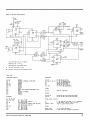
Figure 9 - Big Voice Phoneme Section
C11:1V)
R~
;.orURN
POWER
3.3K;r.
CABLE
J
RI
IOK4
10K
,4L~ATE
1.11311.
j
•!'..CSr
.
]£2.
•
(t-S)
F-r O.VUt:
"'f
~(~I2.)
740"1'
,,-
56
Vee
2 12
HeRO
3 rt
IG
(t5)
IfIO
110< 15
'OKA
74-07
Ui3f
(+:$)
~l·tR5-A
9 Ps
$5" C>
S4§1" UIZ
S3
" PJ 5CPI
52
12
51
/3 PI
SO
14 Po
7srs
STB
Ac.¥OY
(t-s)
G
I~
2200
.J1..
8
ACKjRO>'
TP3
GHD
RI7
Rif
411<
p;.
lUI
t;60.r..
T
Figure 10 - Big Voice Data Section
--",-
a
~.","5fH'
1.1'1-
EPROM TYPE
E PROM
Type
c4~B
II I" G
If
1I
1
E
I 26 28
23 A VI'I' Vee Vee
cfn
-¥
I
.22
20 All
:1.1 AIO
2.4 Aq
,---
2S
A9
.3 A7
4- A&
5 AS
6 A4
7 A3
8 A2
q AI
57
r---t> 56
10 Jt~
~-
()7
..
,.. 18
D6
Ds ~ 16
D+ o-l!!-
~p
~c ~
I
8
GB
GA
/5 A
Ilf
LD LS'"
(DHG
11-
D2
"-
to
J)t
~
/)¢ n.
,
10
e
I
"-
~o
RC
GD
c!
Gc!
Q6
QA
to
srn
8
J
/1
(PN
If
C
r,.,S2564-
B
p F
Ql~
QS
77151514-
G4
(
4.~:
11
rY/
3
EPSEL
tl7
f;
I
RS-C
16
A.
"
1f5:~
RS-G-
Q2 11
EPROM 1
2~
,,-
R5-F
.A,
IlS-IJ
II
v.,.,A
RS-8
PD £PI{OMp/
cS (;NU CS
:Zt /q..:t :t
17
UI7e
/.soo
If"Dh
/.504
!'USITION PIN 1
OF ePIfOM ",Irlf
I'IN 3 OF soclrn
Q3 /~
13-
~!
,.
F
}
18
OR
LSOO
5
7
.s
Ll> LS/'fI
---l.!..>CK
.
IJ
A
GIG ; -
611
~"
T"'S2532
TMS :lS16
LS04
H
IS A
6
'--
lA,
G t:
U;l..
!Soo
~
~
U'r,
/)
8
-
TI152.5/(j
1MS Z~3Z
If
T
h
~
:z.
/I
; - - - i>CK
D3
r!-
if D
10 C
U3
INSTALL
J()MP£RS
-WARNING-
.~
ID~
LS30.
'I :l.1 ~I 5
~
~.5)--O
a 1",1
r2
/7
us
7
lS.213
!If
r-----;
r" ,
I"i
ACLfl
~
S
"
/.s()4.
~[)'O
lJ 13
"'",A
:z.
6
IS
1:1.
11-
10
,
...
6
--c:- 5
J
If
LS .J6S
(JI'I-
OE
i
"S
7
q
I
~
J G 1/ .4
~
s
~
S 4-
J.
53
S2
S I
S ff
---(>
Oe
'L/j
s WAP
l~(t-
$)
12 II
..oo
S
START
Micro Cornucopia, Number 17, April 1984
Figure 11 - Big Voice Timing Section
(+5) TUG
101<'-0.
tXl.
U/3b
'"'1'If
If
3
C
UI8h
:z.
SWAP
LIBel
Q
5
6
U/3C
(t5)
10
LSoo
(TS) (\15
EpSEL
LSOO
"'S)
200 rF:tI~
(+5)
llo
P
D
Q
'f
srB
tl81>
II
T
C
\
II
C
U18~
Q 5
- 6
G
C
Q
6
P
IS74-
7401
ro
5
LS7-+
4·7KJl.
14:l
UISd
LSOO
P
D
3
CLR
:5
1
RC
(*,5)
STROBE
It
QIf
CIO
~
Q 13
LS 123
poe
Rtf
I K./l.
74.07
/If
(.-5)
LS 74
+-______________________________________~
Q~.5~~-4__
ii
B
8
.$r8
C
/3
i.s 123
1.504
ClR
A,cKjR.D'f
5
~
lAI1c
1/
If)
P
'I G
U/SJ,
1.500
5
o~ U~1~~~___________~~
~_____________________
is x)( INDICATES 74 loS XX
. RESISTOR~
ARe
V4- W
S
D
1:1.
STOP
/I
L574-
8 Q
TTL DEVICE
C
%
1'5
SifiM·
CAPACITORS AliI: ;t 20i: UNL1!SS NO T& D.
0-
/NOICATES ca/l'UCTIO/V ro JI' PI
__
/NPI CATES CD"'/v£CT/O/V.,O PO'f(/!Jf ..
~I'I!AItI(
CABLes
Parts List
Integrated Circuits
U1,
U2,
U5
U6,
U8,
U9,
U10
U11
U12
U13
U14
U17
U1S
U4
U3
U7
U15
U16
Capacitors
74LS30
TMS2516 or TMS2532 or TMS 2564
74LS273
74LS191
74LS74
74LSOO
74LS132
LM3S6
Votrax SC-01 Speech Synthesizer chip
7407
74LS365 or 74LS367
74LS04
7liLS123
200 PF 5% Silver Mica
0.1 OF 50V Ceramic disc
220 OF 20V 20% Tantalum
deleted from circuit
100 OF 20V 20% Tantalum
10 UF 16V 10% Electrolytic
Diodes
D1, D2
1N914 or equivalent
Sockets
for U2, U3
for U12
Resistors
R1, R2, R7, R10
R12, R13, R16
R3
R4, RS
R5
R6
R9, R15
R11
R14
R17
C1, C10
C2, C3, Cli, C5, C7
C6
CS
C9
C11, C12
28 pin 600 mil low profile side wipe
22 pin 400 mil low profile side wipe
Plugs, Jacks, and Pins
10K Ohm
5K
Ohm
3.3K Ohm
7 x 4.7K
10K Ohm
4.7K Ohm
560 Ohm
1K
Ohm
2.2K Ohm
1/4W 5%
20 turn trim pot
lIliW 5%
Ohm sip resistor pack (S pins)
20 turn tric pot
1/4W 5%
1/4W 5%
1/liW 5%
1/4W 5%
Micro Cornucopia, Number 17, April 1984
J1
P1
jumpers
(Sea.)
2 x 20 .025 n sq. pin male .1n x .1 n spacing
2 x 20 female plug for .025 n sq. pins
.025 n sq. gold wirewrap posts
Cables
Power cable
Speaker cable
15 n x 3 condo #26 cable
2 condo #26 cable (length as required)
9
The Xerox 820-11 and the Dynadisk
By Clarence Peckham
After owning a Xerox 820-II for over a
year, I was ready for some form of mass
storage other than floppy disks. The
problem was not one of storage capacity,
I'm using 8 inch double density drives,
but one of performance. One obvious solution was to add a winchester subsystem.
However, the winchester was out due
to the high cost. The next solution was a
solid state disk. A solid state disk is a medium-cost storage system with performance in the 125 KB/sec range and zero
access time. It seemed ideal!
Most of the solid state disk systems
available in the marketplace are designed for 5100 applications. The one
unit I found which was usable was the
Dynadisk from LA Software. Tony Ozrelie is the designer of the Dynadisk and
after a short telephone conversation, I
ordered the documentation and software with the intent to wire wrap a
breadboard version of the Dynadisk.
I don't recommend this approach.
Tony now has a printed circuit board
available at a very reasonable price. I
spent a lot of time checking my wiring
when the problem was really an error in
the software.
Dynadisk
The Dynadisk is a 256 KB RAM array
with the necessary TTL logic to provide
an interface to the spare parallel interface
on the BB I. This is the problem. The
Dynadisk was designed to operate with
the BB I and wasn't tested for use with
the Xerox 820-11. Although the hardware
interface is the same, the software is not.
Fortunately, the 820-11 still maintains a
strong link to it's BB I heritage. The
CBIOS for the BB I works fine with both
the 820 and the 820-U. This allowed me
to use a version of CP 1M set up for the BB
Ion my system for testing purposes. So,
armed with Dynadisk and a version pf
CPIM for the BB I, I proceeded to convert
the Dynadisk software to work with the
820-11 CBIOS.
Hardware Modifications
No software project is complete without hardware mods. Fortunately, the
hardware mods are minimal and only effect the 820-11 motherboard. No changes
on the Dynadisk board are required.
10
13075 SW Davies Rd.
" Beaverton OR 97005
The first change required is to remove
the two IC's from the 820-11 motherboard. Remove U90 and U91 and ~eplace
them with jumper blocks as described in
the Dynadisk Operating Manual. U90
and U91 are 74LS243 bidirectional buffers and are not required for the Dynadisk.
The next step is to make the necessary
jumper connections in the J11 jumper
block on the 820-11 motherboard. The
necessary connections are .as follows:
3 - 4
5 - 6
7 - 8
13-14
15-16
Once these changes are made, the last
step is to connect the cable to the Dynadisk. This connection is made using con- "
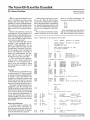
Figure 1 - CBlOS Patch To Use Dynadisk on the Xerox 820
title
RAMOSK - Oynadisk I/O patcher
Based on ddyna - dynadisk i/o patcher
by Tony Ozrelic
Copyright (c) 1982
This version Copyright (c)
by Clarence Peckham
,
0008
0009
000A
000B
ddata
actl
dcsr
bctl
,
1983
i/o ports
equ
equ
equ
equ
8
9
10
11
idata port
ipio control A
icontrol/status port
ipio control B
i Output Bit patterns
,
0000
0001
0002
0004
0008
tOld
sId
ref
data
rw
equ
equ
equ
equ
equ
00000000B
0000000lB
000000l0B
00000l00B
00001000B
0008
0009
000C
0004
000A
dtrack
dsect
dread
dwrite
drfsh
equ
equ
equ
equ
equ
tId + rw
sId + rw
data + rw
data
ref + rw
,
,
F368
F384
F800
seltab
dvrtab
dyna
iTrack load
iSector load
iRefresh on bit
iOata selection
i R/W bit
.Memory addresses in 820-II monitor
equ
equ
equ
Of360h + 8
Of380h + 4
Of800h
iStart of ram driver code
Here We go!
.z80
aseg
org l00h
,
load,patch and set up pio
Id
Id
Id
Idir
hl,begdyn
;start of code
;Oestination
de,dyna
bc,enddyn-begdyn
; length
;go to it!
3E 02
32 F368
Id
Id
a,02
;Select disk driver two
(seltab) ,a
iS tore in table
01 F800
ED 43 F384
Id
Id
bc,ramdvr
(dvrtab) ,bc
0100
0103
0106
0109
21
11
01
ED
010B
0100
0110
O1l3
0l2C
F800
0149
BO
ddyna:
istart of driver
iGo stuff it
Set up pio
0117
0119
3E 8F
03 09
ld
out
a,8fh
iA side for r/w
(actl) ,a
Micro Cornucopia, Number 17, April 1984
~llB
~llD
~llF
~12l
~123
~125
~127
nector J8 on the 820-11 motherboard and
the pinout is the same as JS on the BB I.
Software
Since I used a version of CP 1M for the
BB I, I was able to use all of the utility
software that came with the Dynadisk.
Along with the necessary driver, the
Dynadisk comes with a format routine
and an extensive test routine. I had an
early version of the Dynadisk driver routine, so several changes were required
before the driver software would work
correctly. Tony has since corrected and
released a new version of the software.
The format program must be patched
in order to work with the 820-11. The HEXOUT routine used by the format program is located in a different location in
the 820-11 monitor than in the BB I.
Change locations in DFORMAT.COM
with DDT.
Micro Cornucopia, Number 17, April 1984
3E
03
DB
ld
out
in
a,drfsh ;turn on refresh
(dcsr) , a
a, (ddata)
;clear ready line
~A
~A
~8
;B side 4 out 4 in
(bctl),a
a,~f~h
(bctl) ,a
jp
;GO TO CPM!!
On entry HL points to a command block wit
following information.
,
begdyn
~12C
F8~~
F8~1
F8~2
7E
3C
28
5~
HL -) defb
defb
defb
defw
defw
defw
equ
.phase
ramdvr: ld
inc
jr
command
-l=select,l=read,
logicalunit
physicalunit
track
sector
address buffer
$
dyna
a, (hl)
;get command
a
z,select
Not select so set up for read/write
F8~4
F8~5
F8~6
F8~7
F8~8
F8~9
F8~A
F8~B
F8~D
F8~E
F80F
F8ll
push
inc
inc
inc
ld
inc
ld
inc
ld
inc
inc
push
dec
E5
23
23
23
5E
23
56
23
7E
23
23
E5
3D
EB
ex
hl
hl
hl
hl
e, (hl)
hl
d, (hl)
hl
(hl)
hl
hl
hl
a
de,hl
a,
;address of cmd block
;track number to DE
;A = sector
;pointer to buffer add.
;sector is 0-25
;hl = Track
hl = track
a = sector-l
Compute ramadd = 26*trk + (sector - 1)
F8l2
F8l3
F8l4
F8l5
F8l6
F8l7
F8l8
F8l9
F81A
F81B
F81C
F81D
F81F
29
E5
01
29
29
E5
Cl
29
~9
19
4F
~6
~~
~9
add
push
pop
add
add
push
pop
add
add
add
ld
ld
add
hl,hl
hl
de
hl,hl
hl,hl
hl
bc
hl,hl
hl,bc
hl,de
c,a
;2*trk
b,~
;bc= sector-l
;hl= 26*trk + sector-l
hl,bc
; 4*trk
;8*trk
;16*trk
; + 8*trk
; + 2*trk
=
26*trk
output to ramdsk
1 = sector
h = track
F822
F824
F825
3E
03
7C
03
F827
F829
F82B
F82C
F82~
~8
~8
ld
out
ld
out
a,dtrack
;trk register
(dcsr) , a
a,h
;get track value
(ddata) ,a
3E 09
03 0A
70
03 ~8
ld
out
ld
out
a,dsect
;sector register
(dcsr) ,a
a,l
;get sector value
(ddata) , a
~A
now get buffer address and set up for r/w
F82E
F82F
F83~
F83l
F832
(continued on page 12)
a,~cfh
Here is the disk handler;
F8l~
This is the only change required to use
the software distributed with the Dynadisk. But in order to use the CHIOS that
comes with the 820-11 the next step was
to write a driver routine for the Dynadisk
which would work with the 820-11 software. Two problems had to be resolved.
First the 820-11 uses drives A-D for the
two floppy disks so I chose drive E for the
Dynadisk instead of drive D used by the
standard BB I Dynadisk software.
The second problem was the 820-11
monitor. There is no listing available for
the ROM monitor used in the 820-11 and
it is radically different from the monitor
used in either the BB I or the 820-1. The
only solution was to disassemble the
monitor which was a slow and tedious
process.
The 820-11 monitor uses the loadable
disk drivers and a standardized command block to communicate with all disk
drivers. Two tables in RAM are used to
reference the correct driver for each
drive. The standard 820-11 has two disk
drivers built in. One for the floppies and
one for the SASI interface option. At
boot time the correct driver is configured
ld
out
ld
out
~129
F80C
014D CDF3D2 should be CDFC1B
01F3 CDF3D2 should be CDFC1B
3E CF
03 ~B
3E F~
03 ~B
El
5E
23
56
El
pop hl
ld
inc
ld
pop
e, (hl)
hl
d, (hl)
hl
ide
;hl
address
address of cmd
(Listing continued on page 12)
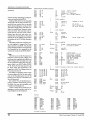
11
XEROX 820 - DYNADISK INTERFACE
CBlOS PA TCH LISTING (continued)
(continued)
into the monitor depending on which in.
terface is installed in the 820-11.
Adding a disk driver for the Dynadisk
turned out to be an easier task than I expected (if you overlook the two months
spent disassembling the monitor). Each
driver has a single entry point and is required to handle three requests; select,
read, and write. The read and write requests read or write one sector of information from the' track and sector contained in the command block. The select
request has to do nothing except return
the address of the CP 1M disk descriptor
block.
The listing contains the complete driver code required to support the Dynadisk as drive E on an 820-11. Note that the
sector translate routine is not required by
the Dynadisk but it is required by the
warm boot routine in the 820-11 CBIOS.
Usage
The best way to use the Dynadisk is to
bring the system up using a floppy and
then copy any compilers and editors you
will be using to the Dynadisk and swap
the A and E drives using the swap program which is an 820-11 utility (SWAP
A =E). Then all of the disk accesses will
be done using the Dynadisk as the
logged in A drive. The A floppy drive can
be accessed an drive E.
One thing to remember is that when
the power goes off all of the data which
was on the Dynadisk goes into the bit
bucket. So save all your work before you
shut off the power!
Is it worth it? Yes, the performance in'crease is excellent. Warm boots occur in
the blink of an eye and assemblies and
compiles are blindingly fast.
I want to thank Tony Ozrelic for designing an excellent product and for being so helpful over the telephone.
•••
F833
F835
F836
F838
F839
F83A
06 80
7E
0E 08
EB
3D
28 0B
Id
Id
1d
ex
dec
b,128
a, (hI)
c,ddata
de,hl
a
z,read
jr
sector length
r/w = 1/0
c = data port
hI = buffer address
Write request
F83C
F83E
F840
F842
F845
F846
3E
03
ED
CD
AF
C9
1d
out
otir
call
xor
ret
04
0A
B3
F859
3E
03
ED
CD
DB
AF
C9
0C
0A
B2
F859
08
;ramdsk to write
;do write
;turn refresh on
;no error a110wec
rfshon
a
read request
,
F847
F849
F84B
F84D
F850
F852
F853
a,dwrite
(dcsr) ,a
read:
Id
out
inir
call
in
xor
ret
a,dread
(dcsr) ,a
rfshon
a, (ddata)
a
;clear ready line
select ramdisk
;
F854
F857
F858
F859
F85B
F85D
21 F889
AF
C9
3E 0A
03 0A
C9
select: Id
xor
ret
rfshon: Id
out
ret
F85E
F860
F861
F862
F863
F865
F867
F868
F869
F86B
F86D
001A
03
07
00
00F2
003F
C0
00
0010
0002
0000
dpblk:
01
19
17
15
14
12
10
07
05
03
02
lA
18
16
00
0B
09
08
06
04
F889
F88B
F88F
F891
F895
F86F
0000 0000
0000
F899 F85E
F939 F919
F899
F919
F939
0275
a,drfsh
(dcsr) ,a
,
13
11
0F
0E
0C
0A
defw
26
defb
3
defb
7
defb
o
defw
242
defw
63
defb 11000000b
defb
o
defw
16
defw
2
defw
o
.; sector/track
;block shift constant
;block mask constant
;extent mask constant
;max block number
;max dire entries
;al10cation
;mask
;check size
;reserved tracks
Sector translate table for single density
,
F86F
F873
F877
F87B
F87F
F883
F887
;disk parameter block
;no error allowed
h1,dph
a
sectab: defb
defb
defb
defb
defb
defb
defb
1,7,13,19
25,5,11,17
23,3,9,15
21,2,8,14
20,26,6,12
18,24,4,10
16,22
dph:
defw
defw
sec tab
0,0,0
defw
defw
dirbuf,dpblk
chk,a11
,
dirbuf: defs
128
all:
defs
32
chk:
defs
16
.dephase
$
enddyn equ
end
ddyna
Macros:
Symbols:
0009
ACTL
012C
BEGDYN
000A
DCSR
F899
DIRBUF
000C
DREAD
0008.
DTRACK
F800
DYNA
F847
READ
0008
RW
F368
SELTAB
F919
F939
0008
F85E
000A
F384
0275
0002
F86F
0001
ALL
CHK
DDATA
DPBLK
DRFSH
DVRTAB
ENDDYN
REF
SECTAB
SLD
000B
0004
0100
F889
0009
0004
F800
F859
F854
0000
BCTL
DATA
DDYNA
DPH
DSECT
DWRITE
RAMDVR
RFSHON
SELECT
TLD
No Fatal error(s)
12
Micro Cornucopia, Number 17, April 1984
'GET
REAL 16 BIT POWER
;ASINGLE BOARD COMPUTER FEATURING THE
INTEL 80186
THE SLICER
•
Full8MHz l6-bit microprocessor having
completesoftwarecompatibility with the
8086 and 8088
• 256KBytesofRAMpius 32K Bytes of
EPROM'memory capacity on board
• Floppy disk controller can run the
combination of 8", 5-1/4", 3-1/2" drives
:; simultaneously
• SASI port for hard disk controller
• TwoJul1 function HS232C serial ports
with individually controlled baud rates
from 50 to 38.4K baud
• 8K of EPROM contains drivers for
peripherals, commands for hardware
checkout and software testing
• Source for monitor and bios included on disk
•
Bios for CP/M 86* supports' 8",5-1/4",3·1/2"
drives and the Xebec 1410 controller for hard
disks
• Board size 6" x 12" power requirements
+5 @3A,+12V @ 60mA, -12V @,50mA
• Complete documentation included.
Sold in various forms:
Assembled and tested . . . . . . . . . ; .$1,075.00
Full Kit ....•..
895.00
Easy Kit (hard to get parts) . . . . . . ' . .. 450.00
Bare Kit (board, Rom, doc, and disk) ... 150.00
CP/M 86* available. . . . . .. .. . . . . ... 85.00
Regular U.P.S. shipping within continental U.S,
is included.
0
•••••
0
.'
•
•
••
•
•
••
THE NEW ,SLICER EXPANSION BOARD
• 256K bytes dynamic RAMusing the
TMS4500 0 RAM controller
• 2 RS232C serial asynchronousportsusing
the Signetics SC2681 serial communications
circuit with baud rates selectable from 38.4K
baud'to 50 baud
• 2 RS232C serial asynchronous ports using the
Zilog 8530 SCC with header connectors
for synchronous communications personality
cards
•
RealTime Clock with battery back-up using the
COP6818 RTC circuit, on-board or off-board
battery
SLICERTM
• Parallel printer port for Centronics-type
printers
• Same size as the SLICER, Power: [email protected];
+12 @'200rnA - l2V @ 100 mA
Sold in various forms:
. ___
" '_"_'
Assembled and tested . . . . . . .
$8QO·OO
Full Kit ...
~
650J)()
Memory Board .........•..•.... ;i.450.()()'
3 Port Board and Clock .
i~~2§.O()
Bare Board and Doc . . . . . . . . ~ ...• ~ ..••
Regular, U.P.S. shipping within continentaL ,lJ~S~{r
is included.
0
0
••••
••
'0
••••
••••••••• '
o• • • • • • • • • • •
95.pq
Choose 8 MHz CPU for speed
6 MHz CPU for speedy delivery
Mastercard, ViSCi.
SLICER COMPUTERS INC. 2543 Marshall St. N.E.
check, money order or
Minneapolis, MN 55418 (612) 788-9481
C.O.D. orders accepted.
'CP/M a trademark of Digital Research, Inc.
Please allow 4 weeks for delivery.
Pascal Procedures
John P. Jones
6245 Columbia Ave.
St. Louis MO 63139
(314) 645-1596
The first step in programming in any
language should be a precise definition
of the problem at hand and an outline of
its solution. In many cases, this step will
be the most time consuming and difficult
portion of the entire project.
mine field positions should then be
blocked out, followed by a functional
definition for a 'command interpreter.'
Finally, the repertoire of actions to be
performed under control of the command interpreter should be outlined.
Program Development
Recently I needed a routine to interpret a message from another computer
and perform a series of processes based
on the message data and imbedded control codes. The first step was to get a definition of the input message in all of its
possible forms.
1. Data in ASCII?
2. Enumeration of all possible fields.
3a. All fields in fixed positions?
3b. Fields delimited by a special character?
4. Enumeration of all possible actions.
5. Enumeration of all codes for 4.
Now the procedures to attack the
problem can be logically outlined or flow
charted. If the data is in ASCII (it was)
the input message can be most conveniently handled as a STRING, since the
built in STRING handling procedures
can then be used. The first outline would
be for a routine to copy the input data to
a Pascal STRING variable.
If fields are not in fixed positions, a
routine for scanning the data to deter-
Start Your Coding
The actual coding can begin at this
point. My method is to sequentially develop the routines for a 'test case' and
then modify/expand to cover all cases. In
my example, the STRING conversion
routine· is written and debugged using
constant input data and a simple calling
program before going on to live input
data.
In like manner, the field extraction
routine is developed first for fixed input,
then for variable.
The command interpreter development is only slightly more complex. The
routines for each action can be written
and tested independently for fixed and
variable input. These routines are later
integrated into the main program by another independently written module
which selects the proper function based
on the control code imbedded in the
field.
To interpret the input data, the main
program needs only to call the STRING
initializer, followed by the field extrac-
tion routine and command interpreter
for each field.
Although this example may not be of
specific value to many readers it does
point out the method of modular programming. First, define the problem and
solution in detail and break it up into
. small, easily coded routines. Fully test
each routine as it is written, then use
these modular building blocks to construct the final program.
Variant Records
One of the more difficult data structures to understand in Pascal is the variant record. As you may recall from an
earlier column, a record is a structured
data type which allows the programmer
to access logically related data elements
as a group.
In some cases, it may be more convenient to access the person's name as a
whole, rather than as last name, first
name and middle initial. Rather than
copying the data from the record fields
into a single char array, a variant record
makes this possible in a more convenient
way.
The case selector, called a tag field,
must be a scalar value (boolean, integer,
char, enumerated) and is another field
which can be manipulated within the
record. The variable 'american' can be
Figure 1 - Pascal Examples
example 1
example 3
type
type
person-name = record
last_name
array[1 •• 20] of char;
first_name
array[1 •• 20] of char;
initial : char;
end;
selector = (this, that, another);
strange_record
recordname
case which
this
that
another
example 2
end;
= record
string[23];
selector of
(number: real);
(yes_or_no: boolean);
(nest
record
a
integer;
b real;
c
string[12];
end; )
type
person-name = record
case whole
boolean of
true
(entireJlame
false:
(lastJlame
first_name
initial
end;
example 4
array[1 •• 41] of char);
array[1 •• 20] of char;
array[1 •• 20] of char;
char) ;
type
ptr_trick
case
= record
char of
'I' : (int : integer);
'P' : (ptr : Ainteger);
dat~type
{or AWhateverl
end;
var
american, gallifreyan, lower_slobovian
14
perso~name;
Micro Cornucopia, Number 17, April 1984
accessed as either a single character array or as two smaller arrays and a char
depending on the value of the field
'whole.' Maintenance and use of the tag
field is the responsibility of the programmer, NOT the compiler.
In my example 2, even if american. whole = true, the variable american.initial can be modified without restriction. The tag field should be used by
the programmer in IF or CASE statements to control proper access to the record's variant fields.
Variant fields do not have to be the
same length, but the compiler will allocate variable space for the longest variant. The variant fields can be of entirely
unrelated types.
The variant record part must be the
last field in the record but since records
can be fields of records, variants can be
nested. Again, since the variant part
must be last, the 'end' terminating the
record definition suffices to terminate
the variant case statement.
For many Pascal compilers, pointer
types cannot be manipulated as integers
even though at the binary level they are
both 16 bit values. The variant record
type in example 4 allows manipulation of
the pointer's value as ptr_var.int and
use ofit as ptr_var. ptr.
To sum up for variant records, it's all
in how you look at the data.
Turbo Tips
Those of you who have seen the review of Borlanci International's Turbo
Pascal in Micro C, issue 16, will know
that I have a very high opinion of this
new native code Pascal system. Because
of the product's reasonable price, standard syntax, and superb performance
(and the uncertainty of support for the
other low priced Pascal compilers), I will
be presenting most of my examples in
Turbo Pascal. As I come up with bits and
suggestions on how to use Turbo effectively they will be included in this section of the column.
Turbo allocates storage for static variables (globals and locals for non-recursive
procedures) at compile time. Because of
this, a Turbo generated .COM file will
not run on another machine with a
smaller transient program area or on the
same machine if part of the TPA is used
Micro Cornucopia, Number 17, April 1984
by another program like SUBMIT or
DDT.
To get around this problem, compile
the program under Turbo with the other
program loaded. For example, if you
want to debug an application program
with DDT, use the steps:
A>DDT TURBO. COM jload ddt, then turbo
-G
jddt prompt, execute Turbo
At this point, the Turbo compiler can
be run normally. Select the Com option
to generate a . COM file of your program.
To debug the program, enter:
A>DDT PROGRAM. COM
You can then use all the DDT commands to examine the code, set breakpoints, trace etc. Since the compiler was
executed with DDT resident, all variables were allocated in available memory.
When running the terminal installation program, TINST.COM, if you wish
to delete a function (such as insert line)
enter a minus sign '-' and TINST will reply 'nothing.' Under these circumstances, the Turbo editor will perform
the required function in software rather
than using a terminal function code.
For any Pascal, the statements:
i := i + 1j
i := succ(i);
have the same effect but the second will
be much more efficient. The first statement will generate code to execute an integer add routine, while the second will
result in a simple increment.
• ••
BIG BOARD I DUAL DRIVE ENCLOSURE
Because of the unprecedented popularity of the original Big Board, we felt there
would be a good market for an attractive yet low cost custom enclosure.
We have had designed THE perfect enclosure for your Big Board and two eight inch
drives.
FEATURES:
* Custom Designed for the original Big Board
* Heavy Duty aI/ aluminum construction.
.
* Mounts Two SABOO/B01R or equlv. drives (Vertlcal/y).
* Has extra space for Switching or Linear Power Supplies.
* Attractive painted cream finish with natural aluminum pre-punched backplate.
* Pre-punched cut outs for cooling fan, 3 DB25 conn., video conn, keyboard
conn., on off switch, AC power filter/plug, fuse, reset switch, and cooling slots.
* Built In stand offs for mounting Big Board.
* Can also be used fora dual drive enclosure for other systems besides the Big
Board.
Canadian Orders add $8 shipping
* 20 x 12 x 10.25 Inches In size.
NEW LOWER PRICE: $69.95 (add $4 UPS) Buy 2 or more at $65 ea.
(Units shipped unassembled)
Limited Oty. of mating PAMOTOR 85000 muffin fans avail. at $12.
Limited Oty. of COE APF600CEE 6 amp AC 3 wire receptical and
line filter that fits our enclosure are avail. at $3.50 each.
Limited Oty. of 50 conductor dual disk drive ribbon cable and
connector assemblies for your Big Board. These feature GOLD
Winchester Electronics connectors! $15 each.
Add extra $1 UPS on above 3 items. We accept VISA, MC, money
orders, or cash. Personal checks OK but cause an extra 2 week
delay for clearing. Texas residents add 5% sales tax. We ship to USA
and Canada only. $15 min. order. No phone orders yet
ODD BALL ELECTRONICS
P.O. BOX 879
DUNCANVILLE, TEXAS 75116
15
COMMUNICATIONS
LOVE AFFAIR FROM
SWAP FILE FULL
The SIG ALMAN MARK XII BRILLIANT
(not TV) MODEM does it all without a
loudspeaker to wake your spouse.
ForKAYPRO
»»$380.00««
110/300/1200 baud Hayes'" compatible.
INC LU 0 E0 (at NO cost) software to use it. 26 entry
USER CHANGABLE directory; auto-dial/answer,
Baud and file speed control, file utilities and more
in SIGXII. COM· plus Communication utility
programs and other handy stuff with instructions
on disk. Prewritten 10 entry PERMANENT
directory.
Send SASE for more information.
To Order: please print your name and address (no p.o. box~,
10 exact names and numbers (including 1 and area code If
needed) for Permanent Directory, send $380.00, California
residents add 6%%, in Money Order or Check (add 2 weeks),
COD orders add $5.00 (Cash or Money order only on COD). No
phone orders yet.
We ship prepaid UPS
BIG BOARD
XEROX 820
Yo
Get the parallel I/O you need after you've
used up that one PIO on your computer. The
board also has a battery backed up clockcalendar chip. Interface that with a simple
triac circuit and have your computer turn
itself on and off. r===:;;:;::;=~~;;;;;S~~iiil
*Up t04 extra PIO's
* Lithium cell backup for clock
*Easyassembly&
installation
* Stand by interrupt
output from clock
Bare P.c'B.
29.95
Complete kit 99.95
Assembled
& tested . 129.95
Shipping
2.50
Goodin
Peripherals
SWAP FILE FULL
25530 Ave. Stanford, #203
Valencia, CA 91355
Micro Cornucopia, Number 17, April 1984
Introductory offer
$49.95
THIS IS THE PASCAL COMPILER
EVERYBODY'S BEEN WAITING FOR •••
EVERYBODY EXCEPT THE COMPETITION!
Extended Pascal for your IBM PC,
APPLE CP/M, MS DOS, CP/M 86, CCP/M
86 or CP/M 80 computer features:
• Full screen interactive editor providing
a complete menu driven program
development environment.
• 11 significant digits in floating point
arithmetic.
• Built-in transcendental functions.
• Dynamic strings with full set of string
handling fE3 atures.
• Program chaining with common
variables.
• Random access data files.
• Full support of operating system
facilities .
•. And much more.
ORDER YOUR COpy OF TURBO
PASCAL TODAY TO TAKE ADVANTAGE
OF OUR INTRODUCTORY SPECIAL.
For Visa and MasterCard orders call toll free
1-800-227-2400 X 968
IN CA: 1-800-772-2666 X 968
(lines open 24 hrs. a day, 7 days a week)
Dealer & Distributor Inquiries welcome.
Turbo Pascal
IBM Pascal
Pascal MT+
PRICE
49.95
300.00
595.00
Compile & Link
speed
1 second III
97 seconds
90 seconds
Execution
speed
2.2 seconds
9 seconds
3 seconds
Disk Space 16 bit
8 bit
33K
28K
w editorl 300K + editor 225K + editor
w editorl Not Available 168K "'" editor
8 and 16 bit
YES
NO
YES
built-in editor
YES
NO
NO
Generate object
code
YES
YES
YES
One pass native
code compiler
YES
NO
NO
Locates Run Time
errors directly in
source code
YES
NO
NO
LEARN TO WRITE
A SPREADSHEET
Our introductory offer
includes MICROCALC, a
spreadsheet written in
Turbo Pascal. It will be on
your disk and ready to
run. And we've included
the source code to show
you exactly how a
spreadsheet is writtenl
Turbo Pascal includes a
250 page bound manual
with extensive explanations and many illustrative
examples.
Benchmark data based on EightQueens in "Algorithms + Data Structures", Programs" by N.
Wirth, run on an IBM PC.
Turbo Pascal is a trademark of Borland International. MT + is a trademark of MT
MicroSystems. IBM is a trademark of International Business Machines.
Turbo Pascal $49.95 + $5.00
shipping per copy.
Check_ _ Money Order_ _
VISA
MasterCard_ __
Card #: _ _ _ _-=:-:----;-:-:-=:::::Exp date:
Shipped UPS
.)) BORLAnD
.)) INTERNATIONAL
Borland International
4807 Scotts Valley Drive
Scotts Valley, California 95066
Telex: 172373
My system is: 8 bit--16 b i t - Operating system: CPIM 80 _ _ __
CPIM 86_MS DOS_PC 008_
Computer: _ _ _ Disk Format: _ __
Please be sure model number and format are correct.
NAME: _____________________
ADDRESS: __________________
CITY/STATE/ZIP: ________
TELEPHONE: ________________
California residents add 6 1/2% sales tax. Outside North America add
$15.00. Checks must be on a U.S. Bank, and in U.S. dollars. Sorry, no
C.O.D.
The Kaypro Column
By David Thompson
K aypro i~ distributing an update
package for the early Kaypro 10 (the one
with the'Tandon drives) that lets you
boot off the floppy.
All systems are supposed to automatically boot off the floppy if there is a disk
in the drive but only the more recent systems can do it. Format and Sysgena floppy with your'10, then hit the reset button
with the new disk in place and see if the
system will boot off the floppy (the winchester light will not come on). If yours
will not boot off the floppy, then you
need to get the free upgrade kit from
your dealer.
The update package includes a new
monitor ROM and a disk of new software. However, the ROM they send is a
250nspart (2732A-25) while the ROM
that came in the 10 was rated at 200ns
(2732A-20). The first replacement ROM
that I got wouldn't run at all, so I
swapped it for another and the second
one seemed to work fine.
After I put the lid on the system and
started using it, it got flaky. It would lock
up sometimes, ignoring the keyboardother times it would just reboot with no
warning.
So I erased the ROM that had come in
my 10 and burned in information from
the new (slower) ROM. This cured the
flakiness.
So, if you are having random problems with a Kaypro 10, check the monitor ROM, U42. If it is a 250ns part, you
should see about getting a faster part.
Note that the monitor ROM is a little
hard to find since it is tucked under the
drive cable. In fact, the cable may well be
contributing to the heat problem so if
you are desperate, you might prop the
cable up away from the ROM temporarily while you're getting a new part.
This ROM problem makes me suspect
that there are some hardware timing
problems on the Kaypro 10. A select line
or a data buffer may be slow, causing
critical timing problems.
We've found that lIs and 4s will be absolutelyreliable at 5 MHz with the 250 ns
ROMs but the lOs will not work at 4 MHz
with the same parts.
Sponge
All of you with fans on your Kaypros
(and bells on your toes) should remem-
18
.16
~
::ffiECT8
FR.O~.
U7J
1 0 . SHECr A
S'lSPIO
• •
U71
•
•
.~
.~
.~
.~
Figure 1 - Original Kaypro Drive Select
Figure 2 - Select Circuit to Access 4 Drives
with Pro-8+
ber to check the little sponge filter behind
the fan. That little filter doesn't look like
it would filter much, but it sure can clog
up. When it does, you get the noise but
no action.
Just pull off the little plasti,c cover and
rinse out the sponge. That's all there is to
it.
pears that they are selling a public domain accounting package for $199.95
(without manuals). For another $149.95,
they'll send you the documentation!
They also sell a Kaypro II monitor
ROM with a custom sign-on. You get 23
characters on the first line and 17 on the
second. This is very interesting since I
designed a custom monitor ROM for the
Kaypro II with 23 characters on the first
line and 17 on the second. (When you
design something in this business, you
never know who will wind up selling it!)
The KIPS people included an advertising cover letter, just in case we might
want to put our ad in their "magazine."
The letter noted that they would be glad
to run any editorial material we wrote
about ourselves, if we bought advertising. I may be old fashioned, but that's
definitely not my idea of ethical journalism.
KIPS
I received a "newsletter" from Custom
Electronics of Fresno, California. The
"newsletter" is called KIPS (Kaypro Information Peripherals and Software)
and for $14.95 per year, you are supposed to get: "Periodical mailings of
Hardware and Software tips from users
nationwide." You are also supposed to
be able to purchase all kinds of Kaypro
products a t "KIPS DISCOUNT
PRICES."
Well, KIPS is really just a 36 page catalog with 3 pages of tips. In these three
pages they cover the latest trom Kaypro,
such as:
The Kaypro 10 has a built-in 10 Meg hard
disk. The Kaypro 4 is a Kaypro II with "dou-
ble sided double density disks." (No mention
of the drives.) And that when you have a
Kaypro, you have "the ability to dedicate the
computer to any language you might want to
learn."
After all this, they review JRT Pascal
and benchmark it against SBASIC. No
indication of the programs they ran,
though they called them "time trails."
(Yep, trails, which may mean it was a
foot race.)
So, we turn to the other 33 pages in
this "mag." Here you can purchase at
"discount" a Gemini lOX that they say
retails for $499 (retail is really $399) and
which they will sell for $339.95. (The
usually mail order price for this printer is
between $269.95 and $299.95.) It also ap-
PRO-8
Dana and I have gotten some calls
from people who are trying to use the
PRO-8 copy programs to copy one format disk (say a Kaypro II disk) to another
format (say Kaypro 4 or 8). These track
copy programs will only copy between
two disks of the same format.
So, if you want to format and copy to a
disk that is different from the source
disk, do the following: Choose the correct version of COPY, select the "0" option and then either "F" to format in B: or
"X" to format drive A:. After you have
formatted the disk(s), exit the COpy
routine and use SYSGEN. COM (comes
with CP/M) to put system tracks onto the
disk (don't use the "SYSGEN" built into
the copy program, it wipes out the system tracks if the disks are formatted differently). Then use PIP. COM to transfer
the files.
Micro Cornucopia, Number 17, April 1984
BELLS AND WHISTLES
.o.~
External Video Generator
Easy Installation
Add an external composite video monitor for all your
needs:
+ word processing
+ spread sheet work
/-.
+ group demos
fI:)
+ class rooms
~
}:./.::j
',~U'.
,. ';:.
,,<
'~~~:'.:. (;.(
I
Composite Video Generator
Kaypro II and 4
Kaypro 10 or 4 ..84
$5995
$89 95
-:..
Y:.'·:
) :.
Color Graphics
Board for
Kaypro II, 4, 4 .. 84, 10 and
Big Board I
Assembled and tested color board has 16 colors,
32 sprites + 16K of RAM. TMS 9918A color
processor, tutorial manual, 2 disks of software
includes screen dump to disk and printer.
Developed by Don Britt~in.
~"
'-J
<
.,~. .'
'\'"
Now only $245 00
Bare Boar.d, Schematic, Software &
Cable $10000
There is also one small bug in the
"20n8" routine. If you put an 80-track
drive in A:, this program will not properly format a Kaypro II disk in A:. The following will fix the problem.
A>ddt 2on8.com
2.2
NEXT PC
DDT VERS
1F80 0100
-s732
0732 FC f8
0733 F5 •
-cntl-C
A>save 30 New2on8.com
In other words, changing the byte at
732 (hex) from FC (hex) to F8 (hex) makes
everything work properly.
Tandon 101-4
Tandon has begun shipping a new
drive called the 101-4. We've had problem reports from users who have this
drive. We borrowed a 101-4 long enough
to bring it up on our Kaypro II.
The most remarkable thing about this
drive is that it is practically silent. I
mean, that little stepper just doesn't realize what steppers are supposed to
sound like. It is great. Anyway, check
out the following if you have one of
these.
Micro Cornucopia, Number 17, April 1984
Logo
TLC
is now available for
all Kaypro owners. Standard version
for Kaypro 4,84 and 10 with internal
graphics.
Deluxe version for all Kaypros using
MicroSphere's Color Graphics Board. Call
us regarding Big Board Version.
TLC Logo features floating point
decimals, multiple turtles. Very easy to
learn.
Standard Version $99 95
Deluxe Version $129 95
(with color board purchase) $65 00
~V
ZENITH MONITOR
Model ZVM 121 green
12'" monitor. 40/80 column option and
great contrast. This is an excellent choice.
Special Limited Offer
$99 00
MicroSphere, Inc.
P.O. Box 1221IBend, OR 97709
(503) 388,1194
1. Be sure that only one drive is terminated (two terminators will overwhelm the driver). The terminators look
like blue ICs.
2. Set up the jumpers as follows: W9
open, W19 closed, Jumper on W13 for 6
ms step rate. W10, W11, W12, and W14
should be left open.
3. Drive select is done by W1-W4. If
this will be drive A: then jumper W1, if B:
jumper W2. The rest of the board should
be jumpered correctly as shipped.
4. Be sure you power down the system after setting the jumpers. The onboard processor only checks the jumpers
at power-up.
5. You may have to hit the reset button
a few seconds after you power-up since
these drives take a while to check themselves out.
6. Remember the COpy programs will
usually only run at 2.5 MHz.
So far, however, the older Tandon
100-4, as well as the TEAC, and CDC
quad density units have been flawless
and we've gotten no reports of problems
with any of the double and single sided
48 tpi drives.
TEAC
The TEAC drives have the ribbon con-
nectars mounted upside down from other drives so you might wind up finding
that your drive data cable is too short if
you have one TEAC drive and one Tandon. If they are both TEACs, then you
are OK.
CDC
On these drives, be sure to jumper
"M." Also jumper the drive number, 1
for drive A:, 2 for drive B: and so on.
Four Drives on the 4
All of the PRO-8 monitor ROMs we've
shipped in the last 2 months support 4
drives as well as 2 (see, there is such a
thing as a free lunch). That means that
you will be able to use two outboard
drives as C: and D: if you add a simple
drive decoder circuit and the necessary
data and power cables. If you get the
TEAC half-wide drives you can mount
all four drives inside the cabinet and run
the whole thing off the built-in supply
since the TEACs use only half the power
(as well as half the space) of the Tandons.
The Tandon and CDC drives will require
separate power supplies. The ROMs that
support four drives have +'s around the
(continued on next page) .
19
KA YPRO COLUMN (continued) - - - - - - - - - - - - - - - - - - - - - - - - -
ROM sign-on message (so we call them
PRO-8+ ROMs).
We will have a complete Plus-2 package for the PRO-8 +. The package will include the decoder board and a disk with
the additional formatting and system
utilities that you will need for four
drives. We're also getting prices on complete cables so if you don't want to build
your own we'll have them. More information on these in issue #18.
Note that this will be the genuine Micro C
decoder board. You'll be the envy of all the
Kaypro users on your block when you show
them your very own Micro C decoder. We're
waiting for Batman and Robin to order their
own copy of this beauty.
Anyway, this way you can leave your
original drives in place, if you wish, and
add two more of any type (191K, 380K,
or 784K) outboard or you can replace
your present drives with up to four halfwides (of any persuasion) and not have
anything h~:mgingout.
Kaypro II Version A
During the Spring of 83, Kaypro spent
several months trying to clean up a disk
error problem. During this period they
went through three new versions of their
monitor ROM. The monitor ROMs (U47)
were marked (on the paper stuck on the
ROM) with an 'N, 'B', or 'C' suffix. Kaypro shipped a few 'A' versions and almost none of the 'B' versions (I understand they had a bad bug), before they
went to the .'e' versions which they are
still shipping.
I hadn't been able to find anyone who
could tell me what they changed from
version to version, but now, thanks to a
letter from Terry Kingrey, I have a pretty
good clue.
Terry tried installing one of our PROmonitor ROMs on his system but it
didn't work (he hadn't told us that he
had one of the 'N ROMs). So he tried
substituting parts on his Kaypro to see if
he had a defective chip (we would have
told him not to bother). He didn't have a
1797 floppy disk controller to swap with
the one on his board so he substituted a
1793 from a friend's Kaypro. After he
substituted in the 1793 he found that his
system worked just fine with our PROmonitor ROM.
That news sent Dana and I to the
Western Digital book to see what the dif-
20
ferences were between the 1793 and the
1797. The 1797 does side select and the
1793 doesn't, but Kaypro isn't using that
line. However, the 1797 requires a sector
size bit, the 1793 doesn't. That could be
the difference.
Anyway, if you are one of the select
few with an 'A' version of the Kaypro, it
looks like you can upgrade to one of the
PRO-monitors (II, 4, or 8) if you will replace your 1797 with a 1793 disk controller. 1793s cost about $25.00 each. You can
order them from Unicorn Electronics
213-341-8833.
If you have a ROM with no suffix or
with a 'C' suffix you are just fine. You
have the 1793 disk controller already.
Oh, and thanks a bunch, Terry, for the
letter. We couldn't have done it without
you.
Close Look at the New Kaypro 4
I had heard that the new Kaypro 4 had
a Kaypro 10 board, two 390K drives, plus
a battery backed-up timer and modem.
Whee!
It turns out that the new 4 board is
more than just the 10 board with two additions. It contains two new 40-pin ICs
that replace a lot of standard ttl chips.
One of them is dedicated to the video
section and it looks like the graphics department just got a lot smarter and easier
to use (is someone planning 1,2,3 for the
Kaypro?).
All the Kaypros will soon contain this
new board and meanwhile they've just
dropped the price of the Kaypro II to
$1295 (and the board is running 4MHz
besides!).
Advantages
Kayprohas added a lot of the features
that independent suppliers have been
selling (which is unusual for a large manufacturer). Obviously Kaypro has been
listening to users.
Also, if Kaypro can resist making
changes for a while, you'll see a lot of
hardware and software coming out for
this board. After all, people will only
have to design a product once and it will
work on all the new Kaypros.
Disadvantage
However, a lot of present upgrades
will not now work on the new board.
Dana will be working on new monitor
ROMs but, of course, those new ROMs
aren't done yet. So those of you with a
Kaypro 4 with graphics and two halfwide drives will have to wait a while before making your system distinctive.
And, those of you planning to purchase a Kaypro 10 might want to wait a
month or so and then make sure you will
be getting a system with the built-in modem.
The MODEM
The built-in modem is a very simple
300 baud direct connect unit. It is locked
at 300 baud for now because its UART
(asynchronous serial chip) is tied to the
same half of the 8116 baud rate generator
as the keyboard 510. Since the keyboard
communicates at 300 baud it's obvious
that Kaypro figured it could save the
price of another baud rate generator by
using the same clock twice.
However, until we come up with
something sneaky (and if it's sneaky, it's
right down our alley) you'll lose use of
your keyboard if you try running the
modem at, say, 450 baud.
Support For Fat Jack
As a technical journal, we've considered ourselves above the jungle of Kaypro add-ons such as legs (a 1 by 2 board
mounted underneath the front gives it a
great "pair" oflegs), stands (I can't stand
them) and reading racks (if God had
meant for me to have a reading rack he
would have taught me how to read).
However, the Twist people sent us
one of the Fat Jack reading racks and a
pageclip (which holds books open when
they are on the rack). The rack easily
hooks to the top of the Kaypro and holds
books or papers at just the right level.
-then Sandy spied the rack and-started
using it. She loved it. In fact, she
wouldn't even let me borrow it.
Well, anyone who puts out a product
that Sandy won't loan me, and then supports it like this, has earned a mention in
MicroC.
Fat Jack Reading Rack $17.95
Twist Inc
PO Box 1406
Renton, WA 98057
•••
Micro Cornucopia, Number 17, April 1984
A NEW TWIST
PROGRAMMER/4+
FAT JACK
READING RACK
* SEE
COPY-SCREEN/KEYBOARD
AT THE SAME TIME.
* EASILY
ATTACHED TO
ANY KAYPRO™
* 16"
WIDE - AND STRONG
FULLY SUPPORTS - BOOKS
MAGAZINES. REPORTS
WITH UNIQUE PAGECLlp™
Dealer and group inquiries invited.
ONLY $17.95 +$1.50Shipping
(Continental U.S.A.)
Washington Residents Add $1.45 Sales Tax.
Cashier Checks & Money Orders Shipped Promptly.
(Personal Checks Must Clear - 2 Weeks.)
(Price & Configuration subject to change without notice.)
The Best Accessory
You'll Ever Buy For Your
KayproTM
ORDER FROM:
TWIST, INC.
P.O. Box 1406, Rent.on, WA 98057
S-BASIC
TUTORIAL
AVAILABLE
Approximately 120
pages of letter size
sheets for 3-ring
binder covering the
aspects of S-Basic
Programming (with
references to
M-Basic)
Send $20.00 money
order (to cover cost for
copying and mailing) to:
Sven Erlandsson
3268 Leon Brisebois
He Bizard, Quebec
Canada, H9C 1W2
Micro Cornucopia, Number 17, April 1984
A LOW COST ALTERNATIVE
TO EPROM PROGRAMMING
Reads and programs 2716, 2732, 2764, and 27128 EPROMS.
Reads 2-16K ROMS.
Direct connect to any RS232C terminal or computer.
Plug selectable as either a data set or data terminal.
All voltages made on board, (no power supplies needed).
(User supplies power Xformer, 25.2 to 30 VAC C.T.l Amp.).
Power electronically switched, (can't damage EPROMS).
Zero insertion force socket for EPROM.
Programs, verifies, and dumps in both ASCII and hex.
Edit buffer (like DDT).
Saves hex and/or image files to and from disk.
Saves or loads all or partial buffer.
Completely menu driven for ease of operation.
Commands of Test, Read, Display, Save, Load, Program and more.
Check sum calculation.
All software on disk including well commented source code.
Detailed owners manual including schematic
All chips socketed.
Not a kit! Completely built and tested.
48 hour dynamic burn-in and test before shipment.
90 day limited warranty on parts and workmanc;hip.
24 hour return policy on repairs.
Delivery from stock.
NOTICE TO PREVIOUS CUSTOMERS: Send us your old disk and a
suitable S.A.S.E. for your free copy of our new software, ver. 1.6.
PROGRAMMER 4+ WITH OWNERS MANUAL AND DISK. $199.95
Order from
Rperlplico
~
.~~ 1659 Scott Blvd., Suite 1
~I ~V Santa Clara, CA 95050
U
(408) 244-5214
VISA and MASTERCARD telephone orders welcome.
Please specify Disk format
CP/M 8" IBM format, KAYPRO II, XEROX 820, OSBORNE I, others.
Please specify method of shipment, UPS or Postal Service.
California residents add 6'70 Sales Tax. Dealer Inquiries invited.
21
SBASIC Column
By Jack Rodenhi
Think how rough it would be if every
time you wanted to go somewhere, you
had to re-invent your car. Likewise, a
good programmer will have a library of
programming tools for tasks he performs
frequently.
In upcoming issues of Micro C, we will
put together several tools in SBASIC.
The overall game plan is to eventually
come up with a program that will demonstrate the desirability of developing
software tools, and at the same time, develop a program that will do something
useful, like creating a checkbook database program.
Input.bas
The first part of the program involves
data input. The classiest kind of input
routine is the type used by dBASE II in
it's full screen editing mode. So let's do
that kind.
One of the nice things about a structured language like SBASIC is that if you
don't like the words it comes with, you
1317 W. College Ave.
Lompoc CA 93436
can make up your own. We are going to
invent the input routine called input4 to
go along with the other input statements
provided by SBASIC.
Declarations and definitions
The first two sections of code in our
input tool are variable declarations and
constant definitions. Because global variables make more work when we chain
programs and they represent permanent
space allocation, we will keep these to a
minimum.
Speed is very important in this routine, however, and we will save a good
deal of time by not reinitializing these
variables on every pass through this routine. Turning off line number generation
with the compiler directive "$lines" will
also save time and space.
Cursor commands
Next comes the cursor procedure.
With this procedure, we don't have to
type "print chr(26)", etc. every time we
EXPAND YOUR BIG BOARD
More Memory * More Ports
Rivendell Audiocomp announces an innovative
expansion board for your BB I, featuring:
ADD MEMORY
• 4 rows of dynamic RAMs,
providing up to 256K
{with 64K RAMs) or
1 Mb (with 256K RAMs)
• 32K ROM or CMOS static
RAM (8K x 8 devices)
ADD PORTS
• 2 RS-232 serial ports
• 4 buffered parallel ports
• 8- input 8-bit A/D
converter
• 2 8-bit D/A converters
OTHER FEATURES
• Same size as BB I-piggyback mount
• Complex sound generator
• Counter/timer
• Real-time clock
• Plus many more hardware
features
Available as bare-board
kit. For more information and prices, write to:
Rivendell Audiocomp
P.O. Box 28937
San Diego, CA 92128
Rivendell Audiocomp
Custom Audio and Computer Design
22
619-451-3424
want to clear the screen, etc. We just say
cursor "up", cursor "down", cursor
"erase", cursor "roll over" and so on.
You may nave to change some of the
print commands if you don't have a Kaypro.
Cursor positioning
To position the cursor on the screen,
the programmer just enters the row and
column and the @ procedure will take
care of the rest. Do that a few times without this routine and you'll really grow to
apprec,iate the power of structured programming. Again, this works for the
Kaypro and may need modification for
use elsewhere.
String search
The "in" function is something I sort
of stole from Pascal. Pascal has a neat set
operator called "in" and a few predefined sets.
However, in SBASIC we'll have to define our own sets of characters as strings
and use this string search function to determine if our test character is in the set.
Notice that this function returns a 't' or
an 'f'.
In SBASIC these characters are taken
for boolean results. This means that we
don't have to say "if in(formaLset) = 't'
", we can just say "if in(formaLset)".
We defined the sets at the beginning of
the program and the next procedure uses these sets to test input characters .
A Test of Character
The test procedure compares a key to
one of our defined sets. Which set to
compare to is accomplished by the case
statement and the "picture_char."
The comparison is assumed to yield a
false and then if the comparison works,
it is changed to true. We have given ourselves only four choices here, but this list
can be expanded to whatever extent is
convenient. A boolean picture_char
would probably be very useful.
Get some character
Now, let's look at the routine getkey
which is the workhorse for our input
tool. This routine was inspired by the
book Advanced Pascal Programming Techniques by Paul A. Sand and published by
Osborne/McGraw-Hill. This excellent
(Column continued on page 25)
Micro Cornucopia, Number 17, April 1984
Figure 7 - SBASIC Tools
$l1nes
var numbers, boolea~set = string : 12;
var contro~set,small-letters, cap-letters
var letters = string : 53
var format~et = string : 5
var ch, control = char
function input4(row, col = byte; picture, default
var position, done = byte
var ma~ength = integer
var input-line,response = string :82
string:27;
contro~set = chr(13)+chr(05)+chr(24)+Chr(25)+chr(08)+chr(04)
numbers = "0123456789.-"
cap-letters
= "ABCDEFGHIJKLMNOPQRSTUVWXYZ "
small-letters = "abcdefghijklmnopqrstuvwxyz"
letters = small-letters + cap-letters + ":;?<>@&"
boolea~set = "YyNnTtFf"
format_set = "9ABXI"
procedure cursor(command = string)
case command of
"erase": print chr$(26);
"beep": print chr$(7);
"left": print chr$(8);
"down": print chr$(10);
"up": print chr$(ll)j
"right": print chr$(12);
"cleareos": print chr$(23);
"cleareol": print chr$(24);
end
end
procedure @(row, column = integer)
print chr$(27)+"="+chr$(row+32)+chr$(column+32);
end
function in(test_set = string : 60; subject
char)
char
var result = char
result = 'f'
if instr(l,test_set,subject) <> 0 then result
't'
end = result
function test(key = string :1; picture_char
char)
char
var ok = char
ok = 'f'
if in (contro~set,key) then ok
't' else
begin
case picture_char of
'9'
if in(numbers,key) then ok = 't'
'A'
if in(letters,key) then ok = 't'
'B'
if in(boolea~set,key) then ok
't'
'X' ok = 't'
'I'
if in(cap-letters,key) then ok
't'
end
end
end = ok
function getkey (picture_char
var key, ok = char
repeat
begin
echo off
input3 key
echo on
char)
char
if picture_char = 'I' and in(small-letters,key)\
then key = chr(asc(key)-32)
ok = test(key,picture_char)
if not ok then
begin
cursor "beep"
end
end
until ok
ch = key
end = key
function mask(model = string :80)
string
var mask = string : 82
var position = integer
mask = space$(len(model»
for position = 1 to len(model)
if in(format_set,mid(model,position,l» then\
mid$(mask,position,l) = '_'\
else mid$(mask,position,l) = mid(model,position,l)
next
mask = ':' + mask + ':'
end = mask
Micro Cornucopia, Number 17, Apri11984
string)
string
control.c.trap off
len(picture)
ma~ength
done = 'f'
response = default + space$(ma~ength-len(default»
input-line = mask(picture)
@ row, col
print input-line
position = 1
@ row,col+position
print defaul t;
@ row,col+position
repeat
begin
if in(format_set,mid(picture,position,l» then begin
case getkey(mid(picture,position,l» of
chr( 13)
done = 't'
chr(05):
begin
done = 't'
control = 'e'
end
chr(24)
begin
done = 't'
control = 'x'
end
chr(25)
begin
response = , ,
@ row, col
print input-line
position = 1
@ row, col+position
chr( 08)
chr(04)
ch
end
begin
if position > 1 then position = position - 1
while not in(format_set,mid(picture,position,l»\
and position > 1 do begin
position = position - 1
end
mid$(response,position,l)=' ,
@ row,col+position
print ,_,
@ row,col+position
end
position = position + 1
begin
mid$(response,position,l)
ch
@ row,col+position
print chi
position = position + 1
end
end
end
else begin
while not in(format_set,mid(picture,position,l»\
and position <= ma~ength do position = position +
end
@ row,col+position
if position > ma~ength then done
't'
end
until done
end = response
remark : the main application
var x,y = integer
var format,autoanswer,answer
var again = char
begins here
string: 80
repeat begin
cursor "erase"
input2 "Please enter screen coordinates as 'row, column' ";x,y
print "Please enter input mask using 9's,A's,B's,X's and I's "
input2 format
print "Please enter default response "
input2 autoanswer
answer = input4(x,y,format,autoanswer)
@ x+l,y
print answer
print "Do you want to do it again?"
again = input4(x+3,y,"B","Y")
end
until not, again
END
23
Main/Frames
SINGLE BOARD
COMPUTER
CHASSIS &
POWER SUPP~A1~
S275
Built like a tank
won't break the bank!
2901
SINGLE BOARD COMPUTER CHASSIS AND
REGULATED POWER SUPPLIES COMPLETELY
ASSEMBLED AND TESTED.
Cabinet size: 20"w x 22.4"d x 7.5"h. Cabinet painted
dove grey; front, back and side accents black. Mounts 2
SHUGART SA851 R EIGHT INCH FLOPPY DISK DRIVES or
MECHANICAL EQUIVALENT·. Lighted reset switch on front
panel. Lamp supplied, but not connected. 4 DB25, 1 Delta
50, 1 Centronics connector cutouts, two switched ac
receptacles, 6' three wire line cord, EMI filter, 70CFM fan
with washable dust filter, line fuse, power switch on rear .
panel. P2901 removable module power supply: +5@3A,
+ [email protected] [email protected] for computer; + [email protected],
[email protected] peak, [email protected] for disk drives. Includes
power cable from power supply to computer (unter-·
minated wires at computer end) and power cable to 2
disk drives (specify single or double sided drives when
ordering).
POWER SUPPLY Be ENCLOSURE AVAILABLE
SEPARATELY
8620 Roosevelt Ave./Vlsollo, CA 93291
209/651·1203
We accept BankAmericard Visa and MasterCard
The Little Board®
Quantity One•••
RP/MT,M,
$349*
The world's simplest and least expensive single board computer
By the author of Hayden's "CP 1M Revealed."
New resident console processor RCP and new
resident disk operating system ROOS replace CCP
and BOOS without TPA size change.
*$ubstantial Quantity discounts available
• 4mHz Z80At CPU, 64K RAM
• MIni floppy controller
• On-board -12V converter
• Two RS232 serial ports
• Parallel printer port
• Only 5.75 x 7.75 Inches
• Power Requirement: +SVDC @ .7SA; +12VDC @ .OSA
• Screws directly onto a mini floppy drive
User 0 files common to all users; user number
visible in system prompt; file size and user
assignment displayed by 0 I R; cross-drive command
file search; paged TYPE display with selectable
page size. SUBMIT runs on any drive with multiple
command files conditionally invoked by CALL. An
automatic disk flaw processing mechanism isolates
unuseable sectors. For high capacity disk systems
ROOS can provide instantaneous directory access
and delete redundant nondismountable disk logins.
RPMGEN and GET RPM automatically self-install RP 1M
on any computer currently running CP/M~ 2.2.
Source program assembly listings ofRCP and ROOS
appear in the RP/M user's manual •
Manual alone $55; manual with RPMGEN. COM and
GETRPM.COM with utilities on 8" SSSO $75.
Shipping $5 ($10 nonUS).
MC, VISA.
All this •••
and CP/Mtt 1.1 also!
t
COMPUTERS, INCORPORATED
tt
Z80A is a registered trademark of Zilos, Inc.
CP/M is a regIStered trademark of Digital Research,
microMethods
P.O. Box G
Warrenton, OR 97146
118 SW First St.
(503) 861-1765
67 East Evelyn Ave.• Mountain View, CA 94041 • (415) 962-0230
(SBASIC Column continued)
book will be the source of many useful
SBASIC routines if you take the time to
do the minimal translation necessary.
With the above routines, the getkey
function is easy to accomplish. Getkey
simply accepts a key and tests it.
Before the test, getkey will change
small letters to capitals if desired. The
ASCII codes for small letters are 32 greater than the ASCII codes for their corresponding capital characters.
If the key tests OK then getkey returns
to the calling routine. Getkey also sets
the global variable" ch" equal to the result of getkey. This allows the calling
routine to use the value later.
Role Model
The last thing we want to do before we
jump into input4 is provide an input line
for the operator to see when entering data. The mask function will build an input
line called a mask from the "model" sent
to it as a parameter. It builds the mask
character by character, substituting underlines for positions occupied by members of the formaLset and printing all
other characters in their respective positions.
Micro Cornucopia, Number 17, April 1984
Ready, Input!
-On to input4. Input4 is declared as a
function rather than a procedure to facilitate later code writing. To use input4,
you pass it four parameters. That is, you
have to tell it where you want the input
to appear on the screen (row and col),
what characters will be acceptable in
what positions, and what answer should
be taken as the default.
We turn the cntl-C trap off because we
want everything done under program
control. We are going to repeatedly get
one key and add it to our "response" until done. Optionally, we can, if certain
control keys are pressed, erase the entire
line, go to the next or the prior entry or
whatever else might be desirable and
useful to program in.
How will we know when we are done?
If the response is as many characters as
were requested or if the operator presses
the return key, we will be done.
We initially set the variable "done" to
, "f". Then we let response equal the default until we know better. Because the
string insertion routine needs a string to
insert into, we pad the default with spaces to the length of the picture passed to
input4. We make a variable called in-'
pULline equal to a mask based on the
picture. Then we print the default over
that.
Now the screen is formatted and the
program is ready to accept input. We only want to look for input at those positions in the picture that input is appropriate. So if the character at the current
position in the picture is in the formaLO
set, we will accept input. Otherwise, we
go past the case structure entirely and
skip over picture characters until we find
another in the formaLset or we reach
the end of the picture.
If we are accep ting in pu t, the character
input can be anyone of the members of
the controL set or any other character
that will pass by getkey's test step. The
case structure oversees execution of the
operation for each of the members of the
control set that may come through.
The last case is one of getkey returning
a value ofch. Getkey always equals ch so
this is our "else" statement and this is
where characters are added to response.
The last part of the listing is an actual
application of this set of tools. Study the
application, use it and then use the routine in your programs. After a little use
and fine tuning, this tool may become
one of your favorites.
•••
25
CP/M-86: A Close Look
By Dana Cotant
The amount of CP/M-86 software
contributed to Micro Cornucopia has not
increased since we put out the three Slicer disks about 6 months ago. After
speaking with some of you I have the impression that many programmers are
uneasy with the prospect of starting
anew iJ) this 16 bit environment.
I can certainly understand your apprehension about abandoning your bag of
CP/M-80 tricks, but you don't have to
start over from the beginning. Actually,
the CP/M-86 environment frees you
from a lot of the routines you developed
for CP/M-80 because of the incredible capabilities of the 8088, 8086 and 80186 microprocessors (hereafter called the 86).
The Documentation
CP/M-86 comes with three separate
manuals. The User Guide explains PIP,
ED, and the basic operating system commands. The Programmer's Guide covers
ASM86 and DDT86 in considerably more
detail than the CP/M-80 documentation.
Technical information on the CP/M-86
operating system is in the System
Guide, which covers system generation,
system interface, and memory management. This manual is not much better
than the CP/M 2.2 interface and alteration guides but it provides most of the
needed information (if you are already
familiar with CP/M-80).
The CP/M-86 assembler
Probably the greatest concern is the
assembler. ASM certainly left a lot to be
desired which is probably why most
CP/M-80 assembly language programmers bought MicroSoft's M80 assembler. ASM86 is a definite improvement
but it's no M80.
There is no provision for linking assembled modules though the assembler
has an include directive for loading
source files from the disk. You can even
use an underscore in an identifier to
make it more readable.
86 assembly language
The 86 instruction set is a vast improvement over the 8080 set. The 86 instructions are more general, depending
on the operands to determine the type of
manipulation. The same mnemonic is
used to perform a register to register data
26
move as a data to register move.
Most instructions follow the general
form OPERATEON (destination),
(source) where (destination) and
(source) can be any of the usual operands without requiring a change in the
instruction mnemonic itself. This improvement provides a comfortable environment for the Z80 programmer who
hates the illogical 8080 instructions.
There are enough new instructions
available in the 86 set to entice even
high-level language programmers. Most
noticeable are the string manipulation
instructions including compare and scan
string operations. Multiplication and diVision are also done with single instructions.
Z80 programmers will appreciate the
repeat and loop instructions but unfortunately the bit-wise operators found in
the Z80 instruction set were not included
in the 86 set. You will have to go back to
OR, XOR, AND, and the rotate instructions to set and test individual bits.
Addressing
The incredible addressing capabilities
of the 86 sets it apart from the 8 bit microprocessors. The 86 has a 20 bit address
bus which gives it a 1 megabyte addressing capability. Rather than having to use
two 16-bit registers to hold a single address and the resulting code bulk, addresses are described by a 16 bit number.
Sixteen bits can address 64K bytes of
memory (which is called a memory segment).
The location of a 64K segment in the 1
megabyte memory range is described by
a segment register. In this way a program can be run any where in memory
without changing a single address. All
you have to do is change the segment
register.
This addressing scheme allows a program to load and execute another program in another memory segment. At
first glance this seems like concurrence
but since there are no provisions for detaching from a program to run another
program, it is not a true concurrent operation.
Still it allows programs like DDT -86 to
test a program without relocating. DDT86 loads into one memory segment and
loads the program under test into anoth':
er. By controlling the segment registers
DDT -86 can run the test program or return to its own routines.
In 86 programs the data, code and
stack usually lie in different memory
segments. There is a segment register for
each, and each may be up to 64K. There
is also a segment called an "extra segment" if extra data space is needed.
These four segment registers are contained in the CPU.
Addresses, either for the program
counter or for program addressing are
generated using the segment registers
and a second operand. The operand can
be an offset from another register, an absolute offset, index to a memory location
from another register, or a relative address. There are seven addressing
modes not counting the operand combinations. I believe this is what scares off
most 8-bit programmers but it need not
be a problem.
The 8080 Model
CP/M-86 has provisions for accepting
programs which have code and data intermixed in a single 64K segment. This is
called the 8080 model and was intended
to make it easy for CP/M-80 programmers to move their programs over to the
16 bit operations with a minimum of rewriting. CP/M-86 itself was written using the 8080 model. For this reason the
CP/M-86 BIOS is nearly identical to the
CP/M-80 BIOS.
So, if you are going to move a program
from 8080 to 86, you'll need to translate
the source to 86 mnemonics and you'll
have to modify slightly the way that
BDOS is called (for the ASM-86 assembler). After the program is assembled, it
is loaded with GENCMD (with the 8080
option set).
This way, you can ignore the complex
addressing problems. The program will
load at the code segment register + 100h
and can expect the usual addresses in the
base page for dma, file control block, and
memory sizing.
GENCMD also has provisions for
loading programs at absolute memory
locations. The absolute address for each
of the four memory segments can be
specified with parameters in the command line when GENCMD is invoked.
Absolute addressing is not recommendMicro Cornucopia, Number 17, April 1984
EPROM PROGRAMMER
WADE-I
interfaces to the BBI (XEROX 820) parallel port
Requires +5v. @ .3A, +25v. @ .1A, interface cable
Universal Interface Expander
1.
2.
3.
4.
5.
6.
Software and schematic
Bareboard and schematic
Software and bare board
Software and kit (less ZIFs)
Software and full kit
Programmer A + T
S/H within N.A.
S/H foreign orders
Big Board II software and source
(uses BB II sockets for programming)
29.95
39.95
64.95
99.95
129.95
149.95
5.00
10.00
29.95
Software is delivered on a 8 inch SS SD floppy disk
- Program, Verify, Load and check for Erased
Intel Eproms 2716, 2732(A), 2764, 27128
T.I. Eproms 2516, 2532, 2564
Xicor EEprom 2816A
- Uses 16k bytes of system memory as a buffer,allowing you to
work with up to 8-2716 EPROMs at the same time
- Upload and Download Intel Hex Files
- Edit the data in the 16k byte memory buffer
- Define your own addresses for the memory buffer
- Complete screen error messages
- Software source included
- Menu driven
- Interfaces with most Z80 CP/M systems
options (available later)
- EPROM emulator
- Adapters for single chip processors
Use the WADE-I U.I.E.for Intelligent Communications
Parallel driven RAM disk
Printer Buffer
PIS to SIP converter
System multiplexer
AND as a BIG BOARD I or XEROX 820 PORT EXPANDER
Power requirements +5 volts @3A, +/-12 volts @.1A
1.
2.
3.
4.
5.
6.
Bareboard
Printer buffer EPROM
Printer buffer source on 8" SSSD diskette
4 MHz Kit (64k) with printer buffer EPROM
4 MHz A + T (64k) with printer buffer EPROM
64k byte bank of RAM (8-4164s 200nsec)
S/H within N.A.
S/H foreign orders
85.95
14.00
25.00
359.00
459.00
79.00
10.00
15.00
BIG BOARD I (XEROX 820) PORT EXPANDER
- interfaces through the Z80 CPU socket and 1 jumper to connect the 'lEO-lEI' daisy chain
- adds 2-PIOs, SIO, CTC, and a DMA controller
FULL MODE 2 INTERRUPT OPERATION
- Works with 2.5MHz and 4MHz systems
- Complete documentation
STAND ALONE U.I.E.
- 256k bytes of RAM with DMA capability
- 4 fully buffered 8 bit parallel ports
- 4 Mhz - use Z80A parts and 200 nsec dynamic RAM
2.5 MHz - use Z80 parts and 250 nsec dynamic RAM
- configurable EPROM socket (2716 thru 27256)
- 4 fully buffered 8 bit parallel ports
- 2 configurable RS232C serial ports
- Complete documentation
all prices shown are in US funds
orders shipped within 10 days A.R.O.
Biegun & Associates
P.O. Box 4071, Stn "B"
Winnipeg, Manitoba
Canada R2W 5K8
CPIM is a trademark of Digital Research. tnc.
ed since CP/M-86 cannot be sure the requested memory is free. Some of the
CP /M -86 programs on our Slicer user
disks require an absolute load and the
GENCMD parameters are described in
the opening comments of the assembly
language source.
Calling BDOS
The call to memory location 5 is missing. For this reason the operating system
can be located anywhere in memory
without providing both an address and
an offset. BDOS is called, instead, with a
244 type interrupt.
There are 256 interrupt vectors located
at the base of memory in an 86 system.
The first 5 are reserved for processor operations. A software interrupt is generated by the instruction INT followed by the
interrupt type. The interrupt type is
multiplied by 4 to create the address to
find the 32-bit interrupt vector.
When the CPU sees the INT instruction and generates the address with the
operand, it then pushes the flags, the
code segment register and the program
counter on the stack. The code segment
register and the program counter are
then loaded with the interrupt vector so
that the next operation will be the inMicro Cornucopia, Number 17, April 1984
struction pointed to by the vector.
All the BDOS functions in CP/M-80
have the same function numbers and parameter registers in CP/M-86. For example, to output a character to the printer,
register CL (was C in CP/M-80) is loaded
with the function number (05 for LST:
output) and the character is loaded in DL
(was E in CP/M-80). Then BDOS is called
by interrupt type 244. Since the current
program counter is pushed on the stack,
the interrupt normally returns to the
calling routine with a RET! (return from
interrupt) which pops the return address
off the stack and restores the flag register. This interrupt processing makes
software interrupts more like a call than
an interrupt and in some respects easier
to use.
As a matter of fact, most CP/M functions are supported in MS-DOS by the
same function numbers. The main difference is that in MS-DOS, the DOS interrupt type is 21. Thus a program written in assembly language for CP/M -86
will be transportable to MS-DOS with
very few modifications.
easiest way was to modify existing code.
When you are working on different ways
to make a program leaner or more elegant, it is really easy to learn the new instructions one at a time and understand
their effects.
You might also try translating your favorite CP/M-80 utility to work under
CP/M-86. This method provides the incentive (if the utility is really worthwhile) to get you over the "new processor" hump. High level lari-g-uage
compilers can also be used to generate
models for assembly language programming. You can compile a small program
using the Small C 86 compiler and then
take a close look at the assembly language output.
If the speed, improved instruction set
and generous memory capacity of the 86
is not enough to entice you to try your
16-bit wings, consider the fl:lture. You
may not agree that the 8-bit machine is
dead (as some will tell you) but one thing
is for sure, the 16-bit machines are here
to stay.
..11
Getting Started
It is hard to get your feet wet in a new
programming environment. For me, the
27
FORTHwords
By Arne Henden
In this column, I would like to repeat
the good news about the FORTH Interest Group, mention some new software
and hardware releases, and end with a
discussion of operating system interfacing.
FORTH Interest Group
I mentioned this important organization back in one of the early columns, but
it is time to refresh your memory. FIG
started as a northern California club and
has since expanded to provide a worldwide FORTH User Group. Dues are $15
U.S., $27 foreign and include a subscrip- .
tion to FORTH Dimensions (FD), the
leading FORTH journal. I definitely recommend joining FIG if you are at all interested in FORTH. Their address is:
FORTH Interest Group, P. O. Box 1105,
San Carlos, CA 94070.
The latest issue of FD (v.5 n.5) includes articles on calculating fixed-point
logarithms, a quick sort routine, Laxon's
second installment on multitasking, and
a review of the 1983 FORML meeting.
Many more articles are in the issuesurely some would interest you!
FIG is considering the operation of a
Software Exchange, to distribute public
domain FORTH application software.
More on this when plans are finalized.
Ever order anything by charge card
from FIG? You will notice that Mountain
View Pres·s is the vendor mentioned on
the charge. FIG is a low-volume organization and uses MVP for a lot of their services. Both are good groups to know and
patronize.
The FIG Z-80 Listing
FIG produces fig-FORTH listings for
just about every micro in existence. Tens
of thousands of these listings have been
sold, making fig-FORTH a familiar dialect of FORTH. Most vendors start with
fig-FORTH and then customize to
FORTH-79, FORTH-83, etc., adding
their own enhancements. Each listing
costs $15, either from FIG or from MV~
One of the latest listings is for the Z80. Dennis Wilson has taken 8080 figFORTH and translated it into Z-80 mnemonics. The port store and fetch words
were modified to use the register C indirect form. The Zilog 2-byte relative jump
was inserted wherever possible to re-
28
7415 Leahy Road
New Carrollton, MD 20784
(301) 552-1295
Figure 1 - BDOS Calls Through FORTH
CODE FDOS
(p1 p2 fen --- HL ~ ••• call CP/M)
BC POP,
( get fen into C)
( NOTE: doesn't work on FIG systems)
HL POP,
( first param to HL)
DE POP,
( second param to DE)
BDOS CALL,
( execute the fen)
HL PUSH,
( put one returned arg on stk)
A L LD,
( move other to 16-bit register)
( clear top half)
o H LD,
HL PUSH,
( and put it on stack)
NEXT, END-CODE
place the Intel3-byte absolute jump. The
CP/M interface has been extended, but
still uses BIOS calls and direct sector I/O.
If you have a Z80 system and a Z80
assembler, I would recommend buying
the Z80 rather than the 8080 listing.
However, I'm disappointed in the lack of
customization. For example, the 16-bit
subtract instruction wasn't used,
CMOVE doesn't use LDIR, and many
other common changes were neglected.
No Visible Support Software
As mentioned in an earlier column,
Mike Perry and Henry Laxon distribute
their public domain FORTH-83 software
through this company. I purchased the
8080 CP/M-80 and the 8086 MS-DOS
versions ($25 each) and must say that I
was impressed! The packaging was nonexistent, but the software'is first-rate.
Each version comes on two unlabelled
disks: one contains the .COM files and
the other is a complete metacompiler
with source code to create the .COM
files. The systems are FORTH-83 standard, and include an assembler, simple
multitasking, editors, a nice decompiler,
and much more. You get no documentation and no support, but if you don't
mind a few false starts, the price can't be
beat.
The Laxon-Perry model has a good
chance of being adopted by FIG as their
long-awaited next standard system.
Z8000FORTH
Volume 150 of the SIG/M CP/M User's
Group (Box 97, Iselin NJ 08830) is Lou
Odette's Z8000 FORTH, originally published in Dr. Dobb's Journal (Sept. 82 p
48). A few bugs have been fixed, minor
changes were made to use a different assembler, and polled terminal I/O using
the Z80 SIO were added. If you are in
need of a Z8000 FORTH, read the original article first to see· if Odette's nonstandard FORTH will serve your purpose. If so, the $14 cost of the disk is a lot
easier to part with than the time necessary to key in this long listing!
The only two other Z8000 FORTHs
that I know of are the cross-compiled
source from Inner Access, and UNIFORTH hosted on the SBS single board
computer. These two latter systems are
both vendor-supported, and may be better choices for businesses.
Hardware News
The March issue of Byte ran an ad on
page 510 for Cyber Robotics America.
They are introducing the CYBER 310, a
$1200 robot arm controlled by FORTH
software. I was wondering how long it
would take for a commercial robotics
firm to discover FORTH. I've wanted to
put FORTH on the Heathkit Hero since
its introduction, but just never had the
time.
Proa Corp. hasintroduceq. (FDv.5 n.5)
their Proatrol Single Board Computer
using the Rockwell FORTH chip. This
$495 board is 5" by 8", and contains an
RS232 serial port, 16K bytes of memory,
8 channels of A/D, and several other I/O
ports. If someone ever gets hold of one of
the development systems using the
Rockwell chip, I would be interested in
receiving timings on the benchmarks
published in one of the earlier
FORTHwords columns.
Micro Cornucopia, Number 17, April 1984
The Slicer
Intel's 8086 family is not really suited
to FORTH because of its lack of stacks
and proper addressing modes. However, the 80186 is an enhanced CPU that
has a separate address calculation section and an optimized multiply/divide
circuit, executing the basic 8086 instruction set at significantly increased speed
at the same clock rate. The fast clock
rates available (8MHz) and the execution
enhancements make the 80186 a much
better FORTH chip.
A pair of the 10 instructions added by
the 80186 are of interest to multitasking/
multiuser FORTH systems. The "push
all" and "pop all" instructions quickly
save and restore all of the major registers
on the hardware stack.
Otto Baude has been nice enough to
loan me a Slicer for a few months to finish the development of a stand-alone
UNIFORTH for this board. It's really a
top-notch computer and I recommend it
highly. The monitor and CP/M-86 implementation are excellent.
I think an interesting project for some
enterprisi,ng engineer would be to package the Slicer and the Digital Research
Computer video board into a portable
computer. KayPro II's are cheap enough
that you could almost buy the computer
and replace the Z80 board.
BDOS Calls Through FORTH
There are over 30 functions that a user
program can obtain from a CP/M-80 operating system. If you are programming
in a conventional language such as FORTRAN or PASCAL, you can only use
those functions that are included in your
vendor's implementation.
One of the advantages of FORTH is its
extensibility. If a particular BDOS function is missing from your system, it is
easy to add it. Once compiled, any later
FORTH word can use the new function.
Try that in BASIC! However, each added
function must be written in assembly
language to be able to "call" CP/M and
request service.
There are· three basic approaches to
providing BDOS support in a FORTH
system: the vendor can implement a useful subset, and let the user code any
missing functions that he needs (this approach is used by UNIFORTH); the venMicro Cornucopia, Number 17, April 1984
dar can implement each and every function; or the vendor can provide a
general-purpos~ BDOS calling word so
that you can implement new functions
from high-level FORTH. The first method is straightforward, but requires short
assembly language routines, which
many FORTH programmers try to avoid.
The second approach is impractical, as
30+ words would be defined and would
take up unnecessary memory space.
By examining the CP/M documentation, you will find that CP/M passes arguments in DE and HL registers, and returns parameters in HL and A.
Therefore,' a general-purpose BDOS
calling word might always have two arguments on the stack which would be
popped into DE and HL before CP/M
was called. Then HL and A would be left
on the stack upon exit. One version of
this word is given below, written in UNIFORTH's Z80 assembler. (See Figure 1.)
The big problem with this word is that
it always looks for two input parameters,
and always returns two parameters. If
the particular function you ~re coding
has fewer arguments than this, you will
have to include dummy arguments or
drop returned arguments, wasting time
and code.
A very interesting article by David
Cornell in Dr. Dobb's Journal (Jan 1984
page 44) describes a utility for a figFORTH system that provides a convenient access to system functions from
high-level FORTH. Written for MS-DOS
interfacing, the utility is a set of macros
that create a BDOS call from high-level
FORTH. An example is the 'open-file'
call, which would be written in his utility
as shown:
CALL: OPEN-FILE
PAsse DX )
15 DOS-FCN
RET( AL )
CALL: defines a machine-language
(CODE) word, in this case called OPENFILE. The word "PASS(" will create pop
instructions for each register mentioned.
DOS-FCN implements the actual BDOS
call. "RET(" creates push instructions for
each register mentioned.
This novel approach provides assembly language interface with the operat-
ing system, yet the user needs to know
absolutely nothing about assembly language, just listing the parameters mentioned in the system call description.
Cornell provides examples of just
about all available MS-DOS calls. In all,
it is highly recommended reading and
should not be difficult to modify for a
CP/M-80 interface.
Next Column
If you've been following the benchmark escapades in earlier columns, I will
be giving you some more systems for
comparison (at least including the 80186
and the Z8000). I promise to devote most
of the column to menus and forms generation, a subject that was pushed aside
because of the wealth of other subjects
this time. Enjoy your Spring, but don't
neglect your computer!
•••
HARDWARE SPOOLER
and
INTERFACE CONVERTER
Hardware spooler buffers your
printing tasks - Download a
60K listing In 50 seconds/!
Converts to Centronics Interface
without Losing Your Parallel Ports
• Input: Serial Port Big Board I or II
(9600 Baud)
• Output: Centronics Parallel or Serial
(110-9600 Baud)
• 60 K Buffer ,(up to 30 pages)
• Requires +5 Volts at 275 mAo
• Uses readily available parts (Z80 base system)
• LSPOOL Utility available for documents
over 60 K
• 4 x 6 inch circuit board
Bare Board, Documentation,
Listing for ROM ........... $29.95
ROM (2732A with program) ... 10.95
Disk with Source Code and LSPOOL
Utility ....................... 10.95
Shipped via Prepaid UPS
- No COD or P.O. Box Check or Money Order to:
L-Band Systems
1037 E. Lemon Ave.
Monrovia, CA 91016
(818) 357-0566
29
C'ing Clearly
Column by Tony Ozrelic
I have always been nuts about computer graphics. Accordingly, I have been
reading and saving articles these many
years.
Recently, I came across one from my
college days which gives some cookbook
algorithms for drawing lines and circles.
I have rewritten them in C and present
them to you now with a bit of explanation.
GRAPH.C
This simple program turns your display into a drawing board. With it, you
can draw lines and circles. It could stand
improvement, but then can't we all!
GRAPH begins by clearing the screen
and using CP/M's BDOS call to look at
the keyboard. This way I can move the
cursor around without depositing characters on the screen. See Figure 1 for
GRAPH's command set.
Figure 1- GRAPH's Command Set
Com.
Description
b
c
i
draw concentric circles
draw circle with set coordinates
move cursor up
j
cursor left
k
cursor right
1
draw line using specified coords
m
cursor down
s
draw a star
q
quit and return to CP'M
space store loco of cursor on stack
Commands band s show what the circle
and line drawing algorithms can do
when driven by the computer. To draw
your own lines and circles, use the
i, j,k,m keys to move the cursor to a point
on the screen and hit the spacebar.
This pushes the current row, column
coordinates onto a small stack (stk[]) and
bumps the stack pointer (sp). Move to a
new location and hit the spacebar again;
this pushes a second set of coordinates
onto the stack.
You are now ready to draw. Hit the I
key and the coordinates will be popped
off the stack and given to lineO, which
will then draw the line using asterisks (*)
as the plot symbols. Hit the c key instead
and you get a circle.
What could be simpler? Hitting any
other key than the ones in the command
set blanks the screen.
(continued on page 32)
30
6708 Melrose
Los Angeles CA 90038
Figure 2 - Graphics Routines in C
,.
.,
graph - simple graphics algorithms
linclude
"qstdio.h"
#define YES
Idefine NO
1
0
'define CLEAR
Idefine ESC
26
27
Idefine PLTCHAR '*'
Ide fine DEPTH
24
Idefine WIDTH
80
,. ctl - z to clear screen
.,
'.escape char for cursor addressing
'.char used for plotting
'·height of display
'.width of display
.,
.,
.,
*'
int row,col,sp,stk[100];
int negx,negy,swap;
maine )
char Cj
int xO,yO,x1,y1;
int dx,dy,r;
'*
clear to home and wait for command
putchar(CLEAR);
row=col=sp=O;
*'
while(1) {
,. look at keyboard and decode keystroke .,
switch(c=bdos(6,OxFF» {
.,
case '\0' :
continue;
,. no key hit
case 'b':
bullseye() ;
break;
,. draw concentric circles *'
'*
case 'e' :
draw circle *'
while(spl=O) {.
xO=pop();
'.load coordinates *'
yO=pop();
x1=pop();
y1=pop();
'*get radius by simple approximation*'
dx=abs(x1-xO);
dy=abs(y1-yO);
r=dx+dy'2;
circle(xO,yO,r);
}
break;
case 'i':
'* cursor up *'
if(row>O) row--;
break;
case 'j':
'* left *'
if(col>O) col--;
break;
'*
case 'k':
right *'
if(col<WIDTH-1) c01++;
break;
case '1':
'* draw line *'
while(spl=O) {
xO=pop();
'*load coordinates*'
yO=pop();
x1=pop();
y1=pop();
line(xO,yO,x1,y1);
}
break;
case 'm':
'* cursor down
H(row<DEPTH-·1) row++;
brea,k;
*'
Micro Cornucopia, Number 17, April 1984
case's' :
stare);
break;
"
draw star "
256K RAMDISK KIT
NOW ONL Y $49.951
case 'q':
exit ( );
CANNED LIGHTNING
IS CHEAPER THAN EVER!
case' ':
push(row,col);
break;
Make your spelling checker,
assembler, or compiler programs run
35·300 percent faster by using
dynaDisk!
default:
pu tchar( CLEAR) ;
moveto(row,col);
}
"
dynaDisk is a 256k ram board that
uses 5V at %A and plugs into BB1's
parallel interface (J5). It comes with
auto·patching software that makes it
look like an 8" SS SO disk drive to
CP/M. It uses 4164 ram chips, regular
TTL, and transfers data 8·10 times
faster than a regular floppy. See Micro
C #9 for a description and MC #11 for a
review of dynaDisk.
"
push - push current coordinates onto stack
push(y,x)
int y,x;
{
stk[sp++]=y;
stk[sp++]=x;
}
"pope)
pop - pop a coord off the stack. pop zero if stack empty
"
8 1/2" by 6%" bare PC board
Software on 8" SS SD floppy
(SOURCE INCLUDED)
Assembly & Operation Manual
sp--;
if(sp>=O) return stk[sp];
else {
sp=o;
return 0;
BARE BOARD ONL Y: $39.95
}
'*
*'
star - draw a star on the screen
stare)
for(x=0;x<WIDTH;x+=3) {
line(x,O,WIDTH-l-x,DEPTH-l);
}
for(y=0;y<DEPTH;y+=2) {
line(O,y,WIDTH-l,DEPTH-l-y);
}
*'
bullseye - draw concentric circles at center of screen
bullseye( )
{
int r;
for(r=1;r<12;r+=2) circle(WIDTH'2,DEPTH'2,r);
"
line - draw a line from xO,yO to xl,yl
"
line(xO,yO,xl,yl)
int xO,yO,xl,yl;
{
int a,b,t;
" first, nnormalize n line to positive, from/to coordinates "
a=xl-xO;
b=yl-yO;
negx=negy=swap=NO;
if(a<O) {
" make a positive "
a'=-l;
negx=YES;
" set this so's we can change back later "
}
if(b<O) {
b'=-l;
negy=YES;
"
same for b "
"
swap 'em to get from/to direction
}
if(a<b) {
t=a;
a=b;
b=t;
swap=YES;
*'
"
set this for later "
"
now draw line from a to busing xy offset"
}
vector(a,b,xO,yO);
}
Micro Cornucopia, Number 17, April 1984
820 OWNERS
820·11 OWNERS
Your hardware will work with minor
modifications. Software patches are
included in the manual for 820·11
owners.
int x,y;
"
FOR $49.95 YOU GET:
(Listing continued on page 32)
DO·IT· YOURSELF
CROSS ASSEMBLERS
LANGUAGE TRANSLATORS
STRUCTURED LANGUAGES
ALL IN ONE $39.95
PROGRAM!
• Use the XLT Macro Processor as a pre·processor to
your favorite assembler and do the job right! To
translate, a file of definitions is read by XLT and com·
pared to the Input text. A match causes the Input text to
be replaced with the definition's contents.
• XLT allows up to ten arguments In a definition,
arguments containing spaces or tabs, Incremen·
tlng/decrementlng strings, a stack, and conditional text
replacement.
• Includes definitions to translate Z80 to 8080
mnemonil;s and vice·versa, and definitions to imple·
ment CSAL, a C·structured assy. language, allowing
code like add a.(hl) to be written a+ = °hl.
• XLT users can pool their definitions via the XLT User&.
Group.
• For CP/M 2.2 8" single density disk Z80 systems.
ALL ORDERS: Please add $5.00 for postage and handling.
All orders shipped first class. Satisfaction guaranteed. Please,
no COD's, PO's, or plastic money.
QUANTITY PURCHASES: Buy five of one item at one time
and get one free! Buy ten, get two free, etc.
Send check or money order to:
L.A. Software
6708 Melrose
Los Angeles
Calif. 90038
213/932·0817
CA residents add sales tax
CP/M is a trademark of Digital Research
Prices and specifications subject to change without notice
31
C'ING CLEA RL Y (continued)
Drawing Lines
Drawing a line begins with a call to
drawO. This function takes the xy coordinates given and tweaks them into an
'ideal' set of coordinates for vectorO,
which then draws the line. plotO untweaks the ideal coordinates and plots
the line dot by dot.
LineO makes an ideal line out of the
coordinates given by turning (if necessary) the distances a and b into positive
numbers and remembering which ones
got turned by setting negx and negy
true. If a is smaller than b, they are
swapped and note of this is made in
swap. These normalized distances are
then given to vectorO.
VectorO plots a line starting at zero
and ending at a. The variable s accumulates error; as we increment x, b is added
to it until it becomes positive which is a
signal that y needs to be bumped and s
needs to be corrected.
The overall effect is that we plot points
that come close to the real line, which we
can't get to because the resolution of the
display isn't fine enough. So we bounce
around the real line, guided by s.
PlotO takes care of turning our line
back into the the type of coordinates we
started out with originally, plus adding
limits on how far the plotting goes so we
don't overshoot the screen or start making it scroll, which will happen if we plot
a point in the lower righthand corner of
the screen.
Graphics Routines continued
1*
{
int x,y,Sj
(continued on next page)
32
1*
1*
1*
1*
x=y=Oj
s= -a/2j
start off at zero *1
as we sweep x, s tells us when to bump y*1
it is updated when we've overstepped our *1
boundaries *1
while(x<=a) {
plot(x,y,xO,yO)j
s+=bj
x++j
if(s>O)
s-=aj
y++j
}
1*
*1
circle - draw a circle on the screen
circle(xO,yO,r)
int xO,yO,rj
{
1*
all this does is go thru each octant of the circle and draw a sector.
*1
for(negx=Ojnegx<2jnegx++) {
for(negy=Ojnegy<2jnegy++) {
for(swap=Ojswap<2jswap++)
sector(r,xO,yO)j
}
1*
*1
sector - plot 1/8 th of circle
sector(r,xO,yO)
int r,xO,yOj
{
int x,y,Sj
1*
this is similar to vector() except that we are plotting
part of a circle. S does the same job, that is, it accumulates
error until it gets too big (positive), and we reduce x accordingly
to keep the circumference of the circle within the radius, r
Drawing Circles
CircleO is much the same as lineO in
that we come close to the real line guided
by an approximation in sectorO. This
function is invoked eight times for each
circle, the idea being that we can plot an
eighth of the circle given and then mirror-image the plot by changing signs and
swapping coordinates.
Comments, Questions, and References
You will have to play with these algorithms to get a feel for what they do.
Don't expect to understand them just by
studying them. Those of you who do
play will see some problems which need
correcting, like scaling x and y axes so
that the circles are less egg-shaped.
GRAPH could use some improvement
too. There's no way to erase a line, or
undo a stored coordinate. How about
*1
vector - draw vector
vector(a,b,xO,yO)
int a,b,xO,yOj
*1
x=rj
y=Oj
s= -rj
while( y<x) {
plot(x,y,xO,yO)j
s+=2*y+1j
Y++j
if(s)O)
s-=2*x+2j
X--j
}
1*
plot - move cursor to coords and put a char there
*1
plot(x,y,xs,ys)
int x,y,xs,YSj
{
int tj
1* ignore out of bounds .coordinates *1
if(x<O I I x>79 II y<O II y>23) returnj
1* don't plot lower righthand corner - it makes the screen scroll *1
if(x==79 && y==23) returnj
(Listing continued on next page)
Micro Cornucopia, Number 17, April 1984
ADD. MOR TO YOUR KAYPRO®
STOR.MOR __.-!~~""---'''''''''''
PORTABLE
PLATED MEDIA
'
2-YEAR WARRANTY=
DELPHI 15 MB HARD ~'iE
DISK SYSTEM
~ §
I
§§
·Enclosure ·Switching
Power Supply
·SASI Controller ·WINIF Host Adapter
·Cables ·CP/M 2.2 Software
·Supports most CP/M Computers
COMPONENTS/KITS AVAILABLE
15MB SYSTEM .................................... $1999.00
PLAY.MOR
ROM GENERATES 23
GAME CHARACTERS
·Patch into PAC MAN,
LADDER, SPACE
INVADERS, STAR
TREK
·1 YR WARRANTY
ROM .......................................................... $24 95
VU.MOR.
W47A;n/$
Ee
E-Z VIEW
COPY STAND
·12"x17"ABS PLASTIC
·MOUNTS EASILY ON
FRONT EDGE
ONLy ....................... $19 95
·Also for Chameleon, Compaq,
=e
TWICE.MOR UPGRADE YOUR II or 4
to a 4 or 8...twice the storage on
FLOPPY DISK DRIVES
·DSDD. Drives (390K) ............................ $225 00
·QUAD DENSITY 96TPI (794K) ....... :..... $279 00
ACCENT.MOR
ROM & PATCH FOR WORDSTAR™
CLlP.MOR LEXAN C.:rHRU PAGE HOLDER
SUPPORTS NOTEBOOKS, BOOKS,
PAPERS 4"x4"x11f2"
ONLy ........................ $4 95
I II
VISA
'
I
Terms: M/C, VISA, COD, Money Order
Registered Check. Two week delay
,
for checks.
Shipping: UPS in Continental US
P.P. insured Outside US, Prepaid.
Tax 7.8% for Washington Residents
Kaypro is a registered Trademark of Kaypro
Corp., WordStar is a trademark of MicroPro
PacMan is a trademark of Atari, Ladder
Yahoo Software, Chameleon by Seequa
Campaq Computor Corp, Otrona
Advanced Systems.
(C'ing Clear/y continued)
dotted lines? printouts? Can GRAPH be
adapted to Microsphere's color graphics
board? How about altering circleO so it
generates conics? Have fun! Let us know
what you've done and how you did it.
If GRAPH piques your interest, you
might try looking at Principles of Interactive Computer Graphics by Newman and
Sproull (McGraw-Hill). This is an excellent book since it ranges from simple line
drawing stuff like GRAPH to three-dimensional color modeling of shaded surfaces.
The algorithms in lineO and circleO
were lifted from an article in Computer
Graphics and Image Processing 5, pp. 280288 (1976).
The spiffy approximation for the radius of a circle was lifted from Dave Cortesi's Doctor Dobb's Clinic column in DDJ,
issue 55, May 1981.
One of these days I'm gonna do a
graphics terminal that will support these
functions. I did a prototype using an
8748 as the controller, but it- was too slow
and small to do the job right. Next pass,
maybe an 8 Mhz 68000 with lotsa memory and a really high-resolution display.
Now let's see, where did I put that
mouse .. _
•••
Micro Cornucopia, Number 17, April 1984
aei aun
STAND.MOR Solid Oak KAYPRO®
STAND * ANGLED FOR E-Z
VIEWING 20"x14" ...................................... $59 95
DESCRIPTION
BEE.MOR ENTERPRISES
22-182nd Avenue East
Sumner, WA 98390
(206) 862-6310
MC
9-5 Pacific Time
*DISPLAYS/PRINTS-DIACRITICAL ACCENTS
*French *Spanish *German
ael Dun
*E-Z Installation
*1 YR WARRANTY
*SUPPORTS PRINTERS
with Vertical Motion
~iHoil~
Index Control
~g16Qfi
ROM ................ $20000 ! i l,.$1;:"&* ( ) _ +-
aTY
:1
STOR.MOR Delphi 15MB Hard Disk
2
TWICE.MOR DSDD 390K Floppy
3
TWICE.MOR Quad Den. 96TPI 794K
4
VUMOR COPY STAND
5
CLIP. MaR LEXAN PAGE HOLDER
1234567890-='
. COST
Total
WT
$1,999. 00
SHIP
12#
$6
225 00
4
$3
279 00
4
$3
1995
3
$3
495
11
NCwith
VU.MOR
12
$6
6
STAND.MOR SOLID OAK STAND
5995
7
PLAY.MOR GAME ROM
2495
$2
8
ACCENT.MOR Diacrit. Accent ROM
200 00
$2
Name
Tele #
Address
City
0
SUB TOTAL'
Tax/Shipping
ST
0
Master Ch
ZIP
VISA
Total
Expiration Date
Graphics Routines continued
/. now undo all the "normalizing" done to the coordinates ./
if(swap) {
t=x;
x=y;
y=t;
}
H(negy) y.=-1;
H(negx) x.=-1;
moveto(y+ys,x+xs);
putchar(PLTCHAR);
}
/*
./
moveto - move cursor
moveto(row, col)
int row,col;
(
/.
this is standard stuff for the bigboard and the Kaypro. The
sequence is ESC, =, row address+32, column address plus 32.
*/
printf("%c=%c%c",ESC,row+32,col+32);
}
/*
abs - return absolute value of a
./
abaCa)
int a;
{
return (a<O) ? -a
a;
}
END
33
Xerox 820 and Up
By Jay Jaeckel
418 Kings Way
Mundelein, 1160060
(312) 949-7500
While at a private show for a major
midwestern university, I talked with the
local XEROX demonstration person.
During the conversation, this person
said that XEROX had quit manufacturing the entire 16/8 820-11 family of products in favor of a newer machine coming
out of XEROX R&D.
Is this rumor or fact? Only time will
tell, but I sure hope they ship my upgrade(s) before they do whatever they
decide to do.
Many readers may have noticed the
proliferation of inexpensive eight inch,
double sided disk drives that seem to be
advertised everywhere. This can be a
major benefit for those who own a Xerox
820-11 single sided, eight inch system.
The double sided disk drive upgrade
for your 820-11 is a snap. Doing the same
thing on the 820 is just a little more difficult because a BIOS change is required
for the operating system to acknowledge
that the new double sided drives are
" differen t."
Ingredients
1 or 2 Double-Sided, Eight-Inch Shugart 850 or 851 Disk Drives
2 AMP 1-480700 (connectors for AC
power to drive)
1 AMP extraction tool (a small screwdriver can be used with care)
1 pair of needle-nose pliers
1 OHM meter or continuity tester
1 BIOS patch (820 only)
Procedure
The first thing you should do is configure the circuit boards on the disk drives.
There are two types of configuration
jumpers on the 850 and 851. They both
have a dip shunt (fancy language for
dual-inline-package jumpers), which
looks like an IC with metal straps across
the top.
Figure 3 - Xerox 820 Disk Parameter Code
FROM XEROX 820 CBIOS.MAC
IF
DSKTY8
; 8 INCH DISK
SECTOR TRANSLATE TABLE FOR STANDARD
1 IN 6 INTERLEAVE FACTOR
;
SECTAB: DEFB
DEFB
DEFB
DEFB
DEFB
DEFB
DEFB
1,7,13,19
25,5,11,17
23,3,9,15
21~2,8,14
20,26,6,12
18,24,4,10
16,22
DISK PARAMETER BLOCK FOR STANDARD 8" FLOPPY
Some of the metal straps may be
"punched" or cut. You'll know when
you have found the right part because
the dip shunt package will have identification letters or abbreviations for the
various functions each of the metal
straps controls. Both the 850 and the 851
dip shunts should be configured the
same according to the 820 and 820-11 service manual. See Figure 1.
Yoilre--aiin6st -done -with the drive.
Now all you have to do is pull all of the
little black two header pin shunts from
the board and replace the following as
shown in Figure 2.
Replace the drives in the enclosure.
Now on to the cable modification. The
first cable to modify is the AC power to
the drives.
Take the old plastic connector off by
using the AMP tool PN #305183 to slide
over the connectors inside and gently remove them. This tool is just a metal tube
that bends the little ears on the connector
inward so you can slide the metal connector out of its plastic shell.
I have had a fair amount of success
bending the ears of the metal connectors
Figure 1 - Shugart 850, 851 Shunt Configuration
Z
HL
A
B
X
I
R
S
(In use from drive select)
(Stepper power from Head Load)
(Radial Head Load)
(Radial Head Load)
(Radial Head Load)
(Index Output)
(Option for ready Output)
(Sector Output)
shorted·
open
shorted
shorted
open
shorted
shorted
shorted
;
DPBLK:
DEFW
DEFB
DEFB
DEFB
DEFW
26
3
7
o
DEFB
DEFB
DEFW
242
63
11000000B
OOOOOOOOB
16
DEFW
2
DEFW
;SECTORS PER TRACK
;BLOCK SHIFT CONST.
;BLOCK MASK CONST.
;EXTENT MASK CONST.
;MAX BLOCKI
;MAX DIRECTORY ENTRY'
;ALLOCATION MASK HSB
;'
I LSB
;CHECK SIZE
;RESERVED TRACKS
DISK PARAMETER HEADERS FOR A 2 DISK SYSTEM
THE LAST TWO REMOVED FOR SPACE.
;
DPHTAB: DEFW
DEFW
DEFW
DEFW
DEFW
DEFW
DEFW
DEFW
ENDIF
34
SECTAB,OOOOH
OOOOH,OOOOH
DIRBUF,DPBLK
CHKO,ALLO
SECTAB,OOOOH
OOOOH,OOOOH
DIRBUF,DPBLK
CHK1,ALL1
;DPH FOR UNIT 0
; DPH FOR UNIT 1
;END OF 8 INCH SECTION
(Yes, shorted means connected with the two points touching.)
Figure 2 - Shugart 850, 851 Jumpers
DC (disk change option)
2S (2 sided output status)
850 (there are three pins here plug between the
two 850 for sector option dis-able)
IW (three pins again; plug between IW for
inhibit write when disk-write protected)
C (Alternate head input load)
DS (Stepper power from drive select)
RS (XEROX says plug it)
S2 (four pins here for S1, S2, S3 the center
being common - S2 standard side select)
E (XEROX says plug it)
IT (XEROX says plug it)
TS (true separation)
FM (851 only)
AF (850 only)
MFM (851 only)
Micro Cornucopia, Number 17, April 1984
CABINET FOR THE
h"-I-D-E
LOW COST
DISK CONTROLLER
DISK DRIVES
(SABOO-2)
inward with a tiny screwdriver, sliding
the metal connectors out of the shell, and
then bending the ears back to their proper positions. Install the metal connectors
into the new shells and plug the cables
into the drive.
Cable number two is the signal cable
(the big one that plugs into the Display!
Processor from the disk drive cabinet).
Start by removing the large metal AMP
shell from the DB-37 connector. Then,
with your needle-nose pliers, push any
two of the pins (I used #27 & #28) on the
bottom row of the DB-37 (they are all
ground lines), and put them in holes #7
and #8.
These pins are fragile (be careful), and
they push out hard but push in and lock
very easy. Now using the continuity
tester on pin 7 find the small metal connector at the other end (the large edge
card connector) and using a tiny screwdriver to release the lug, pull it out and
move it to the other side to position "H".
If you look closely, you'll see that one
side of the connector is numbered and
the other side is lettered. Now do the
same thing for pin #8 on the DB-37 and
move that respective connector to position "K". All done.
Plug in the drives, enjoy, and be grateful that Xerox provided you with an initialization program that already allows
you to do double sided disks. To test
your efforts, try to initialize a double sided disk. If it works, you're home free. If
you're especially suspicious, PIP over
enough files to file your gloriously 980K
disk.
If you have the 820-11, you are done.
The operating system will automatically
recognize your double-sided disks when
you use them.
If you have an 820, all that remains is
the BIOS patch for your double sided
disk parameters. Everyone tells me this
is easy. However, my knowledge of assembler isn't the greatest, but I'll include
the general area in the CBIOS here for
reference. Perhaps some assembler expert out there can be of further help to us
all. Drop me a note.
Heavy CAST ALUMINUM
Cabinet-------$50.00
Cabinet, Pwr Supply
and l.Jiring for 2
drives-------$150.00
NOW FOR BB & BBII
- LESS THAN $10 COMPLETESAVE WEAR AND TEAR ON YOUR DISK DRIVES
AND FLOPPIES WITH THE MODEL 3801 ALL
SOLID STATE RELAY.
SMALL ENOUGH TO FIT
EASILY INSIDE YOUR DISK DRIVE, THE 3801
CAN BE INSTALLED IN MINUTES. YOUR BIG
BOARD WILL THEN TURN YOUR DRIVES ON AND
OFF AUTOMATICALLY AS THEY ARE NEEDED.
- FEATURES -
Quantities Limited
First Come, First
Served.
Cabinets
are USED and sold
AS IS.
Pwr supplies
have been tested.
• SMALL SIZE - 1.75 X 1.40 X
0.35
• FAST INSTALLATION - DIAGRAM
INCLUDED
• ZERO CROSSING - ELIMINATES
ALL SWITCHING NOISE
• TRIAC OUTPUT - NO MECHANICAL
PARTS
• DVDT FILTER - INCLUDED
• LOW COST - ONLY $8.80 EACH
• 1 YEAR WARRANTY
• 30 DAY MONEY BACK GUARANTEE
PBl_.ltZ
ADD $5 Shipp/Hand.
Charge Cards ADD 5%
COMPANY OF CALIFORNIA
161!l SOllTH MI:'>:'>IE STREET
SA:'>TA ANA. CALlFOR:'>IA '~~II~
CASCADE ELECTRONICS
ROUTE 1 BOX 8
RANDOLPH, MN.
55065
507-645-7997
(714) 547-4316
CALIF. RES. ADD 6% SALES TAX
ADD $1.00 POSTAGE & HANDLING
PLEASE SPECIFY BB OR BB II.
MN. add 6% sales tax
BIG BOARD I USERS
SYSTEM MODIFIER PROGRAM -- $29.95
Manual only -- $3
o
o
o
o
o
o
o
Allows easier system
modification. by not
involving the system tracks
Provides Bcreen dumps and
time display on demand
through escape commands
Automatically runs any
program on a cold boot
Includes both serial and
parelel I/O drivers
Fully implements the IOBYTE
Is all in a single program
that loads into high memory
and extend. the PFM monitor
Include. menu driven
configuration program
SWITCHING POWER SUPPLY -- $50
o
o
o
5 volt. at 20 amps
Fuly t •• ted
Call for avalability
C ~ D ENTERPRISES
75 North Street
Saco, Haine, 04072
(207)-282-4401
Add $2 for shipping
•••
Micro Cornucopia, Number 17, April 1984
35
SWP's CO-POWER-88 makes Z80, CP/M
microcomputers IBM-PC compatible!
CO-POWER-88 is a 16-bit 8088 coprocessor for Z80 CP/M
computers. Both versions of CO-POWER-88, 128k and 256k
RAM, include both CP/M-86 and MSDOS, complete with
IBM-PC compatibility. A facility for transferring
data files between CP/M and MSDOS is included.
Simple commands move system control between
the zao and 8088 processors. CO-POWER-88's
RAM can be used in CP/M as a RAM drive! Currently available for Kaypro, Bigboard, Zorba,
Xerox, Access Matrix, Osborne, and ATR8000
computers.
Now available for Kaypro 10 and
4/84 computers.
128k CO-POWER-88 and MSDOS ....................... $400.00
256k CO-POWER-88 and MSDOS ....................... $500.00
ATR8000: SWP's $499.95 CP/M Computer
SWP's ATR8000 is a64k RAM, Z80A, 4 MHz computer that includes double density CP/M 2.2. The ATR8000 runs up to four disk drives that are any mixture of size (5%" and 8"), type (single-sided and doublesided), and density (single, double arJd quad). The ATR8000 has an RS-232 port for a modem or serial
printer and includes software for both. There's also a parallel port with a parallel printer driver. The
ATR8000 inferfaces to an RS-232 terminal or to an ATARI home computer. Software includes a program
that allows the ATR8000 to use CP/M .cJisks from other comptuers. The ATR8000 can be upgraded to
also run CP/M-86 and MSDOS by adding CO-POWER-88.
Bigboard Dual Density
We've just released a new version!
Hardware
Software V#061983
• A daughter board that plugs into the
1771 socket. With this board the system
employs automatic density select.
• One 8" version includes the code to
make a 60k double density CP/M for:
8" SS 2.5 MHz
8" OS 2.5 MHz
8" SS 4 MHz
8" OS 4 MHz
5114" 55 2.5 MHz
• Instructions tell how to run 5lf4" drives.
A 50-34 pin disk drive adapter board is
included with 5lf4" disk orders.
Price:
$149.95
• Printer drivers are built-in, selectable in
the IOBYTE.
• Easy to change port parameters.
• 8" SSDD disk storage is 674k; OS is
twice as much! 51/4" is 183k.
• Includes DDINIT for SO and DO initializing and DDSYSGEN for DO sysgening.
• Special features have been added in- .
cluding a deluxe pause, screen print
and clock.
• Source code is available for $25 after
you sign a disclosure agreement.
Trademarks: CO-POWER-88, ATR8000, SWP, Inc. Z80. Zilog. CP/M,
CP/M-86, Digital Research, Inc. IBM-PC, IBM. MSDOS, Microsoft.
Prices and specifications subject to change without notice.
For orders: We accept MasterCard, Visa, money orders or checks. Ship.ping charges and applicable taxes will be added. Call or write for delivery
time.
2500 E. Randol Mill Rd _. 125
Arlington, Texas 76011
817/469-1181
Inc
ItIIEI1I1EI1It1J1IJTEIl JlI1I1I1IJETS
(We used to be Software Publishers, Inc.)
BB I Dual Density: New Version
Jan Korrubel
"ORYX"
Welbeloond Rd.
Constantia 7800 South Africa.
In the October issue of Micro C my
attention was drawn to the advertisement of SWP microcomputer products,
offering their new version of the Big
Board Dual Density.
The price, $150, was the same as for
the previous version which already had
had a good write-up in Micro C of June,
1982.
I ordered the hardware and software
early in December, 1983, and to my surprise, the parcel was delivered in the second week of January. Previous orders I
had placed in the U.S.A. (at different
firms), usually took much longer for delivery.
Damage
The big disappointment was that the
parcel was extensively damaged, sort of
folded double, and pins of the enclosed
daughter board had pierced the 8 inch
disk containing the necessary software.
In trying to straighten the folded pins,
two pins broke off!
The excellent 27 page instruction manual accompanying the daughter board
gave me the idea that it was possible to
stack the board with a 40 pin socket, in
order to raise it high enough above the
Big-Board to clear the crystal and condensors.
I now used this marvelous idea to solder bridges between the broken pins and
the corresponding pins of the stacked
socket.
One obstacle had been overcome, and
on reading the damaged disk, it became
clear that all damage had occurred in the
unused part near the center. All files
could be transferred to a back-up disk.
Removing the floppy disk con troller
I.e. and installing the daughter board in
its place was no problem at all and my
Big Board booted normally as always on
single density. By following the clear
and precise instructions of the manual I .
had in no time a double density disk that
contained various enhancements to the
BIOS.
New BIOS
First, it has a printer driver that I can
change from serial (either port) to parallel and can modify as well. This was
something I had wanted for a long time.
Secondly, four special function keys
Micro Cornucopia, Number 17, April 1984
appeared on my keyboard (apart from a
host of others): the screen dump to my
printer, the clock toggle, displaying the
time of day in the top righ thand corner of
the screen, the abort key that displays
the value of the program counter in the
lower righthand corner, and the scroll
key that automatically scrolls through 24
linefeeds when in TYPE mode and then
generates a pause.
Six escape sequences, identical to the
newer terminals, not only make your
Wordstar and Supercalc react faster to
your commands, but allow you to set bit
7 of the screen memory. Now it becomes
possible to add the hardware to do video
highlighting, like reverse video or half
intensity.
My 8 inch flippy disks, formatted with
double density, have more than one
Mbyte of user storage and are almost impossible to fill. That is, until I get used to
it having so much space.
There are problems, however. The
new BIOS generates an audible key-click
which I find very annoying. Unfortunately, there is no mention of a key-click
toggle in the manual.
The Set Clock program that I obtained
from users disk one will not set the clock
properly. The program translates the
time to a hexadecimal clock display
which I find very difficult to read. Hopefully, someone will publish an update to
SETCLK.COM so my clock will tell normal time again.
Conclusion
Overall, this is an excellent product
which does all (and more) that is promised in the advertisement.
. I only wish for better packaging as my
nerves fray easily at the sight of folded
and pierced disks. Broken pins I do
know how to repair now.
This method of stacking the board on a
socket may work equally well for that expensive I.e. with the broken pin(s). If
the remaining material is enough to solder to and you are quick in soldering, it is
worth a try.
Do not forget to glue the socket to the
I. e. as otherwise the two will part next
time you extract the I. e. from its socket
on the printed circuit board.
• ••
Integrated BIOS
for BB II
This BIOS adds special
features for floppy and
winchester users.
Floppies
Read and write almost any 8"
and/ or 5" disk format.
20 formats included
(KayPro, Osborne, IBM ... )
Use any type of
5" and/or 8" drive
(SS, DS, 40 tracks, 77 tracks,
80 tracks).
Boot from any format of disk.
Winchester
Winchester formatter with
check for bad sectors automatically assigns alternate
track(s) for track(s)
with bad sectors.
Winchester sysgen (can make
the winchester drive A:)
Also includes codes
for
New BB II monitor
(with all known bugs fixed).
Note:
You must already be
running the Bakker's 8" and
5" interface (available from
Micro C) before installing the
integrated BIOS.
Price $129.95
SASI Interface for
BB I and Xerox 820 I
Includes Card, BIOS,
Formatter, and Sysgen
Price $99.95
ANDYBAKKERS
De Gervelink 12
7591 DT Denekamp
The Netherlands
37
into the STD bus. This second board carries the 74154, 7400 anc~ 7409.
The data bus, IODO-7, is taken from
U104. I have removed U104, inserted a
Ljungstigen 9 .
pin plug in socket U104, and made the
S-144 00 RONNINGE, SWEDEN
connections to the pin plug to avoid soldering on the BB II board. On top of the
didn't work, however, until I removed
pin plug, I have added a socket for the
U99 and U104 from their sockets. They
original 74LS373 (piggy back).
were in parallel with the APU and kept
The RD and WR signals are taken from
the data lines at zero.
U97 (soldered on the board). Together
with BIORQ from the STD bus (comI then moved the APU to another adbined in the 7432), they make the RD and
dress to make the parallel ports free for
other uses. On the BB II the decoding of
WR signals for 8231A.
the address bus in 110 operations is inBAO and CLOCK are connected directcomplete. As you can see on the circuit . ly from the STD bus to 82312A. RESET is
diagram, U27 does not read BA5. Thereinverted in the 7400. The address bus is
fore, I could address the APU both at addecoded by the 74154, the inversion of
dressesDH-DBandatFA-FB.lcompiled
BA1 in the 7400, and the combination of
the test program for these new addresses
two address lines in 7409. All this is necand it worked fine.
essary since there are not enough inputs
To make the BB II 110 decoding read
in the 74154.
DA5, I bent out pin 4 on U27 and conThe PAUSE output from the 8231A is
nected it to BA5 (19) on the STD bus.
connected to WAITRQ on the STD bus. I
With U99 and U104 back in their sockets,
have used the 7409 as a buffer, though it
is not necessary.
the parallel ports are at DA and DB, and
the APU is at FA and FB.
The Intel 8231A I used is a 4 MHz version of AMD9511. It should be possible'
I have made two small circuit boards.
to use a 3 MHz version if you add a sepaThe first holds the 8231A and 7432 and is
rate clock or divide the BB II clock by
located on the modification area on the
two.
BB II board (close to U104). The second
There are languages other than Pascal
board is bolted to a connector which fits
MT+ that can use this APU directly. In
the documentation from AMD, you will
find assembler routines if you prefer to
• ••
roll your own.
A Very Calculating BB II
By Per Wallander
In order to increase the mathematical
throughput of my BB II, I have added an
arithmetic processing unit (APU). Is it
necessary to increase the speed of the BB
II? Yes, if you want to calculate antenna
radiation patterns with millions of trigonometric operations in any kind of reasonable time.
Speedup
I have tested a simple loop of sine calculations, first on the ABC 80, a Swedish
microcomputer with a Z-80 running 4
MHz with an 8K BASIC. Every turn in
the loop takes 40 ms. On the BB~I with
MBASIC, every Ipop takes 15 ms. With
Pascal ~T + every loop takes 15 ms.
With Pascal MT+ and 8231 APU, every
loop takes 2.4 ms., an increase in speed
of about 6 times.
Hardware Details
The APU is addressed as an 110 device
and I started using the two parallel ports
at addresses DA and DB. The system
Figure 1 Big Board /I APU Circuit
"STD bus'
3,'f
+/:.v
SS-
I'
+SV
/,'-
L ,,, 3
ID,,:" .u
iEiiT
8AI
For only $95, O/C is a ready-to-use C compiler for CP/M. You get
complete source code for the compiler and over 75 library functions.
O/C is upward compatible with UNIX Version 7 C, but doesn't support long tntegers, float, parameterized #defines, and bit fields.
• Full source code for compiler and library.
• No license fees for object code.
• Z80 version takes advantage of Z80 instructions.
• Excellent support for assembly language and ROMs.
• O/C is standard. Good portability to UNIX.
Version 3.2 of O/C has many new features: structure initialization,
faster runtime routines, faster compilation, and improved ROM support. Yes, O/C has casts, typedef, sizeof, and function typing. The
ole User's Manual is available for $20 (applies toward purchase).
VISA and MasterCard welcome.
THECODE
WORKS
5266
I
ov
.:z
-DO
1f7
27
8~;z.
:tS'
1M3
:23
19
~o
C'S18
.1.1 -IS'I 17
811'1 :v
EllS' I?
1.3/1~
17
8117
/S'
/I
S"
81o~Q
l.!
U97 L'O
;f~
.(3
:2.1
iP"'II.s~ 17
'r--3
3J
~ -3:1, ~
8Jv~
3~3/A
'---
-09 :z
-~
~
19
7lli
.:20
51
'---
Bill)
-9
{J IOIt
/o/)~
/~
1
~
:z
IS"
S
t5'
9'
II}
II
.s-
~
12
/~
.5"
/3
.2
/9
38
-'.3
WIJITRQ 9",
(805) 683-1585
Q/C, CP/M, Z80, and UNIX are trademarks of Quality Computer Systems, Digital
Research, Zilog, Inc., and Bell Laboratories respectively.
. .22
,
-09
~/;9"'"
811rJ ;J.9
Hollister
Suite 224
Santa Barbara, CA 93111
Isr--
-00
~
7
I¥
/5"
-Micro Cornucopia, Number ,17, April 1984
NOW IN "UNKIT"* FORM TOO!
NEW LOWER PRICES!
"BIG BOARD II"
4 MHz Z80·A SINGLE BOARD COMPUTER WITH "SASI"
HARD·DISK INTERFACE
$795 ASSEMBLED & TESTED
'$545 "UNKIT"*
Jim Ferguson, the designer of the "Big Board" distributed by Digital
Research Computers, has produced a stunning new computer that
Cal-Tex Computers has been shipping for a year. Called "Big Board II", it
has the following features:
• 4 MHz Z80-A CPU and Peripheral Chips
The new Ferguson computer runs at 4 MHz. Its Monitor code is lean, uses Mode 2
interrupts, and makes good use of the Z80-A DMA chip.
• 64K Dynamic RAM + 4K Static CRT RAM +
24K E(E)PROM or Static RAM
"Big Board II" has three memory banks. The first memory bank has eight 4164 DRAMs
that provide 60K of user space and 4K of monitor space. The second memory bank has
two 2Kx8 SRAMs for the memory-mapped CRT display and space for six 2732As. 2Kx8
static RAMs, or pin-compatible EEPROMS. The third memory bank is for RAM or ROM
added to the board via the STD bus. Whether bought as a bare board, an "unkit"·. or
assembled and tested. it comes with a 2732 EPROM containing Russell Smith's superb
Monitor.
• Multiple-Density Controller for
SS/DS Floppy Disks
The new Cal- Tex single-board computer has a multiple-density disk controller. It can
use 1793 or 8877 controller chips since it generates the side signal with TTL parts. The
board has two connectors for disk signals. one with 34 pins for S.2S" drives. the other
with SO pins for 8" drives.
• Vastly Improved CRT Display
The new Ferguson SBC uses a 6845 CRT controller and SMC 8002 video attributes
controller to produce a display rivaling the display of quality terminals. There are three
display modes: Character, block-graphics, and line-graphics. The board emulates an
ADM-31 with 24 lines of 80 characters formed by a 7x9 dot matrix
• STD Bus
The new Ferguson computer has an STD Bus port for easy system expansion.
• DMA
The new Ferguson computer has a Z80-A DMA chip that will allow byte-wise data
transfers at SOD KBytes per second and bit-serial transfers via the Z80-A SIO at 880 Kbits
per second With minimal processer overhead. When a hard-disc subsystem is added.
the DMA chip makes impressive disk performance possible.
CAL·TEX COMPUTERS, INC.
780 E. TRIMBLE ROAD #504 • SAN JOSE. CA 95131 • (408) 942·1424
$245 PC BOARD WITH 16 PARTS
SIZE: 8.75" X 15.5"
POWER: +5V @ 3A, +-12V @ O.1A
• "SASI" Interface for Winchester Disks
Our "Big Board II" implements the Host portion of the "Shugart Associates Systems
Interface." Adding a Winchester disk drive is no harder than attaching a floppy-disk
drive. A user simply 1) runs a fifty-conductor ribbon cable from a header on the board to
a Xebec controller that costs only $29S and implements the controller portion of the
SASI interface, 2) cables the controller to a Seagate Technology ST-S06 hard disk or
one compatible with it. and 3) provides power for the controller-card and drive. Since
our CBIOS contains code for communicating with hard-disks, that's all a user has to do
to add a Winchester to a system l
• Two Synchronous/Asynchronous Serial Ports
With a Z80-A SIOIO and a Z80-A CTC as a baud-rate generator, the new Ferguson
computer has two full RS232-C ports. It autobauds on both.
• A Parallel Keyboard Port + Four Other Parallel
Ports for User I/O
The new Cal- Tex single-board computer has one parallel port for all ASCII keyboard
and four others for user-defined 1/0.
• Two Z80-A CTCs = Eight Programmable Counters/Timers
The new Ferguson computer has two Z80-A CTCs. One is used to clock data into and
out of the Z80-A SIOIO, while the other is for systems and applications use.
• PROM Programming Circuitry
The new Cal- Tex SBC has circuitry for programming 2716s. 2732(A)s, or pincombatible EEPROMs.
• CP/M 2.2**
CPIM with Russell Smith's CBIOS for the new Cal- Tex computer is available for $lS0
The CBIOS is available separately for $2S.
* The "unkit"is a fully-socketed. wave-soldered "Big Board "". It requires
NO soldering. All an "unkit" purchaser must do is carefully insert the
prime ICs we supply in the proper sockets and systematically proceed to
bring up and test the board.
"CP M IS a regIstered trademark of DIgItal Research
Terms: Orders paid for with a cashier's check or bank card will be shipped within three
working days. Orders paid for With a personal check will be shipped within three weeks.
Add $S for packing & shipping in North America.
Morse Code Interface For The Kaypro
By James E. Shaffer
It doesn't take an expensive or complicated interface to make the Kaypro II
receive and transmit international morse
code. Plus, a license isn't required to receive Amateur Radio Morse Code, only
to transmit it. So, here is a way for the
non-amateur radio computer hacker to
have some fun watching the dit-dah-dits
magically appear on the Kaypro screen
in English.
445 Los Robles #307
Pasadena CA 91101
Cheap Hardware
The hardware has only 13 components
and receives its power from the Kaypro.
All connections are to the parallel printer
port.
The LM567 tone detector converts audio from the speaker jack of any shortwave receiver to digital pulses. These
CW pulses are sent to Kaypro via pin 11.
The Kaypro outputs CW on pin 9 of
the printer port to a 4N33 optoisolator
which will key most modern transceivers.
I used pin 30 for ground, and pin 18 for
+5 volts. I understand that earlier models of Kaypro II did not have +5 volts on
pin 18. So if you have an old II, you may
have to go inside to get power for the
cheap and dirty.
Dirty Software
The software is MBASlC so everyone
can understand and modify it to suit
their needs. It has lots of GOTO's, so I
guess the PASCAL folks will call it dirty.
The program starts out in the receive
mode. The cursor keys are used to control the program.
Up arrow
= Transmit Mode
Down arrow = Receive Mode
Left arrow = Dec. xmit speed 2 wpm
Right arrow = Inc. xmit speed 2 wpm
The software is adjusted to run with a
4 MHz clock. If you have a 2.5 MHz version change the S+4's to 5 in lines 230,
240 and 250.
Speak English, please!
To calibrate the cheap and dirty interface, tune in a clear CW signal, then ad-
40
• ••
Figure 1 - Morse Code Interface Circuit
.3
)eMIT Key:
&
IKA'I'PRolt
I PRunE:R..
---j[r--------------------S Ul 211--r____________________~I-4PORT~~
o
I 19
AUOIO
J:N
U
I
4N33
d~I·IOO
The Cheap and Dirty CW Interface
The following cheap and dirty interface and software will also enable experienced Hams to send and receive CW
(continuous wave) at incredible speeds.
Have fun with the cheap and dirty. I
have been using it for over a year now
without any problems. It performs like
an expensive and complicated interface.
just R3 until you see the dit-dah-dits
converted to English on the screen.
Sometimes Amateur Radio operators
use so many abbreviations it's hard to
recognize that the message is English.
c3
05 F
I
~.---,..-----,-----il·~·...::~....;....------.
~
VI
lN3~
I
r----t---II
TO,..F
c4
D2
IN34
rll
..L
Parts List
+5'1 I
,....-J:----=--~'--,
t5v
tllE
I
I
C1
C2
C3
C4
C5
C6
H1
R2
R3
1uF 25V Tantalum
.047uF Mylar
.05uF 50V Ceramic Disc
10uF 16V Electrolytic
.1uF 50V Ceramic Disc
.1uF 50V Ceramic Disc
100 ohm 1/4 watt
4.7k ohm 1/4 watt
10k ohm mini pot
D1
D2
U1
U2
1N34
1N34
4N33
LM567
I
rr
-=
I
30
I
Figure 2 - Morse Code Program
MBASIC Program
10 , •••••••••• RECEIVE AND XMIT MORSE CODE ••••••••
20 ,
30 ,
40 ,
50 CLEAR 100:DEFINT A-Z:DIM Y$(6,63):PRINT CHR$(26):B=7:TR=1
60 DIM X(47,6):S=9:SI=400/S-5:FOR 1=1 TO 47:FOR J=1 TO 6:READ X(I,J)
:NEXT J,I
70 Y$=nETINAMSDRGUKWOHBLZFCP VX Q YJ 56>7
8 /94=
3 2 10 n
80 N=O:FOR 1=1 TO 5:FOR J=o TO 2~I-1:N=N+1:Y$(I,J)=MID$(Y$,N,1):NEXT J:NEXT I
90 Y$(5,13)=RKNn:FOR J=1 TO 63:Y$(6,J)=n n:NEXT J:Y$(6,7)=,,:n
100 Y$(6,12)=n?n:Y$(6,21)=n;n:Y$(6,40)=R<n:Y$(6,42)=n.R:Y$(6,51)=n,n
110 FOR I=O TO 6:J(I)=2~I:NEXT I:PRINT nRECEIVE MODEn
120 I=O:J=O
130 IF INP(28)<70 THEN N=N+1:IF N«2*B) THEN 130
140 N=O:IF INP(28)<70 THEN GOSUB 290:PRINT n n;:GOTO 130
150 N=N+1:IF INP(28»70 THEN 150
160 IF N>=B THEN J=J+J(I):B=(9*B+2.N+6)/12 ELSE B=(3.B+2.N+2)/4
170 N=0:I=I+1:IF 1>6 THEN GOSUB 290:PRINT R n;:GOTO 210
180 IF INP(28)<70 THEN N=N+1:IF (2·N)<B THEN 180 ELSE 200
190 IF INP(28»70 THEN N=O:GOTO 130
200 GOSUB 290:PRINT Y$(I,J);:N=N+1
210 X$=INKEY$:IF X$=nn THEN IF TR=1 THEN 120 ELSE 210
220 I=ASC(X$)-43:IF I=-33 THEN TR=1:PRINT R( RECEIVE MODE )n:GOTO 120
230 IF I=-32 THEN TR=O:PRINT n( XMIT MODEn;S+4;n )n:GOTO 210
240 IF 1=-31 THEN S=S+2:SI=400/S-5:PRINT n( SPEEDn;S+4;n )n;
250 IF I=-35 AND S>8 THEN S=S-2:SI=400/S-5:PRINT n( SPEEDR;S+4;R )R;
260 IF 1<1 OR I>47 THEN PRINT n n;:FOR J=14 TO 7.SI:NEXT:GOTO 210 ELSE
PRINT X$;
270 FOR J=1 TO 6:IF X(I,J) THEN FOR K=2 TO SI.X(I,J):OUT 8,
128:NEXT:OUT 8,0:FOR K=2 TO SI:NEXT
280 NEXT:FOR J=6 TOK 3.SI:NEXT:GOTO 210
290 IF POS(3)=80 THEN PRINT CHR$(13)
300 RETURN
310 DATA 3,3,1,1,3,3,1,3,1,3,1,0,1,3,1,3,1,3,3,1,1,3,1,0,3,3,3,3,3,
0,1,3,3,3,3,0,1,1,3,3,3,0,1,1,1,3,3,0,1,1,1,1,3,0,1,1,1,1,1,0,3,1,1,
1,1,0,3,3,1,1,1,0,3,3,3,1,1,0,3,3,3,3,1,0,3,3,3,1,1,1,3,1,3,1,3,1,1,
3,1,1,1,0,3,1,1,1,3,0
320 DATA 1,1,1,3,1,3,1,1,3,3,1,1,0,0,0,0,0,0,1,3,0,0,0,0,3,1,1,1,0,
0,3,1,3,1,0,0,3,1,1,0,0,0,1,0,0,0,0,0,1,1,3,1,0,0,3,3,1,0,0,0,1,1,1,
1,0,0,1,1,0,0,0,0,1,3,3,3,0,0,3,1,3,0,0,0,1,3,1,1,0,0,3,3,0,0,0,0,3,
1,0,0,0,0,3,3,3,0,0,0,1,3,3,1,0,0
330 DATA 3,3,1,3,0,0,1,3,1,0,0,0,1,1,1,0,0,0,3,0,0,0,0,0,1,1,3,0,0,
0,1,1,1,3,0,0,1,3,3,0,0,0,3,1,1,3,0,0,3,1,3,3,0,0,3,3,1,1,0,0
Micro Cornucopia, Number 17, April 1984
Attention HP 3000 Users:
PRINT on parallel printer emulates HP thermal
MOVE ASCII files between HP disk
KAYPRO*
and Kaypro disk.
(Upload requires one-time
access to SPL)
UNPROTECTED floppy disk
Terminal Emulator
includes manual
Termtype-10 Compatible
ONLY
$50
Scroll:
• Kaypro is a trademark of Kaypro Corporation
255 Characters wide
200-700 lines vertical
Order MuNet/Kaypro from:
Computer Service Department
•
Southern College •
Collegedale, TN 37315
•
(615) 238-2080
"ICO" IS THE BIGGEST BOARD!!
The "ICO" was designed for a variety of fields
like personal computers, cash registers,
intelligent industrial controllers ...
CP/M PLUS license is included. All CP/M PLUS
features are supported.
OEM
CPU: Z804MHz
RAM: 128K Byte
CRT CONTROLLER: On board 80
columns x 24 rows (cycle steal access
non-blinking and fast) separate or
composite
SERIAL PORT: Two RS232C, 110 Baud to
19200 Baud programmable
and
DEALER
inquires
welcome
PARALLELL PORT: One Centronics
standard 16 bit user's option
CALENDAR: Battery back-up
- - - KEYBOARD: 7 bit or 8 bit ASCII negative
strobe
POWER: +5V 1.5A, ±12V 0.1 A
PCB SIZE: 10" x 5.5"
FLOPPY DISK CONTROLLER: Auto
density check 8" DDDS, 8" SDSS, 5"
KayPro format, 8" compatible 5" drive (1.2
MB double track quad density)
FLOPPY DISK DRIVE, KEYBOARD, CRT,
POWER SUPPLY ARE NOT INCLUDED
$699
$999
Assembled & Tested + CP/M PLUS
(RMAC, MAC, ED, SID with manuals)
Assembled & Tested + CP/M PLUS + 8" compatible
Disk Drive (1.2mb double track quad density)
*RAM DISK BOARD, NEC7220 Graphic Board with GSX,
68000 + CP/M-68K Board will be available soon!!
*CP/M PLUS, GSX, RMAC, MAC, ED and SID are trademarks of
Digital Research
Micro Cornucopia, Number 17, April 1984
For more information write or call:
SOUTHERN PACIFIC LIMITED
1-3-18 Tsurumi-chuo, Tsurumi, Yokohama, Japan 230
Phone: (405) 501-8842 Telex: 3822320 SPACIF J
Exclusive United States Distributor:
ARTISOFT, INC.
2450 East Speedway #4, Tucson, AZ 85719
Phone: (602) 327-4305 Orders: (800) 821-6010
41
Micro Cornucopia
KayPro Disk KI
Modem software
KAYPRO USERS DISKS
This disk is absolutely priceless if you will be
using a modem to communicate with bulletin
boards, other micros or mainframes.
MODEMPAT. COM: Menu selection of baud
rate, bits/character, stop bits, & parity for serial
port.
MODEM7.COM: Very popular MODEM 7
configured for KayPro.
MODEM7+.COM: This is MODEM7 &
MODEMPAT combined, you can communicate
with anything!
KMDM795.COM: Super-version ofMODEM7
set up for KayPro.
TERM.MAC: Commented disassembly of the
TERM program you get with your KayPro so you
can configure it for any interface.
SQ/US~COM:
Programs to squeeze and
unsqueeze files for faster transfer.
for KayPro II, 4 and 10
KayPro Disk K2
Utilities
Really oodles of spiffy little (and big) programs to
help you get full use of your KayPro.
ZESOURCE.COM: A true Zilog format
disassembler for SOSO and ZSO object(.COM)
files. Now you can turn .COM files into. MAC
files.
UNERA.COM: Simply enter "UNERA"
followed by the name of the file you just erased
and presto, the erased file is back! A lifesaver.
FINDBD54.COM: Checks an entire disk,
reports bad sectors, and then creates a special file
containing those sectors. You save a bundle on
disks.
CAT2: This a group of programs which create
and maintain a single directory of all the programs
you have on all your disks. Even keeps track of
which programs are backed up and which aren't.
UNSPOOL.COM: Use your KayPro II and
print files at the same time. Doesn't slow down
system response!
DUMPX, DU,77, COMPARE, SUPERSUB,
FORMFEED, DIR,DUMP, ••• and all have
documentation on disk.
KayPro Disk K3
Games
PACMAN.COM: Despite the KayPro's lack of
graphics, this one looks and plays amazingly like
the real thing! Keep it hidden.
ZCHESS.COM: Chess with a 1,6 level look
ahead.
OTHELLO. COM: You learn it in minutes,
master it in years.
BIO.COM: Generates custom graphic biorhythm.
MM.COM: Master Mind.
WUMPUS.COM: Classic wumpus hunting.
KayPro Disk K4
Adventure
This disk contains one 191K game, Adventure.
ADV.COM: This is the latest, greatest, most
cussed adventure ever devised by half-mortals.
This is the SSO-point version so the cave is greatly
expanded and the creatures are much smarter.
KayPro Disk K5
Graphics
MX~80
A complete MX-SO graphics package including
example files.
KayPro Disk K6
Word Processing Utilities
A powerful line oriented text editor that looks
like Unix's EX, plus a scad of text utilities written
in C which handles pretty printing, shortening a
file, multiple space output, add tabs, remove
trailing whitespace, and more. Also includes
ROFF.COM a very neat text formatter.
KayPro Disk K7
Small C Version 2 Compiler
This is a greatly extended version of Ron Cain's
Small C compiler. Version 2 has more expressions
and larger library, true subset of Unix C. Disk
contains compiler, documentation, and \i.braryeverything you need.
KayPro Disk K8
Small C Version 2 Source
This disk contains the source (written in Small C)
of the Small eversion 2 compiler. Get K8 if you
want to try extending the compiler. (You must
have K7.)
I$12
00
each
I
The following are full disks of software assembled for
the KayPro. Each program has a .DOC (documentation)
file and many come with source.
-
• •
I
KayPro Disk K9
ZCPR
KayPro Disk Kl5
Hard Disk Utilities
ZCPR: The big news on this disk is the selfinstalling version ZCPR available only from Micro
C. Once you have ZCPR in your CP/M, you'll
never go back to straight CP/M! For instance,
ZCPR searches drive A for any program not
found on drive B, so, even an empty disk in drive
B appears to contain every program on A. It's
great for text editors, compilers, etc. Works on
KayPro II and 4.
PASWORD: Lets you encrypt and decrypt your
precious files. Includes source.
EXI4: a super replacement for SUBMIT.
Plus many more: TREK, FIX, FIND, SNOOPY
ALIENS and DIF2.
This disk is for the KayPro 10 or any KayPro with
a Winchester drive. With these routines you can
not only backup files (with printed directories of
the backup disks), you can also break up large
files. The backed-up files are not encoded (as they
are with KayPro's backup routine) so you can
access them on any system.
KayPro Disk Kl6
Pascal Compiler
This is a real Pascal compiler. It supports only a
subset of the language (no records, pointers,
booleans, reals or complex) but it generates a real
.COM file. Everything is on this disk: the compiler, its source, example programs and documentation.
KayPro Disk KIO
Assemblers
We've received a lot of requests for a ZSO
assembler. So Dana put in some long hours
getting the Crowe ZSO assembler to run on the
KayPro (and every other ZSO machine).
CROWECPM: This is a first class Z80 assem,
bier. We use this assembler daily (and we included
its source). Takes standard Zilog mnemonics.
LASM: This is a more powerful version of the
ASM assembler you received with the KayPro.
This will link multiple programs· together at
assembly time.
PRINTPRN: This program makes it easy to
print the listing files generated by the Crowe
assembler.
KayPro Disk Kl7
Z80Tools
This is for those of you who are into ZSO assembly
language.
XLATE.COM: A very good SOSO to ZSO translation routine.
DASM.COM: An easier to use version of
ZZSOURCE (the ZSO disassembler). This full
disk includes source and documentation for both
routines.
KayPro Disk K18
System Diagnostics
Just as we finished editing the routines on this
disk, we received a copy of KayPro's diagnostic
disk. The memory test, drive exercise, and drive
alignment routines on this disk are more powerful
than KayPro's versions. (Plus, it's only $12!)
Setup for KayPro II and 4.
KayPro Disk Kll
Library & Checkbook Programs
CHECKS: This has been a very popular group of
programs. Categorizes checks so you can keep
track which are tax deductible and which get
charged to which projects. Includes source and
excellent example check files. Very powerful.
LIBR: This is a complete set of library routines
which let you group files into a single file called a
library. Then CP/M sees them as a single program,
but with the library routines, you can list them
out separately, run them separately, or divide
them up again. Almost like a unix environment.
DISPLAY, VLIST, PGLST: Additional screen
and print utilities.
KayPro Disk Kl2
FORTH
Yep, this is FORTH, one of the most unique,
most extendable languages known, and for a
paltry $12.00. This disk contains not just one
FORTH, but two, along with an editor, decompiler and SOSO assembler! The editor even uses
the cursor control keys.
FORTH: This is true fig-FORTH.
KFORTH: A very nicely extended version of
fig-FORTH.
PLUS, all the rest of the FORTH goodies. (Forth
Heaven!)
KayPro Disk Kl9
Prowriter Graphics
This is a complete Prowriter graphics package
written by the same Micro C subscriber who
wrote the MX-SO graphics package. Plot points,
lines, circles, boxes, and more. Examples, documentation, and more.
~\
Kaypro Disk K20
~~
Color Graphics Routines
PACMAN.COM: This is a deluxe version of
pacman for MicroSphere's color graphics board.
PIE.COM: Pie chart generator.
SKETCH.COM: An easy way to sketch color
graphic designs. You can even use a joystick with
this software (see Micro C issue #IS for joystick
interface).
.
~~\
~
SBASIC: Finally a disk of SBASIC software.
There are some good examples of structured
programming on this disk (including one program
written both ways so you can see the difference).
SCREEN DUMP: This is a screen dump for the
Kaypro II and older 4 (any system without
graphics). You can buy a similar package else'
where for $60.
KayPro Disk K13
Source of fig~FORTIi
All this disk contains is the 40K ASM source of
fig-FORTH with the hooks in place for the
KayPro. This disk is for FORTH hackers who just
can't leave anything alone. (Look, you probably
have faults, too.) The source of FORTH is here
because there isn't room on K12. This is the only
disk that isn't stuffed.
KayPro Disk K14
Smartmodem Programs
This is the disk for you if you have a Smartmodem
compatible modem.
SMODEMK: Smartmodem program set up for
the KayPro (and source).
XMODEM: Lets you remotely control your
KayPro from a distant computer.
KA YTERM: This is the information you need
to run or write modem software on the KayPro.
Kaypro Disk K21
SBASIC Routines & Screen Dump
. ~\
~~
Kaypro Disk K22
Fancy ZCPR
This ZCPR lets you pass any control charac,
ters to your system (they aren't trapped like
the old version). Also, this version comes
with installation routines for every Kaypro
now on the market (including the 4,84 and
the 10).
•
We have
something
special for
your Kaypro!
ROMs from Micro Cornucopia
There are two ROMs in each Kaypro, a monitor ROM and a character ROM. The Monitor ROM
supplies information for the ZSO processor on such things as how to get information from the
disk drives, and which character to use as a cursor. The character ROM works entirely in the
video circuit and it determines what the characters look like on the screen (for instance, does the
"f" have a high, smal1 cross bar,"Or a lower, longer one of the Micro C character ROM). When
you speed up your Kaypro, you are speeding up the processor dock so you have to use a monitor
ROM that wil1 also run at the higher speed. You are not changing the video clock when you speed
up the Kaypro so you don't need to change the character ROM (unless you want the nicer
looking character set). Since the monitor ROM tel1s the processor how to do disk accesses you
are going to have to change that ROM in order to upgrade to larger drives.
Pro-Monitor II for Kaypro II
1. This ROM is a fast part so you can run 4 or 5 MHz with your Kaypro II.
2. It gives you a non-blinking block cursor (much less irritating), though you can specify a
standard blinking underline if prefer it.
3.It does faster disk accesses (even if you don't speed up your system).
4.It throws away nul1 characters (those little asterisks that sometimes garbage the screen during
data communications).
5. Includes complete printed instructions for simple plug-in installation. (takes 5 minutes).
Pro-Monitor 4 for Kaypro 4
This ROM does everything the Pro-Monitor II does, only it's for a Kaypro 4. Though the ROM
that comes in your Kaypro 4 will run 4 or 5 MHz (unlike the ROM that comes in the II), this
ROM also gives you:
Pro-B ROM Package
The PRO,8 package from Micro Cornucopia upgrades
your KayPro 4 to a KayPro 8 with 784K bytes (96
directory entries) per Tandon 100,4 (or equivalent)
quad,density drive. Plus, you can select your own cursor
character (and change it at will).
The package includes the new PRO,8 monitor ROM,
a disk of formatters and copiers, and printed instruc,
tions. (We even tell you how to turn your KayPro II into
a KayPro 4.) All you add is one or two double,sided
double, density (390K), or double,sided quad,density
(784K) drives. You get over 1.5 Megabytes on a two'
drive quad,density system!
This new system can read, write, and format KayPro II
and KayPro 4 disks as well as KayPro 8 disks. And it
recognizes each disk type automatically!
All this for only
$49 95 !
Watch Micro Cornucopia for more Kay Pro compatibles.
Call or write for information on the other KayPro II
and 4 ROMS from Micro Cornucopia.
1. Non-blinking block cursor.
2. Faster disk accesses.
3. Throws away nul1 characters.
4. Complete printed instructions for simple plug-in instal1ation (takes 5 minutes).
Pro-Monitor 8 package for Kaypro 4
This ROM package does everything the Pro-Monitor II and 4 do (it will run at 5 MHz, ignores
nulls, has the fast disk accesses). In fact, even if you will be using your original 191K or 390K
drives for now, you can use this ROM package. The Pro-Monitor 8 features include:
1. You get 784K per disk with quad density (96tpi, double sided) Tandon 100-4 (or equivalent)
drives.
2. You can use any combination of Tandon 100-1 (Kaypro II), 100-2 (Kaypro 4), or 100-4
drives as drives A and B.
3. You can boot from any disk with normal system tracks (Kaypro II, Kaypro 4, or Kaypro 8).
The disk needs no modification.
4. You can choose any character (including space) as a cursor and you can choose to make the
character blink or not blink. Plus, you can change the cursor at will.
5. You get a disk which contains a new copy routine for copying and formatting 784K disks, and a
drive diagnostic routine for checking out the quad density drives.
6. You get complete printed insturctions for instal1ation of ROM and drives (takes 10 to 15
minutes, including drives).
7. The installation requires no cuts or jumpers, everything simply plugs into a Kaypro 4. (If you
have a Kaypro II, see the modification article in Micro C issue 15 to turn your II into a 4.)
Pro-Character ROM (for Kaypro II and 4)
The character ROM gives you a nicer looking character set. Kaypros have come with two
different character ROMs, the early character ROMs had a rotten g, y, q, f, and t as wel1 as
commas and semi-colons that were hard to tell from periods and colons. On the newer systems
(manufactured since Sept 83) half of the characters (notably the g) have been improved, but they
haven't gone al1 the way.
KayPro II Schematic Package
This is a complete schematic of the KayPro,
logically laid out on a single 24 x 36 sheetno more searching to see where a signal goes or
comes from. Even the unused gates are shown.
It's drawn in positive logic, lines are labeled,
and we've tossed in hours and hours of careful
checking for accuracy. Then we added a
Theory of Operation that's keyed to the
schematic.
H
H
$2000
Also, many of the older character ROMs were poor quality parts so they generated snow as
information scrol1ed up the screen. This white flecky snow disappears when you instal1 a
Pro-Character ROM.
The character ROM comes in two flavon:
1. The standard Greek Pro-Character has the nicer character set plus the standard Kaypro Greek
characters.
2. The Clean Pro-Character has the nicer character set but no Greek characters. This is the ROM
for people who get strange Greek characters on the screen when interfacing with Mainframe
systems.
3. Complete printed instructions for simple plug-in instal1ation (takes 5 minutes).
Note: These ROMs will not work in the KayPro 10 or the latest KayPro 4 with graphics (it
contains the KayPro 10 board). We are working on new ROMs for these systems.
Prices:
Pro-Monitor II ...........................................•...•............
Pro-Monitor 4 .•.....................................................•....
Pro-Monitor 8 (package) ...................................•..........•.•..
Pro-Character (either Greek or Clean) •..................................•....
29.95
29.95
49.95
29.95
Pro-Set II (Pro-Monitor II & Pro-Character) ..............................•.... 55.00
Pro-Set 4 (Pro-Monitor 4 & Pro-Character) .............................•.... 55.00
Pro-Set 8 (Pro-Monitor 8 package & Pro-Character) ......................•.... 70.00
Micro Cornucopia
P.o. Box 223
Send, OR 97709
503-382-8048
9-5 Pacific TIme
Monday-Friday
•
On Your Own
By David Thompson
This is a definite departure from previous
columns. The idea for this liOn Your Own"
was triggered by a letter I received from Ralph
Freshour of 7 Silver Eagle Road, Rolling
Hills Estates, CA 90274. In that letter, he
mentioned that he had been publishing a
newsletter for NEC BOOlA's and then he
mentioned that he was going to be terminating the newsletter. Of course I had give him a
call.
What follows are Ralph's comments about
what happened. I've taken the liberty of doing
some organizing and editing but then that's
my job.
NEC newsletter
A year ago, I started a newsletter for
the NEC PC-8001A computer. The computer is Z80 based and has two operating
systems, NECDOS and CP/M-80.
It seemed like a natural system to support since there were over 18,000 users in
the U.S. and since there was very little
technical support from the manufacturer.
When I bought the NEC, I was very
strapped for dollars so I bought it in
modules. I mean, here was a machine I
could buy as I could afford to, plus it was
reliable and CP/M-80 compatible.
The newsletter was the same thing, a
low investment thing I could build slowly. I invested $300 at the start for materials and a classified ad. I sent releases to
Byte, Creative Computing, Personal
Computing and a few others. I purchased a classified ad in Computer
Shopper (it wasn't a display ad, just a bit
of text announcing the newsletter). By
far, the best response was from the ad in
Computer Shopper. Plus, the ad was
cheap.
However, in March of this year I
mailed out issue #7: This issue marked
both the first anniversary of the publication and the end of the publication. Circulation was 150.
Marketing
It's hard to know why there were so
few readers, but it's probably because
most owners of the system never found
out that the newsletter existed.
I started on a shoestring and spent just
enough to have a classified ad in computer shopper. People who saw our ad
and contacted us said they were pleased
44
to know someone was doing it. Most
were computer professionals-most felt
alone and most felt that they weren't getting much help from NEC.
The magazine continued to grow at
about 6 subscribers a month even after I
stopped advertising which indicates that
there has been some word-of-mouth advertising.
Production
It took me a while to get the printing
costs down. I was having only 150 printed but I was paying $250 per printing.
You see, I was having so few printed that
most of the cost was for making the
plates and putting them on the press. I
looked for a long time for someone
cheaper and then, by accident I found a
pnnter who was willing to do it for half
as much. That helped a lot. The magazine was running 10-12 pages (5-6 sheets
printed on both sides).
I was charging $20 per year for a subscription so I wasn't exactly getting rich
on the deal, but if! didn't count my time,
I wasn't losing any either. (If I counted
my time, I just got depressed.)
Time
I'm sure I spent 60 hours per issue,
much more than I anticipated. In the beginning I did all the typing myself, then I
had it typed by a professional. However,
the original writing took a lot more time
than I expected and product reviews often took weeks.
In fact, it was this demand on my time
that really killed the magazine. If it had
been financially more worthwhile, I
would have stayed with it. But my other
business, writing software packages in
dBASE II, has really taken off so ending
the newsletter is giving me that 60 hours
to devote to this more profitable project.
Contents
The magazine contained mostly reviews of CP/M software that would run
on theNEC.
In the process I reviewed the products
of my advertisers and I lost some advertisers because I was critical of their products. However, they had to understand
that I wore two different hats. One was
advertising sales and the other was reviewer. The two didn't cross.
I wanted to be able to get inside my
system like Micro C gets inside the Kaypro and Big Board, but I don't have the
technical knowledge to do that. Not being able to come up with nice system expansions was a real handicap because
that would have made the publication
unique and would have really helped
sell it.
You really need a mix of software reviews and hardware mods to have a balanced publication.
Support from NEC
My relationship with NEC was very
standoffish. They acknowledged my existence and referred a few people to me
but the introduction of the new PC-6000
and PC-8800 meant they were really
rushed and didn't want to bother with
me. So I couldn't get the kind of information I needed from their customer support.
However, don't worry about factory
support when you consider getting into
the publication business. If you base
your publication on the factory support
then you are in a very difficult position.
You are at the mercy of the whims of
some big business. You need to remain
independent so if something is a piece of
junk, you can say so without fear of repercussions.
But, it would really have helped if
NEC could have sent out my literature
with their systems. That would have
been great and I would have respected
them more if they had done it. I don't
think that would have tied me too closely
to them. The only thing they did along
that line was they mentioned me in their
dealer newsletter, just my name and address.
Would I Do It Again?
I would definitely start another magazine. This small newsletter really kept
me in tune with what is going on in the
industry. If you are strong technically,
you can really do a service to the reader
by fielding technical questions.
Sharing is what the publication business is all about. It makes the computing
more personal because you become isolated when you are off programming by
yourself. I really enjoy that part of it.
Be sure to pick a popular computer
Micro Cornucopia, Number 17, April 1984
EXPAND YOUR
GET IN. THE F A S T LANE
PRO
WITHOUT BURNING YOUR WALLET
with a
-::- HARD DISK ADAPTOR
U.
Allows you to add megabytes of storage.
Easy to install. Includes complete
software and documentation.
$95.00 single unit quantity.
:: CP/M 3.0 BIOS UPGRADE
Allows installation of CP /M 3.0 giving
you a faster more powerful system.
$50.00 single unit quantity.
:: PRONET
Il=f[))s
ROB 0 TIC S
1200 BAUD MODEM
Product:
Auto Dial 212A:
Password:
Password 300:
Telpac:
Lamp:
-local network for Kaypro computers.
Call to order or for information
OEM/DEALER INQUIRIES WELCOME
Quantity Discount Available.
s.
Features:
Cash Price: 1-4 5+mix List:
1200/300 baud, auto answer/dial •• $425 •• $405 .• $599
Coat-pocketable Auto Dial 212A .•. $339 .. $319 .• $449
300 baud version of Password ..••• $159 .• $147 •• $199
Modem Software from USR ..•...••.•. $69 .•. $59 .•• $79
CPM/80 Modem Software from Widener Consulting.$20
Latest Technology------Fewer Parts-------Two Year Warranty
All units are direct connect, full or half duplex, 1200/300 baud,
software compatible with the Hayes Smartmodems.
The Auto Dial has
two RJIIC jacks, analog self test, status LED's and a metal case~
Password has a smaller plastic case, no status LED's and a built-in
RS232 cable with choice of male or female connector.
Password 300
available soon.
S-100 and IBMPC board modems also available. Lamp
is based on YAM from BBUD #9.
HUNTINGTON DATA SYSTEMS
---NEW PRODUCTS FOR BB AND KAYPRO!---
Solutions that work for you
All those who have lusted after several add-ons for the Big Board I,
but been discouraged by the shortage of parallel ports, take notice!
Now you can run all the add-ons at once with the
307 SIXTH STREET
HUNTINGTON BEACH, CA 92648
(714) 960-7498
with a popular operating system. If there
are too many magazines already trying
the water then maybe you shouldn't
launch yours, but definitely look for a
large audience.
Feedback, the Important Bonus
I was trying to create something that
would meet the needs of my readers but
I had very little feedback ..A few people
would write several times but most of
them I never heard from.
That human connection is very important. I remember, when Arne Henden
mentioned that in Micro C's FORTH column. People need to see that someone
else is having the same problems and
working on the same solutions that they
are so they don't feel alone. Readers sign
up for a publication so they can have
contact with an editor who is using the
same system or the same language. Of
course, the editor needs contact too.
Though it was meager, this feedback
was the most important bonus I got for
producing the newsletter. I'll miss that.
•••
Micro Cornucopia, Number 17, April 1984
Parallel Port Expander ..•... $189 assembled, $59 board + instructions
-
eight I/O ports, compatible with Big Board 1&11 and
operate 2 parallel printers, rom burner, hard disk,
and if you are a real hog, parallel four expanders
bios with three printer drivers (1 serial) selected
installation instructions for all mentioned devices
adapt Big Board add-ons to the Kaypro.
Kaypro II&IV.
and Dynadisk!
for 32 ports!
by IOBYTE.
included.
THE ULTIMATE
255 CONTINUOUS CHARACTER AND REVERSE VIDEO CURSOR
BIG BOARD I AND KAY PRO II/IV MOD
Now you can have a significant increase in the writ.ing power of your
system, with the ability to key in, display, edit, and print 212
characters, including continuous line graphics.
Other features are
blinking or constant reverse video cursor, charact.er sets to match
NEC 8023 and C.ltoh Prowriter, key labels, reverse video fields,
install program for Perfect Writer, a growing library of software,
and improvements in the monitor rom.
The mod comes assembled and
tested and requires about 45 minutes to install.
Software included
to define custom characters and down-load them to printers.
Coming
features include graphics software, circuit board layout tools and
proto typing services, and H19 and IBMPC emulation.
NEC Extended character set (C.ltoh has same set, just re-arranged):
!·.i/·t~~~~+( )~oo3Y4S~,po,nrO'KE~v~~~~el±u~h2~-~¢w~~?e9~~~x~O;k~
_ _ _ _ • •
=
~
• • I
:::t: ::l
~
II • • •
a.. -,- r-. • •
+
-l
..l.. -r
~
•
0
,~
/
"
- - I. I r ' L.J o''''
X .-. :
-'-...,. ··1 I· ..:.
',.'
The Ultimate Video Mod ....••••••.••.••••.•..••..•.•..•....• $189.00
Perfect Writer •..•..•......•.....••••.•...•.•..•..•...••••• $209.00
Cash price with U.S. shipping~ Visa/MC/Net30 add 3%, COD $6.
Dealer inquiries invited - quantity discounts available.
Widener Consulting
2835 NE Brogden
Hillsboro, OR 97124
(503) 648-0363
45
EZPROMMER
EPROM PROGRAMMER
FOR THE BIG BOARD
AND XEROX 820
Parallel Pulse Stretcher
When implementing King's parallel
printer interface in issue #14, I did not
have the ECG-220 FET. A local parts
house had the item stocked, but at a
price of $4.50 each!
It seemed to me that a 2N2222 transistor should work in the circuit. The lower
input resistance could be compensated
for by using a larger capacitor. I substituted a .01 for the 470pf capacitor and a
2N2222 for the FET. I also used a 1N4148
(lN914) for the diode because it's what I
had.
The circuit gives a strobe pulse of
about 5ms and works fine with my Prowriter printer. I didn't make any attempt
to optimize the capacitor value. The capacitor value may not be correct for all
printers, but it seems fine in my system.
Cliff Nunnery
313 Vaughn St.
Fort Walton Beach FL 32548
Diablo 620 Proportional Spacing
The Diablo 620 printer is less than perfect when using the proportional spacing feature of Perfect Writer. To achieve
perfection, make sure you have the 10
pitch pica wheel on the Diablo when you
turn it on. Then while the unsuspecting
printer awaits its mission, quickly slip on
the proportional spacing wheel. It seems
that when the Diablo is initialized with
the proportional wheel, it is incompatible with the proportional writing of Perfect Writer.
John Beckett
Computer Service Department
Southern College
Collegedale TN 37315
•••
EZPROMMER
A&TwlHarness, Disk .... $125
Kit with Disk ............ $90
Figure 1 - Parallel Pulse Stretcher
ODAV2.~
.OI.,uF
. . . - - - - - - I DATA STROBE
APL
21\f222.2
~-~------'-----
CHARACTER GENERA10R
FOR XEROX 820-ll
19
GND
* * * * ** * * * * * * **
** * * * * * * * *STOP
THIEVES
*
* HAVE YOUR SCREEN SAY ANYTHING YOU WANT. *
*
**
*
*
*
**
*
**
*
*
*
*
46
WITH A CUSTOM PROGRAMED ROM
(AYPRO *
All Models*
$45
*
disc on 2+
FEATURES:
• Supports 2716, 2732, 2732A,
2764
• Easily installed with only two
connections
• No external supply needed, all
power derived from +5 Volts
• All power controlled by
software
• Extensive MENU driven software to Read, Program, Save,
Load, Verify CRC check,
Dump, Erase check complete
with source code
.• Over one year of troublefree
use.
*
*HAVE
* * *YOUR
* *NAME
* * **
-COMPANY NAMEPHONE NUMBER
*** *****
Other
**
* brands
*
* call first *
*
**
WITH A CUSTOM PROGRAMMED "ROM" YOUR
SCREEN WILL SAY ANYTHING YOU WANT IT TO *
*
To order or more info:
Specify Model! *
Don Asquith ·213-306-2146
*
446 Sherman Canal Venice Cao 90291
*
(please include: what your kaypro says now*
** *** * ** * *** * * ** ******
Upgrade kit allows the 820-II to
display all the standard characters and attributes while permitting the display of all APL characters. Kit includes ROM and
software.
APL UPGRADE KIT ... $49.95
NY RES. ADD LOCAL TAX. POSTAGE
AND HANDLING $2.00
VISA, MC, CHECK or COD
*
716-377-0369
r
JOPTRONICS
TECHNOLOGY
P.o. BOX 81
PITTSFORD, NY 14534
Micro Cornucopia, Number 17, April 1984
,-....---Especially for the Big Board------........
FrolD. Micro Cornucopia
REMEMBER
FREE Users Disks in exchange
for submitted software or articles
P.O. Box 223
Bend, OR 97709
(503) 382.. 8048
:111
\ I
VISA
BB I, BB II, and XEROX 820 USERS DISKS
The following are full 8'" disks of software. Each program has a .DOC
(documentation) file and many come with source.
.
USERS DISK # 1
I-Two fast disk copiers
4-Two disk formatters
2-The manual for Small C+ 5-Modem 7
3-Crowe zao Assembler
6-0thello
7-Serial print routine-Port B
USERS DISK #2
I-Two single disk drive copy programs, both with
source
2-Crowe zao Assembler source
3-New Crowe. COM file, debugged version
4-New CBlOS with parallel print driver & other
extensions for CP/M 1.4 & 2.2
5-Disk mapper with source
USERS DISK #3
I-EPROM burning software for BB I
2-Reset bit 7 (unWordStar a file)
3-Disk file CRC checker
4-New fast copy program & source
5-DU77, disk inspector/editor
6-ANDBAD, isolates bad disk sectors
7-Print fancy page headings
USERS DISK #4
I-CBlOS, custom bios for Tandon drives
2-ZCPR, dynamite CCP checks drive A for missing
.COM files; improved commands
3-ZCPRBLOC, identifies CCP location
USERS DISK #5
I-CAT, disk cataloging routines
2-Modem 7 for Port A
3-Modem 7 for Port B
4-PACMAN, the arcade game
5-FAST, buffers the disk to speed up assemblies
6-NOLOCK, removes BB I shift lock
7-VERIFY, cleanup & verify a flaky disk
8-DUMPX, enhanced for BB I
9-UNLOAD, create .HEX file from .COM file
USERS DISK #6
I-REZ, 8080/Z80 disassembler, TOL mnemonics
2-PRINTPRN, prints Crowe listings
3-R UNPAC, run-time utility package for 8080 assembly language programs. Has 51 functions. Includes
source which assembles under ASM.
USERS DISK #7
I-CHNGPFM, PFM monitor mods
2-TERM, terminal routines let you set up BB as
simple terminal, as a file receiver, or as a file sender
3-Checkbook balancing package
4-Disk Utilities - copy to memory, from memory,
and dump.
USERS DISK #8
I-BDSCIO, custom BDSC 110 for BB I (both .h
and .c)
2-YAM, Yet Another Modem program in source &
.COM form. Turns BB into paging intelligent
terminal, complete with printer interface, baud
rates to 9600.
3-ROFF, text formatter
4-SIGNS, prints large block letters
USERS DISK #9
I-ADVENTURE, expanded 550 pt version
2-Keyboard translation program
3-CBIOS, serial & parallel printer interface
4-EPROM programming package for BB II, for 2732s
only
USERS DISK #10 - Lots of Disk U·tilities
I-REBOOT, sets up the CP/M auto load
2-SWEEP, directory/file transer routine
3-A, Lets BB I recognize a double sided drive as one
drive with 494K of usable space
4-FIX, super disk utility, does everything, much
easier to use than DU77
5-Compare files routine
6-UNERA, retrieve erased files
7-AND, check all drives on system for a file
8-MENU, menu program for CP/M
9-NEWCAT, enhanced disk catalog program
I O-Single dri ve copy program that does track by track
copies rather than file by file
BB II DRIVE INTERFACE
For 5\4" and 8" Drives
Andy Bakkers is making this special software package
available through Micro C. Complete source, HEX,
& documentation files on an 8" SS SD disk. Also
outlines on disk the hardware changes needed.
$29.95
USERS DISK #11 - Printer Utilities
l-Microline 92 printer routine
2-Graphics display package for MX-80 with Graftrax,
very fancy
3-Epson MX80 setup for BB I with 59.5K CP/M
4-Epson MX8 setup for any CP/M, lets you set print
modes.
5-Micro Tek print driver, Ports A & B
USERS DISK #12· Games for BB I
I-ALIENS, a fast, exciting arcade game
2-ZCHESS, chess with a l-6'levellook ahead
3-MASTERMIND, match wits with the computer
4-BIO, Biorhythm charts complete with graphics on
the BB I
5-LIFE, so fast it's real animation!
6-CRAPS, see how much you'd lose in Vegas
7-WUMPUS, a caver's delight, kill the Wumpus or
be killed
B-PRESSUP, similar to Othello
9-Games, 7 games in one program, includes blackjack,
maze and animal
USERS DISK #13· General Utilities, BB 1
I-ZZSOURCE, disassembles to real Zilog mnemonics
2-EXI4, superset of submit or supersub
3-MOVPATCH, lets you use MOVECPM on other
copies of CP /M
4-XMON, 3K expanded BB I monitor, use in ROM
or as overlay.
5-CURSOR, prompts you for cursor char you want
6-UMPIRE, very fancy RAM test
7·ZSlDFlX, display improvement for ZSlD
8-PIPPAT, modify PIP so you can reset system from
within PIP
9-@, Lets you use the BB as a calculator, including
HEX
lO-SORT, sort package written in CBO.
USERS DISK #14· BB II Software
l-PR032, latest 2732 reader & programmer
2-SMODEM2, lets BB II talk to Hayes Smartmodem
3-GRAFDEMO, demonstrates BB II graphics (in
BASIC)
4-ATTRTEST, demonstrates BB II graphics (inJRT
Pascal)
5-INITSIO, initializes port B for 300 or 1200 baud
6-MENU, displays menu of .COM files, enter number
to run file
7 -SETCLK, sets realtime clock built into BB II
B-PRINT2, modified print which accesses BB II clock
9-BOX, draws a thin line box on screen determined
by HLand BC
10-ALIENS, space invaders arcade game
II-LISTSET, printer interface, auto-enables RTS,
ignores DCD.
USERS DISK #15· Word Processing
I-EDIT, very fancy line editor similar to EX (Unix).
Includes help menu, programmable key, and full
manual on disk.
2-TED, simple minded line editor, easy to learn &
use. Very fast.
3·TTYPE, typing training program written in BASIC
4-TlNYPLAN, very simple-minded spreadsheet.
Whets your appetite for a fancy one.
5-CBO Text Utilities
6-CHOP, cuts off file after N bytes
7-ENTAB, replace spaces with tabs where possible
B-MS, double or triple spaces a file to output
9-RTW, removes trailing spaces from file
10-TRUNC, truncates each line to specified lengrh
ll-WRAP, wraps at column BO, plus pretty pretty
printing, page #s ...
USERS DISK #16· BB I Modem Software
l-RCPM27, list of U.S. bulletin boards
2-SMODEM, interfaces BB I with Hayes Smartmodem
3-PLINK66, easy to use with non-CP/M host, for
port A
.
4-BBPAT, menu selection of BAUD rate, bits/char,
parity, & stop bits
5-MODEM 7+, Modem 7 plus BBPAT, lets you talk
to anything from port A
USERS DISK # 1 7 - Small C version 2
SMALLC2, this substantially expanded version of
Small C now includes for, goto,label, switch (case);
external declarations; new preprocessor commands;
expanded 110 includes redirection; initializers; plus
12 new expressions. The 110 and runtime libraries
have been greatly expanded (including print£). Source
& documentation on one full disk.
USERS DISK #IB • FORTH
IFORTH, this is Idaho FORTH which can be burned
into ROM or loaded from disk. It replaces the PFM
monitor & handles all the monitor functions. See
issue #11 FORTH column for more info about
IFORTH and this disk.
USERS DISK #19· BB I Double Density
New BB I Monitor, BIOS, character ROM, Winchester Interface, ZCPR, and formatter from Trevor
Marshall. See BB I expansion article in Issue # 11.
USERS DISK #20 • Assemblers
CROWEASM: This is the Crowe assembler modified so that it runs on any CP/M system (including
the BB I, BB II, Xerox ... ). Includes .COM .Z80 and
.DOC files.
LASM: This assembler is similar to the ASM that
comes with CP/M except that it can link files at
assembly time.
PRINTPRN: Print routine for CROWEASM .PRN
files.
LIBRARY: Utilities which let you combine many
files into one, then you can run, type, or extrace any
file within the larger system.
USERS DISK #21 - Winchester Utilities
BACKUP: Helps you back-up the winchester onto
multiple floppies. Creates a catalog of the files on
each disk and includes the date of the latest backup.
Will not back-up an unchanged file more than once.
Plus many more super features.
FLOPCOPY: Lets you make floppy copies (with
only one floppy drive) by using the winchester as a
buffer.
BIGBURST: Backs up a very large winchester file
onto multiple floppies. Joins the copies to recreate
the original file.
MULTCOPY: Use this like PIP but it prompts you
to change disks. Accepts ambiguous file names.
MDIR: Displays files in all user areas on selected
drive. Many features.
MAKE, MOVE: PIP-like utilities that make it easy
to move files between user areas.
S WEEP: The famous disk cleanup and transfer
routine that does just about everything you can do
with TYPE, ERA, DIR, and PIP.
UNSQ; This is the latest, greatest file unsqueezer.
Enter UNSQ *. * and it will check every file on the
disk. All squeezed files will be unsqueezed.
8" Users Disks
$15.00 each
OTHER GOODIES
Screen Editor in Small C .............. $39.00
A simple but full-function ·screen text editor plus a
text formatter, all written in Small C by Edward
Ream. This package includes the editor and formatter
.COM files setup for the Big Board, Small C i'tself,
and source code for all. With the documentation this
is over 400K on a flippy disk. Edward is selling this
package for $50, you can buy it from us for $39 (and
Ed gets a royalty). Where else can you get an editor, a
formatter, a C compiler, and source for all, for under
$40?
More ROMS: Fast monitor ROMs for speed freaks
and our famous 'better than Texas' character ROM
(V2.3) for screen freaks.
Fast Monitor ROM BBI .............. $29.95
Deluxe Character ROM BBI or
KayPro ............................. $29.95
MICRO CORNUCOPIA - P.O. Box 223 - Bend, Oregon - 97709 ---------~
M68K Single Board Computer
By Raymond L. Buvel
About a year ago I needed a computer
based on the Motorola MC68000 microprocessor, but I didn't want to spend a
fortune on it. I already had a Big Board
up and running with lots of nice software and didn't want to buy another
complete system.
What I had in mind was a slave coprocessor with its own memory that
could run independently of the Big
Board. The M68K single board computer
from EMS (Educational Microcomputer
Systems) fit the bi~l nicely. It cost me
about $600 to build (I think it can be done
for $500 at today's chip prices) and has
been running reliably since I brought it
up.
Strengths
The M68K computer can run at 10MHz
with the MC68000 chip from EMS and
250ns RAM and EPROM chips since
there is a 200ns wait state built in. There
is 20K of static RAM (10 6116's) and 16K
of EPROM (2 2764's) on the board. The
machine also has two RS-232 serial channels and a 16-bit bidirectional parallel
port for the built-in 110.
There are also five 16-bit counter/timers provided by the AM9513 System
Timing Controller (which is also the
baud rate generator for the serial channels).
The timer chip is wired up to one of the
vectored interrupts on the board (there
are 7). There are two separate memory
expansion busses, so you can add up to
384K of RAM and EPROM to the system.
110 expansion is provided through an
MC6800 compatible 8-bit peripheral expansion bus with address space for 1024
ports.
The monitor is almost identical to the
Motorola MACSBUG monitor. It has
built in execution'and trace features usu.ally found only in a debugger like CPt
M's DDT. The monitor takes up 8K of the
16K EPROM space (two 2764s).
If you are building this computer, I
recommend that you purchase the monitor (even though it is overpriced in my
opinion). Then you will have a convenient way to test out the hardware.
I plan on writing a very simple resident operating system for M68K that will
allow me to produce programs on the Big
Board and send them over to the M68K
48
Box 3071
Moscow 10 83843
With this compiler and a cross assembler, I can write the software I need. I use
the M68K for doing high speed numeric
calculations so I don't need a fancy operating system or a lot of utilities. The Big
Board is perfect for that task.
For those who need a cross assembler
to run under CP/M, EMS offers one, but
I dori't know how good it is. There is also
a public domain cross assembler written
in FORTRAN that may be available from
some user group. I have also seen several ads in BYTE and Dr. Dobbs Journal for
68000 cross assemblers that run under
CP/M.
through the parallel port (it is currently
attached to my Big Board through a serial
channel). There should be plenty of
room for this while still allowing the
monitor to be resident for debugging.
Weaknesses
The documentation supplied with the
M68K is terrible (but adequate for people
who know what they are doing). I would
not recommend constructing this computer unless you have built a Big Board
or some other computer of equivalent
complexity.
When I brought.up the M68K, I had to
wire pins 12 (BGACK*) and 13 (BR*) on
the MC68000 chip to +5V to get the computer to run. These lines are not used in
this design and EMS just let them float.
As it turned out, they floated to the
wrong state and locked up the CPU.
I also had trouble locating a crystal oscillator module until someone pointed
out that Jameco sold them. I wrote to
EMS but they didn't even bother to tell
me where to find the module.
One other complaint I have with the
board concerns the 16-bit bidirectional
port. The port is buffered but not latched
so it is a lot more trouble to use than the
parallel ports on the Big Board. Also, the
handshaking on the port is not nearly as
nice as that on the Big Board PIO.
The most serious problem with this
machine is the lack of software. I have
partially solved this problem by writing
my own cross compiler that runs on my
Big Board under Z80-FORTH. (It will
hopefully be available on a user disk
soon.)
Conclusion
I have used the M68K computer for
about a year and I am satisfied with jt.
This is definitely the least expensive
MC68000 computer I have found.
For use as a co-processor, the M68K is
a nice machine. However, anyone who
needs an MC68000 based microcomputer in their business should look elsewhere.
Prices
The bare board with documentation is
$99.95, the debugging monitor in 2764s
is $120, and the CPU and memory map
ROM is $115.
M68K Single Board Computer
Educational Microcomputer Systems
(EMS)
PO Box 16115
Irvine CA 92713-6115
(714) 553-0133
•••
CP/M 2.2 LICENSE AND SUPPORT
CP/M 2.2 License and disk for Scull-Tek Big Board .................. $95.00
Reconfiguration of above for BBI, Xerox 820 8" SSSD, or Xerox 820 5W' SSSD ...... $10.00
CP/M Manuals ................................................................... $20.00
SWP dual density board ......................................................... $149.00
SWP dual density board with CP/M ............................................... $225.00
Other CP/M configurations, Custom CP/M development, ROM Development,
ROM modification, ROM copying, and consultation on CP/M are available,
CP/M Public Domain Software - We have CPMUG, RCPM and SIGM disks
for $5,00 each on Wabash 8" SSSD, 10 disks with catalogs and abstracts on
them for $50,00. Write for quote on entire collection.
Wabash 8 inch SSSD diskettes ........................... 10 for $30.00
Wabash 5114 inch SSSD diskettes ......................... 10 for $28.00
Line Check Board for RS-232-C (Inserted into the line it will monitor the
seven commonly used signals.) PC Board - $7.00; PC Board and parts kit$21.00; Assembled and tested - $26.00.
~
Lr'I [] nV
.!l1 I
1\11 l.J
•
Call or write for catalog which describes the above and other items in more detail.
EN.1.1TEnn pnn ILl
I E
Ll
Q
Q
Add $2 shipping to all orders. Illinois residents
add 6% sales tax. Mastercard, Visa. CPIM is a
trademark of Digital Research, Inc.
P.O. BOX 395 • NAUVOO, ILLINOIS 62354 • (217) 453-2345
Micro Cornucopia, Number 17, April 1984
Big Board
and Xerox 820
ABLE II VT
INTELLIGIENT STAND ALONE
VIDEO TERMINAL WITH
MANY HIGH END FEATURES
EPROM
programmer kit
ASK ABOUT OUR EMULATION
SOFTWARE FOR USE UNDER
C P1M (CP/M Is a TM of DIGITAL RESEARCH INC.)
IRTCLOCK II VIDEO ATTRIBUTES I
$75.00
ION-SCREEN SET-UP
Backed by our "Money Back Customer Satisfaction Policy"
Programs 2516,2716 (5 V), and 2532 EPROMS.
(Most users only require the above list, so why
pay for more?)
- Plugs into parallel port
- User friendly menu~riven software written in
BDS C with all 1800 lines of source code included.
Now available in the the following packages:
Software and Documentation only
Software, Documentation, and Bare Board
Complete Kit
Demo Disk and Documentation (refundable)
$25
$55
$75
$5
Send for the package that suits your needs or for a
free brochure describing all the features of our
EPROM programmer. Be sure to include $5 shipping
charge for any of the packages above. All prices are
in U.S. funds. New York State residents please add
7% sales tax.
.:::
,:.,.:.:9
••:::~•. ,.
::::?:=::
o
"':'::::'
?:::.
,,<-:
I
•
.•:•••:....
.::::::.:. 0
.:.'
.:.:•••••
Kenmore Computer Technologies
20 Landers Road
Kenmore, NY 14217
(716) 877-0617
Micro Cornucopia, Number 17, April 1984
I
* Easy Emulation * A Very Powerful Low Cost Terminal Board *
6502 CPU &6845 Video Controller * 4K Control in 2732 EPROM
* Emulate or Customize with powerful download feature *
Custom programs and escape tables retained during power
down * Defaults to control ROM tables (H19 Compatible) when
not modified * Month to MSEC Real Time Clock; DisplaytoSec,
Transmit to MSEC * Reliable battery interface for clock and 2K
user RAM * Menu driven set-up * Powers up as previously
configured * History, for communcations analysis, displays last
256 video, escape and control char received * 2 Program/Menu
selectable RS-232 compatible ports, with Daisy Chain * 16
Program/Menu selectable baud rates (50 to 19,200) * TTL and
RS-232 level baud clock outputs * 6 Program/Menu selectable
bell tones * 9 Menu cursor selections (Box, underline, overline/
solid, blink fast or slow) * Menu selectable auto LF on CR
and/or Auto CR on LF or neither * Local, full duplex, simplex
operation * 80x50 video with 80x24 screen window * Up/Down
scroll with non-destruct mode * Transmit screen from top to
cursor * cursor home, forward, backward, up, down * Horz. tab *
full X-V cursor control including save, restore and report cursor
* cursor on/off * clear screen, clear line, erase to end of screen,
to beginning of screen, to end of line, to beginning of line * Char
selectable, normal, inverse, blink and low intensity * 96 Upper
and Lower case with descenders * 32 interconnecting line/block
graphic set * type ahead buffer * 8%x11 silk screened, double
sided, glass-apoxy PC board * only uses easy to get parts *
requires parallel ASCII keyboard and standard composite video
monitor * made in U.S.A. *
Bare Board, Programmed Control
& Char. Gen EPROMS, Complete
Detailed Documentation Including
Schematlce and Source Listing.
***CALL OR WRITE***
- NOW ONLY $79.95-
P.O. Box 5783
Newport News, VA 23605
804-244-3874
Complete Documentation - $10
(Refundable with purchase)
Will Accept MC & VISA
LINGER
ENTERPRISES, INC.
Add $2 shipping & handling
(VA residents add 4% tax)
49
LETTERS
Dear Editor,
The recent Micro C answered a question I had about why the Kaypro II CRT
displays go belly-up above 2400 baud (in
serial input> CRT). I thought it was only
juggling 1 ball; but with 1920 in the air, I
see why one more is too much.
Software scroll seemed like a dumb
idea until I read about screen-dump calculations on hardware scroll.
AIPaarmann
368 EI Gaucho Road
Santa Barbara CA 93111
Editor's note:
Actually, the very early Kaypro lIs had the
hardware scroll circuit installed. They didn't
use it because Gilbert Ohysnty couldn't figure out how to do the hardware scroll calculations in the monitor. Later, they removed the
3JCs because they weren't using them.
Dear Editor,
In the installation of ZCPR to CP/M, I
SYSGENed a blank disk, PIPed the six
programs (3 from CP/M and 3 from
ZCPR), and entered EX14 IN·STALL (cr).
The program just gets rolling when
the message, 'Synchronization Error'
appears, and the program locks up. RESET is the only way out.
Since you have my interest whetted
with ZCPR, I hope you can get me
'synched'!
J. Karl Jones
220 Wilson Hall
Kansas Wesleyan
Salina KS 67401
Editor's note:
Yep, I can get you synched. You see, MOVCPM is part of the installation routine in INSTALL. MOVCPM looks at the serial number on the system tracks and at its own serial
number before starting to work. If the serial
numbers are different, it displays a synchronization error and locks up. That's Digital
Research's method of encouraging people to
purchase their own copies of CP/M.
So, you need to get out your original CP/M
distribution disk. It has the system tracks and
MOVCPM that match. Copy the system
tracks (use SYSGEN.COM) onto a blank,
formatted disk and then copy MOVCPM.COM. Then add the other programs you
need to create the ZCPR disk.
50
Dear Editor,
I received your K2 disk yesterday and
am very happy with all of the programs
as I have been with your other disks.
However, my main reason for ordering the disk was to get a copy of the UN. COM and UN. DOC for getting back to
the source on protected MicroSoft BASIC files.
As far as I can determine the programs
are not on the disk although your advertising and the disk directory indicates
that they are.
Charles Clark
689 N. 800 W. St.
Provo UT 84601
Editor's note:
Sorry, those utilities are not on the disk.
UN. COM doesn't work on MicroSoft BASIC
any longer (MicroSoft obviously made some
changes to defeat UN) so we took them off the
disk. Unfortunately, our ad brochures still
show the files.
Dear Editor,
I am looking for a good, well debugged version of Kerniit so I can talk to
a person who doesn't have MODEM7
configuration yet for his system.
Steve Schick
4244 Cheeney St.
Santa Clara CA 95054
Editor's note:
Yep, we have Kermit configured for the
Kaypro. It's on two full disks and costs $24.
Just ask for Kermit.
Dear Editor,
I've had some problems using the keypad when running ZCPR. Any suggestions?
Also if you could consolidate all of the
Kaypro modifications that you have discussed, and write them in a fashion similiar to your reply to Chris Paulsen in issue #15, it would be a big help.
Charles Dugan
3834 136th Ave SE
Bellevue WA 98006
Editor's note:
See the Kaypro column in issue #15 for the
ZCPRpatch.
As far as the Kaypro II is concerned, I'd do
the following.
I'd do the Kaypro II to Kaypro 4 mod first,
and then get the PRO-8 set. After installing
the new monitor ROM (and Z80B) I'd speed
the system up to 5 MHz (definitely include
the switch so you can go back to 2.5 MHz).
Then I'd purchase a copy of Uniform for
the Kaypro 4 from the Uniform folks (supports about 25 formats) and install two halfwide Kaypro 4. drives (the double sided
TEACs) as drives A and B and two half-wide
quad density TEACs as drives C and D .
I'd also get a copy of Plu-Perfect for the
Kaypro 4 and ZCPR. Plu-Perfect is great if
you use Perfect writer and want to custom
configure the keypad.
I would put ZCPR on all but my Plu-Perfect disks.
Once you are finished with all this, you can
add the Co-Power board if you wish or the
Delphi winchester system (we're using it
with the PRO-8 now and it's great).
Of the stuff coming up, I'm really interested in the MicroSphere 64K add-on which
gives you a 128K Kaypro. The additional64K
will act as a track buffer which makes disk
accesses really scream. They are doing Logo
for their color graphics board which has my
two grade-schoolers very excited.
Dear Editor,
I have a few questions about the Kaypro end of Micro C. Regarding user
disks, do you know if the Epson MX-80
is enough like the Gemini lOX that I
would have any use for disk K5 (MX-80
Graphics Software)?
Also, I know that ZCPR is usually
available as an ASM file, so that some
options can be modified. Will you be
making it available on Kaypro format?
Incidentally, as to why more people
don't use SBASIC, in my case the answer is that like many compiled highlevel languages, it doesn't generate very
compact programs.
For example, the little program in the
Kaypro User's Guide to turn off the keyboard beeper compiles to a little less than
2K (780H).
A routine in assembly language to do
the same thing occupies only four bytes:
(MVI A,8 ! OUT 5). This is because SBASIC puts portions of its library files into
each program.
So far I have used SBASIC to test concepts, but I have used assembly language for the final effort.
Philip E. Bond
27 Sharon Drive
Spring Valley NY 10977
Editor's note:
Yes, Philip, disk K5 does work on the Gemini lOX. Also, you can send for Kaypro disk
K22 which has a newly updated version of
ZCPR which works on the Kaypro II, 4, and
10 and it's complete with source .
• ••
Micro Cornucopia, Number 17, April 1984
Order Line:
(214) 272-5724
EPIC SALES
9 AM -8 PM CST
5}4"'WINCHESTER SUB-SYSTEM
NEW
NEW
8" DRIVE SUB-SYSTEM
$1299
Includes: [2] FDD 200-8
DSDD Drives, Horiz.
Case and Power Supply
}
Multibus
DSDD 8" Floppy Drives
[Shugart 850 Compatible]
$229
Available For:
}
$1399
$749
NEW
[5 and 15 Megabyte Systems also Available]
5 }4"SEAGATE
WINCHESTER DRIVES
St-406 [5M] .......................................... $399
ST-412 [10M] ........................................ $599
ST-419 [15M] ........................................ $799
All are New Drives
SBC 86-30 256K .............................. $899
SBC 86/12 ....................................... $449
SBC 80/30 ........................................ $299
SBC 80/20 ........................................ $199
SBC 534 ........................................... $199
SBC 544 ........................................... $499
SBC 519 .......................................... $199
SBC 218 ........................................... $199
SBC 215 ........................................... ,$499
SBC 208 .......................................... $449
TI 512K ECC ................................... $899
18 Slot Backpla,ne ................................ $'75
WINCHESTER CONTROLLER
& HOST BOARDS
LATE SPECIALS
Disk Drives Cables 5114" ....................... $20
Xerox 820 8" ........................................ $30
Order Line: 214 - 272 - 5724
TERMS:
,~
$459
NEW
5}4 ''HALF HIGH DRIVES
Panasonic Drives
40 Track, 48TPI
$199
NEW
DISK DRIVE CABINETS
5114" Dual 1fl High Case with Power Supply
[Vert. or Horiz.]
$n.oo
8" Dual Full High Case with Power
Supply [Horiz.]
$325.00
FLOPPY CONTROLLER CHIPS
$325
$125
$125
$125
$195
$ 20
$ 75
Includes: [2] 5114" Half High
Panasonic Drives, Power Supply
& Case [Vert. or Horiz.]
[SA-455 Compatible]
MULTIBUS BOARDS
Xebec 1410 Controler .........................
IBM Host [Xebec] ..............................
Apple Host [Xebec] ............................
S-100 Host [Xebec] .............................
Multibus Host [Xebec] .......................
Software for above .............................
Xerox & Bigboard Host [Epic] .............
5}4" DRIVE SUB-SYSTEM
SIEMENS FDD 200-8
Includes: 10M Seagate ST-412 Drive, Host
Adapter Board, Controler Board, Software
Case, Fan, Power Supply & Cables.
IBMPC
Apple
Xerox 820, BB-I
S-100
8" FLOPPY DRIVES
132 Plano - Walnut Center
Garland, Texas 75040
1771 ................................................ $12.95
1791 ................................................ $19.95
1793 ................................................. $19.95
1797 ................................................. $24.95
2793 ................................................ $39.95
5114" Dual Full High Case
7" H X7"W X10" 0
$15.00
ROBINSON NUGENT IC SOCKETS
Low Profile Solder Tail Sockets
All Sizes .10 Each, $70/1000
$25.00 Minimun Order
ALL PRODUCTS BACKED BY
OUR 90 DAY GUARANTEE!
(9-8 CST)
64 Dram 200ns
$5.25
Store Hours: 9 - 6 M-F_9-1 Sat
Master Card, Visa, American Express add 3% service charge. Allow 10 days for checks.
$4.00 Minimum UPS charge. $1.65 for COD. Dallas MTA.Area 6% All other Texas Residents 5% Sales Tax.
IT'S EASY TO USE!
Just enter "SPE LLSYS", select which
disks you'll use~ and file you're checking.
Then SpellSys takes over. Everything is
self-prompting-so sit back and relax.
Are you signing your name with an X
because spelling doesn't come easily?
Then you need SpellSys!
With this full-feature package, you can
write prose with the pros. SpeliSys features a 42,000 word dictionary and all
the bells and whistles of those expensive
checkers-including rhyming, crossword
search, letter unscrambling, etc.
SpeliSys is made up of a group of individual programs which you can use together or separately. With SpeliSys you can
setup and maintain your own custom
dictionary (in addition to the main dictionary). These are real dictionaries, not
hash tables, so you edit or remove words
from your own dictionary at will.
•
Word Review Operations
C .. show Context in file
L .. Lookup word in dictionary
M .. Misspelled (correct file to ..... )
D .. put ~n user Dictionary
I .. Ignore
N .. Next word
P .. Previous word
E .. Exit review
? .. (or any other key) displays menu
ORDER AT NO RISK!
Check out the manual
agree that SpeliSys is
just return the package
opened within 30 days
your money.
and if you don't
a super bargain,
with the disk unand we'll refund
$29.95 ppd. in US & Can
Other Foreign add $5.00
Requires 32K CP/M*
Formats: 8" SS SD or
5" SS DD for KayPro, Xerox,
Osborne, Morrow, Superbrain.
SPELLSYS
12" GREEN ball brothers TV-12 monitor in enclosure 19 x 16.5 x 14". Room for mounting
BB1, BB2 & X820 type SBC's; 8" drive(s) &
power supply (see below). Needs + 15 Vdc
@1.2 Amp, Non composite (separate sync) input. Used & 100%Tested.
MONITOR &ENCLOSURE (30#) $65.00
Matching keyboard & enclosure 19x4x5", 77
keys. Non-functional lighted pushbuttons on
far right missing. sold only with monitor.
KEYBOARD &ENCLOSURE (6#) $45.00
Unregulated power supply; outputs: 9 v @10
A, 30 vct @ 2 A, 18v @ 1.5A, 14 v @ 0.5 A.
Includes transformer, capacitors, rectifiers &
heatsinks. Add 3 terminal regulators for cheap
power. Removed from used equipment.
UN-REG POWER SUPPLY (25#) $15.00
Regulated power supplyu; 6 outputs: 5v @4 A,
+/- 12 v @ 0.2 A, +24v @ 1.2A, -24v @
O.2A, [email protected]",10Ibs,New.
REGULATED POWER SUPPLY $35.00
• CP/M is a trademark of Digital Research
ARKON ENGINEERING
P.O. Box 65
Bend, OR 97709
MC
(503) 382-8048
Visa
PO BOX 60, Rome NY. 13440
(315) 336-4381 anytime
or (339-2232 evenings)
TERMS: Prepaid or UPS COD (CASH
OR CERTIFIED CHECKS ONLY.)
EDITORIAL
(continued from page 1)
exchange information. The phone has
become a very important part of that and
when someone calls with a problem or
request that eventually leads to an important solution, then we all gain. And,
even more significantly, some of the calls
are from people who have figured out
answers to problems that have been
bothering folks for a long time.
However, a large share of the requests
for information are from people who are
simply too lazy, or too stubborn, or too
something, to get the information for
themselves. The fact that we are accessible leaves us at the mercy of anyone with
a spare hour (or two!) and a Sprint line.
If You Need Help
We are glad to help. Your questions
can be very basic or very advanced.
However, Please! Try to help us too.
1. Try your darndest to find the information for yourself. If the question is
about a software package or a piece of
hardware you purchased from someone
other than Micro C, contact the manufacturer about the problem. We can't
possibly know every nook and cranny in
52
every product we've mentioned (or
haven't mentioned).
If they won't take the time to support
their product, then maybe the best thing
we can do is push them a little. Send us a
letter to the editor detailing the problem
and the lack of support. They'll get to
hear about it.
2. If you're working on something
that we've covered in a back issue,
please be willing to order the issue.
Don't call and expect us to spend half an
hour telling you what the article said so
you can save $3.00.
3. Try to locate your own sources of
parts like disk drives. If you call, we'll tell
you to check the ads in Micro C, in the
back of Byte, or in the Computer Shopper. We'll also try to keep you posted on
good sources in our columns. Cascade
Electronics and Micro Processors Unlimited are both good places to start.
4. We encourage you to dig into your
system, but don't do it if you are totally
lost. Read up, get help, practice on
something a little less important than
your computer.
In almost every community there is a
CP/M users group. Check with your local computer stQres to locate. such a
group. Then get active. You'll find a
wealth of support and training as well as
access to people with test equipment. It's
very difficult for us to help you service
your system by phone, especially if you
have no test equipment. (We wouldn't
dream of tackling our own systems without at least a logic probe.) And, much of
what we can tell you on the phone we've
already covered in the magazine.
5. If you are totally in a bind with nowhere else to turn, then call us. But before you pick up the phone:
Try to get a~ much information about
the problem as possible. When does it
happen? When doesn't it happen? Is it
heat sensitive? Is it consistent? Have you
tried swapping parts? Have your tried
the ice bag trick on all the chips (including your new Z80B)? Can you undo
things you did one by one and get it to
work again? Did you take any shortcuts?
Meanwhile, you really need some way of
seeing what is happening inside the circuit (a scope or logic probe).
Now, have the system in front of you
(preferably messing up), take a test
probe in your left hand, the phone in
your right hand and then call us (no fair
swapping hands).
Micro Cornucopia, Number 17, April 1984
'IHADS
The following folks are reaching you for
only 20 cents per word. If you would
like to reach the same audience, send
your words and 20 cents for each to Micro Cornucopia.
Protect your schematics. Heavy duty vinyl sheet protector, llX17, 3-hole
punched, perfect for BB schematics! Six
for $6.00 postpaid. Tony Ozrelic, LA
Software, 6708 Melrose, Los Angeles CA
90038.
dBASE II Consulting Service. Los
Angeles area. Give us a call, we may be
able to help you solve your dBASE II
problems. Call 213-375-6391. Ralph
Freshour, consultant.
Xerox 820 boards, completely assembled
and tested. $150, includes shipping,
manual, schematics, ROM source code
listing. Call evenings (818) 340-5410, or
write Jiri Kratt, 20311 Sherman Way
#316, Canoga Park, CA 91303.
Big Board II System: BBII, 20meg Rodime Winchester, Xebec Controller,
Siemens 8/1 0500 in Ferguson enclosure with power supply, $2475 o.b.o.
Keyboard with Amdek 300A 12/1 amber
monitor, $150. All used only one month.
Jay Tucker, 501-227-9079.
Just remember, any time we are talking on the phone is time we aren't working on new Kaypro, Xerox, Slicer, or Big
Board projects. Anything you can do for
yourself, will be a big help to us and to
everyone who reads Micro C.
Text Co-Processor Reports
You folks calling us must wonder what
the heck is going on at Micro C these
days. If you're wondering why there's a
bit of confusion, it's because of the rapid
increase of employees (yep, 2 new ones
since January, me included).
Both of us are getting our feet wet at
once (the carpet is getting soggy in places) and that's causing all the stammering, stuttering and groping for answers that is part of learning a new
language and system. Please bear with
us through these fluid times.
Micro Cornucopia, Number 17, April 1984
8" Disk Drives Used, clean, working
disk drives. Several models available,
5550 at $100; OS, DO $225; Cases available. Quantity discounts. 12/1 B&W Hi
resolution monitors 80 column. DC
model 15VDC @ 1.1A $35. AC model
115V $45. Both drives and monitors
work with BB or Xerox 820. Call evenings. R. Breinlinger, 51 Wash Pond
Road, Hampstead, NH 03841 603-3295838.
Kaypro SoftwareMemory Bugout-Isolates defective Memory Chips for easy
repair. Pays for itself with first failure.
(Assembly Language). $19.95. MaillistCreate and maintain your Personal I
Business Mailing List. Prints Mailing Labels, Menu driven, easy to use. $34.95.
ABRAMS CONSULTING (Custom Kaypro Software), 9615 Cecilwood Dr., Santee CA 92071. CA residents add 6%.
BBI ROM Terminal Emulator. Menudriven selection of 510 port, baud rate,
parity, etc. Interrupt-driven I/O loafs at
9600 baud. Uses one EPROM slot. $29.95
ppd ($34.95 for 2716-1). Unified Software Systems, PO Box 2644, New Carrollton MD 20784.
For Sale: P-Mate Text Editor, world's
best full-screen, macro-command editor; versions for CPIM, CP/M-86, MSDOS, PC-DOS; customized version using BigBoard I memory-mapped video
for fast display (Kaypro, Xerox similarly). Sage Microsystems, 1435 Centre,
Newton MA 02159,617-965-3552 (voice)
or 617-965-7259 (RCPM, 30011200 baud,
24-hrs, logon password = BIGBOARD).
Public Domain UG Software Rental: CPI
MUG Vol 1-92 on 468/1 Flippies $45.00,
SIG/M UG Vol 1-150 on 75 8/1 Flippies
$75.00, PICONET Vol 1-34 on 178/1 Flippies $25.00, Pascal-Z UG Vol 1-25 13 8"
Flippies $20.00, UG Games 20 Vols of the
best ones $20.00, UG Modem 20 Vols of
the best $20.00, UG Business 20 Vols of
the best $25.00, UG Utilities 10 Vols of
the best $20.00. Rental is for 7 days after
receipt with 3 more days grace for return. Credit cards accepted (preferred).
5/1 disk formats also available. Downloading-disk format conversions. Call.
User Group Software Automatic Update
Service-$7.50 per 2 volume set PP. 619727-101524 hrs. 619-941-0925 info. P.J.'s
National Public Domain Software Center, 1062 Taylor Street, Vista CA 92083.
Structured vs. Unstructured
Those reading Micro C know that
we're structured programming zealots.
However, you may not realize that we're
also unstructured work-lifestyle zealots.
This, of course, creates the mayhem and
anarchy that makes working here so interesting.
For example, last week I decided to
work most of the days of the week, but
only 2to 4 hours at a time, popping in
whenever convenient. This really makes
Alice envious. She has to be here, 8 to 5,
Monday through Friday, chained to her
desk.
Tracey will be working Monday,
Wednesday and Friday. Dana works a
Monday through Thursday schedule,
plus countless odd hours. Dorcas works
Monday through Friday, like Alice and,
of course, no one ever knows when Dave
4116's 8/$3.99. 250 ns pullouts. 200 ns 81
$4.99. Add $1.50 per order for shipping.
Claire Love, 621 'M' St., Hoquiam WA
98550206-533-3484.
SUPERB MAILING LIST PROGRAM
for CP/M 2.2 supplied on 8" SSSD or
now available for Kaypro 5.25". Requires
two disk drives and printer capable of
132 columris for maximum usage. Installation program module included.
Special introductory offer by ABLE
DATA SOFTWARE, INC., P.O. Box
86923, Station C. North Vancouver,
B.C. V7L 4P6 only U.S. $19.95 postpaid
check or money order.
TI
•
TI
•
will be here or won't be here.
Having explained all this, I hope the
insight will give you a couple of chuckles
next time you call and find that those
who are here aren't even sure who's
here. (Which may come from some of us
not ever being all here).
David Thompson
Editor & Publisher
53
_CALL WREN!
SALE
DISKS:
Dysan
Verbatim
5% SSDD 53.40
514 SSDD 52.70
5% DSDD 4.45
5% DSDD 3.75
5% SS4D
4.85
5% SS4D
3.50
5% DS4D 5.40
5% DS4D 4.75
8 SSSD
3.85
8 SSSD
3.10
8 SSDD 4.85
8 SSDD 3.40
8
DSDD 5.40
8
DSDD 3.80
Disk Mailers 10 for 55.00, 100 for 540.00.
2012 Miniscribe 12 mb drive
$700
4020 Miniscribe 17 mb drive
850
RO-204 Rodime 27 mb drive
900
S1410 Xebec controller 2 drv.
295
Kaypro II
1200
1200
Morrow MD-2 w/terminal
QUME Sprint II 40 cps
1295
Smith-Corona TP-l
350
Quantex 150 cps
700
Cromemco CS-3
1700
Otrona Attache'
2000
H-XT Controller for IBM PC-XT 295
5 MHz upgrade package
30
PRINTERS:
OKI
82
83
84
84
92
92
93
93
2350
2350
A S&P
8.5 Carr. 120 CPS 5 325.
A S & P 13.6 Carr. 120 CPS
P
P
13.6 Carr. 200 CPS
S
P
S
P
S
S
P
S
P
S
P
S
Tandon
Tandon
. Tandon
Tandon
13.6 Carr.
8.5 Carr.
8.5 Carr.
13.2 Carr.
13.2 Carr.
13.6 Carr.
13.6 Carr.
575.
975.
1065.
440.
530.
715.
900.
1975.
2025.
200 CPS
160 CPS
160 CPS
160 CPS
160 CPS
350 CPS
350 CPS
DRIVES: _ _ __
848-1
848-2
100-1
100-2
8
8
514
5%
SSDD 5325.
DSDD 375.
SSDD 175.
DSDD 238.
Plug-in replacements for U66 and U86 to make your
KayPro run 5 MHz. Depending on your KayPro, you
may also need 280B and PRO monitor ROM. Does
not include switch for 2.5 MHz (won't run COPY).
513-931-7160
POLYGON INDUSTRIES, INC.
Minimum Order $30.00
8600 Ponchartrain Blvd./New Orleans, LA 70124
(504) 282-5372
880 Reynard
Cincinnati, Ohio 45231
POWER SUPPLY
For the BIG BOARD and other SBC's
Assembled, tested and burned-in 4.8 hours
•
•
•
•
•
•
PLUS $5
S&H
+5V @ 4A + DVP. 24 V @ 2.5A. ± 12V @ .2A
All supplies have over-current protection
Bell circuit and Piezo speaker for BB
Low line warning circuit - brown out
Input 105-120 VAC 50/60 Hz @1.0 A
4.5"H. 3.8"D, 11"L - 5 lb.
LOW COST
,
$19
$ 29
$59
$79
£ AstroTronics
ff'1b \1ICROSYSTE\1S
PCB wHh
DRAWINGS
COMPATIBLE WITH
KIT wHhout
WD 2795
ANY COMPUTER
USING WD 1771
WD
2795
KITwHh
DRAWINGS
fcf;)~
~,:~.~
,
KIT OF 2 EACH
WITH PINS
Cheep·
$5
Plus $1 S & H
BIG BOARD
'6~6~~c''!»
a\~e'
The "LA CAJA" Enclosure w/Power Supply
DAISY WHEEL PRINTER
PARALLEL
PLUS $20 SHIPPING
CONNECTORS
FOR YOUR
DISK DRIVE
ONLY $1.00 S &. H
$299
CABLES AVAILABLE
CASSETTE TYPE PRINT WHEELS AND RIBBONS
RS232-C OR CENTRONICS PARALLEL
BI-DiRECTIONAL PLATEN AND HEAD
PROPORTIONAL (MICRO ADJUSTMENT)
GRAPHIC PRINTING
BOLD PRINTING
2K BUFFER
INSTALLS LIKE DlABLD 620/630
$499
AMP
DOUBLE DENSITY HARDWARE
DAUGHTER BOARD FOR THE WD2795 DSDD CONTROLLER
HR-15
BIG BOARD COMPATIBLE
•
•
•
•
•
•
•
•
$110
PLUS $20
S&'H
STANDARD FEATURES INCLUDE
• Power Supply
5V @ 4A + OVP, 24V @ 2.5A, ± 12V @ .2A
All voltages are current protBcted
• Reset Switch
• Fan
• Key-lock Power
• Solid State AC
• Bell Circuit and Piezo Speaker
• 2 AC Outlets, One Switched
• Color, Beige and Chocolate
• 6" H x 12" W x 16" D 24"W for 2 Drive Unit
IN STOCK!
"La Caja" can be supplied fully wired for the Big Board
with all ports disk DC and timed AC for 5150.00
California residents add 6% tax on all items - phone evenings California time
c::J
~
(714) 734-6006
~
~
1137 TOPAZ ST
CORONA. CA 91720
r-- ------DIDBRFGRI----- ---,
I
I
I
I
Micro C works because it is a central information exchange for
the doers in this crazy industry. So we encourage you to share
your trials and tribulations. That way we can invent nE.!W
wheels rather than redoing the old ones over and over.
What information would you like to see in Micro C? .
I
I
What kind of exciting adventure (misadventure) are you
working on?
I
I
I
I
I
Quantity
Description
I
I
I
I
USERS DISKS - 8" SSSD, CP/M
#'5
CP/M 86 DISKS - 8" SSSD
#'5
KA YPRO DISKS for the II, 4, & 10 - 5" SSDD
#'5
BACK ISSUES
#'5
I
OTH~R
I
I
I
I
U.S.
o $16 (Bul~)
o $20 (1st Class)
SUBSCRIPTION (1 year-6 issues)
o New o Renewal
Price Each
Can&Mex
0$20
Other Foreign
0$26
(AirMail)
(AirMail)
$15
$15
$15
$15
$15
$15
$12
$12
$12
$3
$3
$5
Total
I
I
I
I
ITEMS:
I
I
I
I
I
I
I
I
Prices include media, package, 1st Class postage (Air Mail for Other Foreign)
I
o Check or money order enclosed
(US funds only, payable on a US bank)
Make checks payable to:
MICRO CORNUCOPIA
TOTAL
ENCLOSED
I
I
I
I
I
I
I
I
I
I
I
II
I
CardNo. _ _ __
o Visa 0 MasterCard
_ _ _ _ Exp. _ _ _ _ _ _ _ _ _ _ _ _ _ _ _ _ _ _ __
Signature
NAME ___________________________
I
I
I
PHONE (?) _ _ _ _ _ _ _ _ _ __
I
ADDRESS _ _ _ _ _ _ _ _ _ _ _ _ _ _ _ _ _ _ _ _ _ _ __
I
CITY-_ _ _ _ _ _ _ _ _ _ _ _ STATE _-,-ZIP - - -
I
L
MICRO CORNUCOPIA· P.O. Box 223· Bend, Oregon· 97709
(503) 382-8048
------------------
I
__ J
BACK
ISSUES
$3.00 each
ISSUE NO.6 (6/82)
BB I EPROM Programmer
Customize Your Chars
Double Density Update
Self~Loading ROM
Terminal in FORTH
24 pages
US,CAN,MEX
$5.00 each
Other Foreign
ISSUE NO.1 (8/81)
Power Supply
RAM Protection
V~deo Wiggle
ISSUE NO.7 (8/82)
6 Reviews of C
Adding 6K of RAM
Viewing 50 Hz
On Your Own begins
24 pages
~PFM.PRN
16 pages
ISSUE NO.2 (10/81)
Parallel Print Driver
Drive Motor Control
Shugart Jumpers
Program Storage Above PFM
ISSUE NO.8 (10/82)
Drive Maintenance
Interfacing Drives
Installing a New BIOS
Flippy Floppies
C'ing Clearly begins
Xerox 820 begins
28 pages
~PFM.PRN
16 pages
ISSUE NO.3 (12/81)
4 MHz Mods
Configuring Modem 7
Safer Formatter
Reverse Video Cursor
FORTHwords begins
16 pages.
ISSUE NO.4 (2/82)
Keyboard Translation
More 4 MHz Mods
Modems, Lync, and SIOs
Undoing CP1M ERASE
Keyboard Encoder
20 pages
ISSUE NO.5 (4/82)
Word Processing
Two Great Spells
Two Text Editors
Double Density Review
Scribble, A Formatter
20 pages
ISSUE NO.9 (12/82)
BB II EPROM Program
Relocating Your CP1M
Serial Print Driver
Big Board I Fixes
Bringing Up WordStar
Cheap RAM Disk
32 pages
ISSUE NO. 10 (2/83)
Saving a Flaky Disk
Hooking Wini to BB II
The Disk Inspector
JRTFix
Serial Keyboard Interface
Pascal Procedures begins
36 pages
ISSUE NO. 11 (4/83)
BB I Expansions
BB II Details
Dyna, RAM Disk Review
Easier Reverse Video Cursor
PlannerCalc Review
KayPro Column begins
36 pages
BOOKS
ISSUE NO. 12 (6/83)
256K for BB I
Bringing Up BB II
dBase II
Look at WordStar
Double Sided Drives for BB I
Packet Radio
5MHz Mod for KayPro
40 pages
CP/M86
DISKS
ISSUE NO. 13 (8/83)
CP1M Disk Directory
More 256K for BB I
Mini Front Panel
Cheap Fast Modem
Nevada Cobol Review
BB I Printer Interface
KayPro Reverse Video Mod
44 pages
ISSUE NO. 14 (10/83)
BB II Installation
The Perfett Terminal
Interface to Electronic Typewriter
BB I Video Size
Video Jitter Fix
Slicer Column starts
KayPro Color Graphics Review
48 pages
ISSUE NO. 15 (12/83)
Screen Dump Listing
Fixing Serial Ports
Playing Adventure
SBASIC Column Begins
Upgrading KayPro II to 4
Upgrading KayPro 4 to 8
48 pages
ISSUE NO. 16 (2/84)
Xerox 820 Column Restarts
BB I Double Density
BB II 5"'/8'" Interface Fix
KayPro ZCPR Patch
Adding Joystick to Color Graphics
Recovering Text from Memory
52 pages
DISK 86·1 - Disk Utilities
D.CMDI A86,
SD.CMDIA86,
XDIR.CMDI A86: Three extended directory pro·
grams. Each does it differently, so we included all
three.
FILE-EXT.CMDI A86: Disk status program with
good display format.
PAGE. CMD/A86: A text paging program. Dis·
plays 24 lines at a time.
PRINT.CMDI A86: File printing routine. Puts a
header at the top of each page along with page number
and file name.
MUCHTEXT.CMDI A86: Counts words and
lines in a text file.
ERQ.CMDI A86: Selective file erase program.
Dispfays all selected files and then asks you one at a
time for a YIN.
INUSE.CMDI A86: Prints "In Use" on your
terminal and asks for a password. It will not release
the console until you enter the password.
FINDBAD.CMDI A867. Finds and collects bad
sectors on a disk. If there are no bad sectors,
information on the disk is unaltered.
Disk 86·2 - DU and Modem Programs
DU·V7S.CMDI A86/DOC: This is the popular
disk utility from CP1M 80. It lets you read, write, and
modify disk sectors.
MODEM4.CMDI A86: This is a modem program
set up for the Slicer. This program includes a built·in
help file.
MODEM7SL.CMDI A86/DOC: No modem disk
would be complete without this standard. This is
modem 7 set up for the Slicer. It displays a menu when
it is called.
Di8k 86·3 - Small C
C86.CMD: This is the original Small C compiler
which appeared in Dr Dobbs Journal in 1980. It runs
under CPM·86 and generates 8086 source for the
ASM86 assembler.
C86. COM: This is the C86 compiler which runs
under CPM·80. This 8080 program produces 8086
assembly language.
C86L1B.A86: This is the C86 110 library.
SMALLC86.DOC: Documentation on Small C.
crrm.c: Source of the C86 compiler.
Plus, there are a number of demonstration files and
ENTAB (insert tabs in place of spaces) and DETAB
(replace tabs with spaces) programs all written in
SmallC.
8" CP IM ..86 Disk
$15.00 each
Your Fortune in the Microcomputer
Busine18 ............... $26.45 (US, Can, Mex)
......................... $36.45 (Other foreign)
This is the best, most complete collection of "working
for yourself" information I've found (and I've heard
nothing but good comments from those who have
received it). This two-volume set is perfect for those
times when you need a break from monitor watching.
In8ide Cp/M ........... $27.95 (US, Can, Mex)
.. .. ...... .. .... . . .. .. ... $37.95 (Otherforeign)
This is one of the best books on CP1M. It covers the
whole spectrum of users from novice to guru. There
are a few books that include more programming
examples but none work better for the whole range of
users and this book is perfect for reference use. Micro
C's copy of Inside CP1M is showing definite signs of
overuse.
- - - - - - - - M I C R O CORNUCOPIA - P.O. Box 223 - Bend, Oregon - 97709 - - - - - - - - -
FERGUSON ENGINEERING
817-640-0207
BIGBOARD-1 /820-1 256K
RAM EXPANSION MODULE
Very
schematics set of six drawings ... $18.00
STD BUS connector for BBII ........••.........•........ $12.50
BIGBOARD-1 /820-1 256K
RAM EXPANSION MODULE
Now you can add a quarter-megabyte of RAM to your Bigboard-1 or
a20-1 in a clean and efficient manner. This module can be used as a
RAM disk. a spooler buffer. a disk cache or anything that requires more
memory than the basic 64K. This module uses none of your precious
I/O. Instead. it plugs in to five device sockets below the existing RAM
array as a daughter board. It adds only 1 inch to the overall height of the
computer board. The interface is accomplished with absolutely NO
wires. cables or jumpers. The interconnect hardware. PAL and
difficult-to-obtain discrete components are provided with the bare
board. kit and tested versions. Only 7 TTL devices are required.
This memory array resides in the address space of the CPU as 1 6
blocks of 16K. Any 16K physical block can be mapped into any 1 6K logical block addressable by the CPU. A bipolar RAM mapper controls
which 1 6K blocks the CPU has access to. The mapper is configured by
easily-understood single-byte commands written to memory location
OFFFFH. This extremely flexible architecture will accommodate a
wide variety of applications. such as MPM. CPM+ and a host of highspeed data acquisition tasks. This RAM upgrade will work at 4 Mhz.
This product comes with complete schematics and a full theory of
operation with many programming examples. Assembly. installation
and test procedures are thoroughly documented. PAL code is not
available.
We have modified XDRIVE. a public-domain RAM disk software
package. to run with the a20-256K. By the end of the 2nd quarter. we
will have a CACHE BIOS melded with ZCPR that will give you nearly all
the flexibility of CPM+ at a fraction of the cost.
CRVDOM S312 OV switching SSR ...•..................• $ 7.50
Complete 820 Documentation Package ..............•.•• $15.00
820 CBIOS & Rom monitor source ...•...............•... $35.00
CP/M Primer (Xerox CP/M handbook) .............. ".o" $10.00
8" Dual Drive Cable 1 7" ..............••.............•••.. $30.00
BARE BOARD & DOCUMENTATION ........................ $ 67.50
KITW/O RAM ................................................ 95.00
2.5 Mhz A&T (250 ns RAM) ................................. 325.00
4.0 Mhz A&T (150 ns RAM) ........•........................ 375.00
NEW MONITOR ROM SOURCE & XDRIVE SOFTWARE ........ 45.00
DB25S to 26 Pin Header. 18" Long •.....•.•.......•.•.... $15.00
AMP Mini-Jumpers for easy configuration
1=::::::::I~~~"IIiIi"-"iIi"-"-"-"-"-""""""""""'" •..•..•..•.$_.1~°If:~rr:r.~r.T~~mrr,.,-:mm~n'!f!lt~~rn~
LB-I
Bare Board & Doc
UNINTERRUPTABLE POWER SUPPLY
UPS 5-200
5195°0
+5 V @ B.5 AMPS, + 12 V @ 7.2 AMPS
-12V @ .5 AMP, + 24V @ 2 AMPS [4A Pk]
This supply is designed to power entire computer systems .~ith
Winchester and floppy disk subsystems, as well as providing
emergency battery backup capability. Designed to meet the needs
of single-board Winchester systems.
24V 4.5 AH battery pack, BP-1 ................. $65.00.
FEATURES:
High Reliability
High Efficiency [75% TYP.]
High Power - 200 Watts
25 Khz Switching Frequency [inaudible]
Soft Start
Built-In Quick-Response O.V.P.
Cycle-By-Cycle Fold-Back Current Limiting
Drop-Out Immunity for up to 250 Ms [without battery]
Uninterruptable [with addition of BP-1 battery pack]
50
..
~
.. ......
~
~~
~I.J''''UIVIIVIII.JOATES
• ZBO, ZBOA, OR ZBOB Series Parts
• Dual RS232 Serial VO WICurrant Loop Option on "A"
Channel (both strappable as terminal or modem in
RS232 Mode]
• 16 Programmable Baud Rates on each serial
channel
• 32 Bits Buffered Parallel
Assignable on 4 Bit
Boundaries, W/Strappabie Handshake Polarity
(2XZ80-PI0]
• 4 Channels of Counter-Tmer. 4 Inputs, 3 Outputs
• Accommodates 16K Mix of Ram or Rom or EEPROM on 2K
Boundaries in 2716 or 2016 or XICOR EEPROM
• 2.3" x 10" Sea of Holes Prototyping Area
• AD VO Fuly Mode " Interrupt Compatible
• Watchdog Tmer for Long-Term Unattended Operation
va
Rom monitor and sourcelisting .............. 13500
..
ICs
PROMPT DELIVERY!!!
SAME DAY SHIPPING (USUALLY)
DYNAMIC RAM
200 ns
$59.90
200 ns
5.87
150 ns
5.99
120 ns
7.50
1.15
200 ns
EPROM
300 ns
$22.50
27128
250 ns
9.25
2764
8.50
450 ns
2732
3.60
450 ns
2716
450 ns
4.75
2532
STATIC RAM
6264P-15 150 ns
6264LP-15 150 ns
6116P-3
150 ns
256K
64K
64K
64K
16K
Full implementation of "C" with standard floating
point, library, and I/O subroutines. UNIX VER 7
compatible. Produces relocatable 8080 (optional OZ80)
assembler code. Relocating assembler and linker
supplied with package or use Microsoft M80 and L80,
SID/ZSID debugger interface. FAST COMPILATION
AND EXECUTION.
AZTEC CII FOR CP/M
--
$199
(Special price for Micro C subscribers $149)
VISA
MasterCardlVlSA or' UPS CASH COD
MJ\NX
software
Factory New, Prime Parts
systems
24,000 South Peoria Ave.
BEGGS, OK. 74421
Box 55, Shrewsbury, N.J. 07701
(201) 780-4004
Also available for Apple DOS, HODS, CPIM-86, PC-DOS
(918) 267 4961
-
Prices shown above are for March 15, 1984
Please call for current & volume prices. Prices subject to change. Please expect higher
prices on some parts due to world wide shortages. Shipping and Insurance extra. Cash
discount prices shown. Small orders received by 6 PM CST can usually be delivered to
you by the next morning, via Federal Express Standard Air (iiI $5.991
MICRO CORNUCaPl1
The Single Board Systems Journal
Tired of the slowness of BASIC? Find that the bugs in
FORTRAN are bugging you? Step up to FORTH, the language
that gives you total control over your computer! UNIFORTH
is the only version of FORTH available either "captured" under
an operating system (such as CP/M), or "standalone",
acting as its own operating system. Our standalone versions
are customized to your single board computer, providing serial
and parallel port support, a real-time clock, formatting, fast
disk copy, a.nd disk access up to twice as fast as CP/M! All
systems are FORTH-79, and include a video editor, macro
assembler, debugger, decompiler, top-notch documentation,
and much more. Write for our free brochure, or order direct
from the special Micro-C reader prices listed below.
UNIFORTH Version
System
Big Board
Big Board"
Slicer
Any CPM-80
Integer
$ 60
80
100
60
MultiFloating
Point
Tasking
$100
$125
125
150
150
200
100
JJPOC
MICROPROCESSORS UNLIMITED
MultiUser
$150
200
250
unified Software .systems
P.O. Box 2644, New Carrollton, MD 20784,301/552-9590
DEC, VAX,PDP,RT·11, RSX·11 (TM) Digital Equipment Corp; CP/M (TM) Digital Research; MSDOS
(TM) Microsoft; VIC·20 (TM) Commodore.
P,O. BOX 223
BEND, OREGON 97709