1
OWNER INTERACTION MANUAL
SW I FT F U T U R A ™
[oi_man.doc]
6.0 REMOTE GROUP
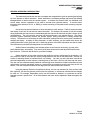
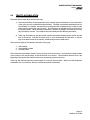
The Remote Group allows the user to activate Hall Calls, Code Blue Calls (optional), VIP calls (optional),
Fire Service (optional) and Inconspicuous Riser Service (optional) via the Owner Interaction terminal.
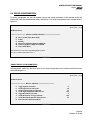
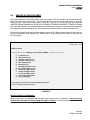
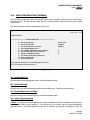
The Remote Group menu is shown below in figure 6.0.
Jul 30, 1990 19:00
SWIFT FUTURA
******************** REMOTE GROUP ********************
U
D
A
B
C
V
F
I
R
E
Set an Up Call at a Floor
Set a Down Call at a Floor
Set a Rear Up Call at a floor
Set a Rear Down Call at a floor
Set a Code Blue Call at a floor
Set a VIP Call at a floor
Toggle Fire Service Activation
Toggle Inconspicuous Riser Enable
Toggle Rear Riser Enable
Exit to Main Menu
F
F
F
Enter character to select the corresponding Menu Function
Hit ".R" to redisplay this menu screen: ?
FIGURE 6.0
SETTING HALL CALLS AND SPECIAL SERVICE CALLS
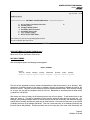
Select the type of hall call desired (‘c’ for code blue call for example). The OI system will then prompt the
user for a floor number. Use the ‘i’ (increment) and ‘d’ (decrement) keys to set the floor number and press
enter. A call of the type selected will be set at that floor.
TOGGLE FIRE SERVICE ACTIVATION
For this service, the "T"rue indicates that an I/O on the group controller was activated to turn on the service.
"F"alse indicates the service was deactivated.
TOGGLE INCONSPICUOUS RISER ENABLE
For this service, the "T"rue indicates that an I/O on the group controller was activated to turn on the service.
"F"alse indicates the service was deactivated.
Page 25
04/29/04 10:16 AM