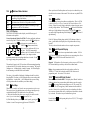
1
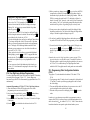
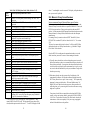
2. Press the
key to select an address.
The display will typically show 00:03,
with the 2 digits in the "Address" side
(left hand side) of the display flashing
to let you know that you need to select
an address. The "LOCO" flag on the screen will also flash during address
"browsing" or selection. Note: During 2 digit loco address selection, the
right hand side of the display shows complete status information of any
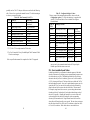
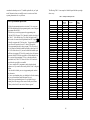
locomotive address in the display. Section 16.0 gives details of locomotive
status codes & what they mean and how you can use them in your
operations.
3. Turn either throttle knob, or use the
keys, to scan or "browse"
through the addresses until you reach the address number “00”. Notice,
turning the knob clockwise increases the loco address number & turning
the knob counterclockwise reduces the loco address number. When you
have scanned to the address you want, '00' in this example, press the
key again to SET this address active in the Right throttle. The display will
stop flashing & the direction indicator
next to the Right throttle will
flash GREEN indicating the Right throttle is the "active display" throttle &
the system assumes that the locomotive is going forward. Note: Since this
is an analog loco the actual direction is determined by the orientation of
the track feeds and how the loco is placed on the track. In the case of an
analog loco, the direction indicator
may or may not match the physical
direction of the loco. In the case of a DCC loco the direction indicator
will always match the actual loco direction. If you press the
(right
arrow) key to change direction, the direction indicator will flash RED
indicating that the loco has changed direction.
Checking Analog Mode:
Before placing an analog locomotive on the track you should
1. Turn the Right Throttle knob "R" clockwise slowly to 99% or full speed.
The DCS100 "TRACK STATUS" indicator should change from ORANGE
to more RED or GREEN indicating that we will be able to control the
analog locomotive on the layout.
2. Press the reverse
direction key for the right throttle. The right
direction indicator will change from blinking GREEN to blinking RED.
Also the TRACK STATUS indicator on the DCS100 will change from
RED to GREEN or vice-versa.
3. Once you observe these "track status" indications, turn the Right Throttle
counter clockwise down to 0% speed.
4. Place an analog locomotive on the track fed from the DCS100 Rail A/B
terminals. Remember, that we recommend that you use the "N scale"
15
setting when using an analog locomotive on your layout. The locomotive
should be still on the layout and you will hear the locomotive "sing"
slightly due to the DCC track signal. Once the analog loco is moving, this
sound will change and be less noticeable.
4. Use the Right Throttle knob to run the analog locomotive. As the value in
the % SPEED display increases, the locomotive on the track will begin to
move.
5. Once you have successfully run an analog locomotive, then you can add a
second locomotive that is equipped with a decoder. Follow the instructions
in your Decoder User's Manual to complete the decoder installation and
proceed to the next step.
4.4 How To Select & Run A DCC Equipped Loco
In order to select a DCC locomotive to run on either throttle, you must know
its address. All Digitrax decoders are factory programmed to the default 2
digit short address "03." If your decoder has not been re-programmed then
select "03" as the address for the Left Throttle knob "L." If you do not know
the address of the DCC locomotive you want to run, you have two options:
You can read back the actual address of the decoder using the programming
track as outlined in section 21.1, OR you can re program the decoder as
outlined in section 21.3 or 21.4.
Selecting A 2 Digit "Short" DCC Locomotive Address:
This Quick Installation only deals with DCC locomotives equipped with the
decoder that came with your Chief Set. These decoders are factory
programmed to use 2 digit short addresses and are capable of 128 speed step
operation. If you wish to use other decoders during the Quick Installation
procedure please see the notes below. Refer to section 12.5.2 for information
on using the Chief's aliased 4 digit addressing capabilities & 4 digit long
address (also called extended packet format, EPF or 14 bit addressing)
capabilities.
1. Turn the Left Throttle Knob about 1/4 turn to activate the left hand
throttle.
2. The display will change to SE:L- to let you know that the Left throttle is
display active but has no loco address selected.
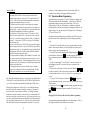
3. Press the
(Select/Set) key. SE:L- will begin to flash.
4. Use either the throttle knob or the
keys to scan for the locomotive
address you want to run. Address "03" in this example. When the address
you want to run is in the left side of the display, press
(Select/Set) to
SET this address as the active address in the Left Throttle.
16