1
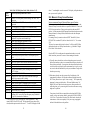
5. The left throttle direction indicator will flash GREEN indicating that
the Left throttle information is currently displayed & that the DCC loco's
direction is forward.
6. Now use the Left Throttle Knob to run the DCC loco you have selected
and set to the Left throttle.
7. Since the display can only show information for one throttle at a time, the
throttle direction indicator shows which throttle is on display by
flashing. Notice when we started working with the Left throttle that the
Right direction indicator stopped flashing & became a steady color
indicating the direction of the Right throttle's locomotive. To display the
Right throttle address & % speed all you have to do is move the throttle
knob or change the loco's direction.
By now you are running two locomotives (one analog and one DCC) and you
have learned some of the key concepts of using the DT100!! Please read the
following sections for more in depth information about other features &
capabilities of the Chief set. ENJOY!
QUICK INSTALLATION Notes for Users of Non-default Digitrax Decoders
and Decoders Made by Other DCC Manufacturers:
1. The DCS100 command station defaults to 128 speed step operation so, if
you are using a DCC locomotive with a decoder that does not have 128
step capability, please refer to section 16.0-16.2 for instructions to modify
or Status Edit the speed step mode that the system will use for this
locomotive address. OR see section 24.0 to change the global System
default from 128 Steps to something else.
2. If you can't control the operation of the lights in your locomotive with the
DT100 (in default 128, or 28 speed step mode), be sure that the decoder
itself is programmed in advanced 28 speed step mode. Please refer to
section 26.5 "Strange Lights" for corrective measures.
4.5 Shutting Down the System
When you are finished with the quick installation session, you can shut down
the Chief & LocoNet by simply switching the DCS100 "Mode" switch to the
"Sleep" position
. At this point all attached DT100 &/or DT200 throttles
will go to "idLE" indicating that they are powered down and in the "sleep"
state. We recommend leaving the power to the DCS100 on all the time. It
consumes less energy than a 20th of a normal household lamp and in this
state the DCS100 provides keep alive power to all throttles that are connected
properly to LocoNet. This conserves throttle battery life.
That's all there is to it!
17
When you are ready to resume your session exactly where you left off, simply
switch the DCS100 "Mode" switch back to the "Run" position
. The
attached DT100's and DT200's will beep within a couple of seconds to
indicate that LocoNet is active again and the "idLE" displays on the throttles
will change.
If the track status indicator did not come on when you switched the DCS100
back to "RUN" mode, then press the
&
on any DT100 to restore track
power.
At this point you have placed your Chief set in service & can now continue to
add to the layout, LocoNet system & operations as you desire. See diagram 2
to get an idea of how to add a host of other Digitrax & other vendors' LocoNet
Certified components & expand on the Chief set as the core of a very
powerful & expandable networked system!
If you had problems at any step in this Quick Installation section, we suggest
you try backing up a step until you get correct results. We carefully set up the
installation procedure so that if you follow them carefully, any problems you
encounter will be easy to isolate & debug.
If you have any questions or problems, we encourage you to call, fax or e-mail
us or your favorite Digitrax dealer. We have a lot of experience at helping a
diverse range of customers with successful installations. We have staff
available to help during normal business hours, so if you are "spinning your
wheels" we would be very glad to help.
5.0 Adding Chief Components To Your Existing Big
Boy Set
With your Big Boy Set, the DT200 acts as both Command Station & Throttle
for your system. The DB100 series booster is a stand alone booster. With the
Chief Set the DCS100 acts as the Command Station & Booster & the DT100
is your Throttle.
You can add either or both the DCS100 &/or the DT100 to a system that is
already running with a DT200 command station (Big Boy Starter Set).
Adding a DCS100 to your existing Big Boy will give you
1. The ability to run more engines at a time.
2. Complete walk around capability for all DT200 throttles.
3. Nested Consisting (using consists as part of other consists).
18