1
CONSUMER DIRECTION MODULE: MASTER USER MANUAL
2. Enter Phone Call Note.......................................................................................................................................................20
Printing a Participant’s File ............................................................................................................................................................. 22
Working with Participants’ Non-Financial Information
Creating a Participant Budget ......................................................................................................................................................... 23
Creating a Participant Budget: Enter a Dollar Amount ........................................................................................................23
Creating a Participant Budget: Via the Assessment Module.................................................................................................24
Creating a Participant Budget: Via the Spending Plan ...........................................................................................................24
Viewing and Printing a Spending Plan..........................................................................................................................................25
Creating or Editing a Spending Plan .............................................................................................................................................26
Online Spending Plan..................................................................................................................................................................26
1.
Edit this Plan (Valid for Drafted Status only) ...........................................................................................................26
2.
Make Copy of Plan, and select Budget and/or Date Range ...................................................................................27
3.
Create Blank Spending Plan .........................................................................................................................................27
Spending Plan Spreadsheet ........................................................................................................................................................28
Downloading the Spreadsheet ..............................................................................................................................................28
Filling out the Spending Plan ................................................................................................................................................29
Uploading/Submitting the Spending Plan ..........................................................................................................................30
Approving or Denying a Spending Plan .......................................................................................................................................32
Recording Participant Expenditures .............................................................................................................................................34
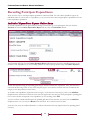
Individual Expenditure Report: Online Entry ........................................................................................................................34
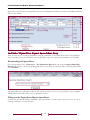
Individual Expenditure Report: Spreadsheet Entry ...............................................................................................................35
Downloading the Spreadsheet ..............................................................................................................................................35
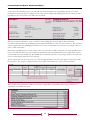
Filling out the Expenditure Report Spreadsheet ................................................................................................................35
Uploading the Expenditure Report Spreadsheet ...............................................................................................................37
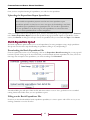
Batch Expenditure Upload.........................................................................................................................................................37
Downloading the Batch Expenditure File...........................................................................................................................37
Filling out the Batch Expenditure File.................................................................................................................................37
Uploading the Batch Expenditure File ................................................................................................................................38
Viewing Participant Expenditures .................................................................................................................................................40
Editing Participant Expenditures...................................................................................................................................................41
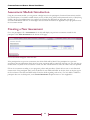
Assessment Module Introduction..................................................................................................................................................43
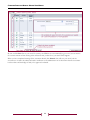
Creating a New Assessment ........................................................................................................................................................... 43
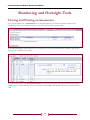
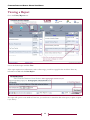
Viewing and Printing an Assessment ............................................................................................................................................45