1
Converteon Management Software User’s Guide
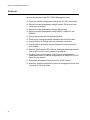
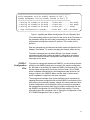
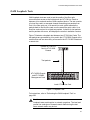
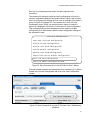
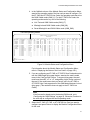
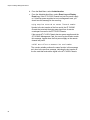
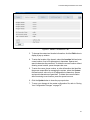
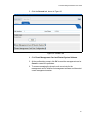
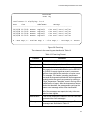
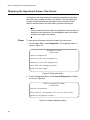
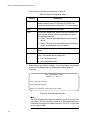
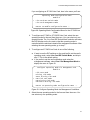
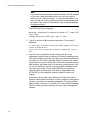
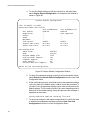
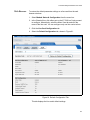
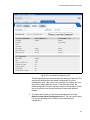
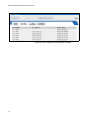
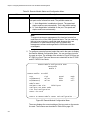
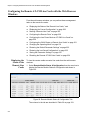
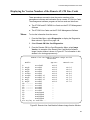
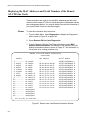
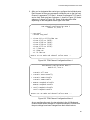
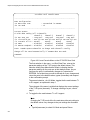
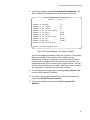
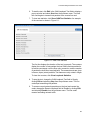
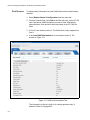
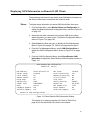
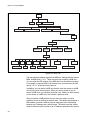
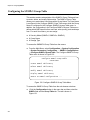
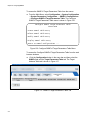
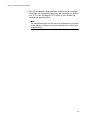
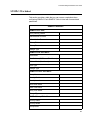
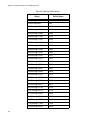
8. To view test statistics, select Show Loopback Test Statistics. The
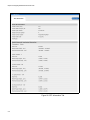
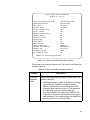
Show Loopback Test Statistics window is shown in Figure 109.
Show Loopback Test Statistics
Module = 5, Port = 1
Number
Number
Number
Number
Number
Number
Number
Number
Number
Number
of
of
of
of
of
of
of
of
of
of
Seconds
Tx Frames
Rx Frames
Rx Errored Frames
Tx Bytes
Rx Bytes
Rx Errored Bytes
Tx Bits
Rx Bits
Rx Errored Bits
71
71
71
0
4260
4260
0
34080
34080
0
Return to OAM Loopback Test...
Figure 109. Show Loopback Test Statistics Window
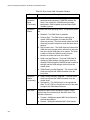
The first line displays the duration of the test in seconds. The counters
display the number of test packets the local OAM client has
transmitted to its remote counterpart over the fiber optic connection,
and the number of packets the local client has received back. The
measurements are given in frames, bytes (octets) and bits. The local
client should receive the same number of test frames, bytes, and bits
as it transmitted. Test frames are sixty octets in length.
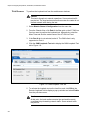
9. You can stop the test at any time by selecting Stop Loopback Test
from the OAM Loopback Test Menu.
10. To resume normal network operations on the local and remote line
cards, select Disable Remote Loopback.
11. To clear the statistics counters, select Clear Loopback Test
Statistics.
261