1
Appendix C
Port Speed Specifications
A UCNA can support only one Ethernet port speed at a time, and the preference is always for 10 Gb/s.
The type of module used (copper or optical) does not make a difference. As soon as a 10-Gb module is
plugged into one of the ports, the UCNA switches to a 10-Gb speed no matter what speed the other port
is running, or even if I/O is running on that port. This behavior is a per-UCNA constraint; another UCNA
can be running on a different speed.
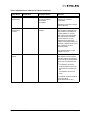
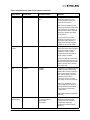
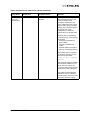
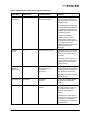
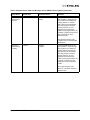
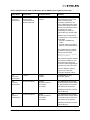
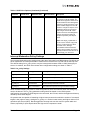
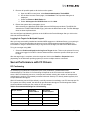
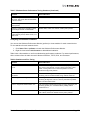
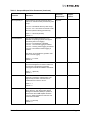
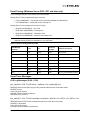
Table 32 lists negotiated speed specifications per an adapter’s port connection:.
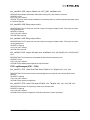
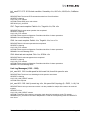
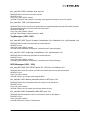
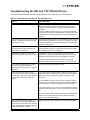
Table 32: Negotiated Speed Specification per Adapter Port Connection
Port 0
Port 1
Port Link
Status Speed
10 Gb/s
10 Gb/s
Both ports link up
10 Gb/s
10 Gb/s
1Gb/s
Only Port 0 links up
10 Gb/s
1Gb/s
10 Gb/s
Only Port 1 links up
10 Gb/s
1Gb/s
1Gb/s
Both ports link up
1 Gb/s
1Gb/s
-
Only Port 0 links up
1 Gb/s
-
1Gb/s
Only Port 1 links up
1 Gb/s
10 Gb/s
-
Only Port 0 links up
10 Gb/s
-
10 Gb/s
Only Port 1 links up
10 Gb/s
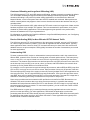
Negotiating Speed on a Mezzanine Card
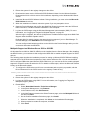
A mezzanine card retains the first negotiated speed. This could be either 10 Gb/s or 1 Gb/s, depending
on the switch connected. To change the speed on a mezzanine card:
1. Remove the switch from both the ports.
2. Insert the switch on one port and wait for the link to come up.
3. After the link is up, insert the switch on the other port.
The mezzanine card retains the speed of the first link until both links are down.
Emulex Drivers for Windows User Manual
Page 119