1
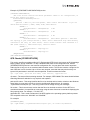
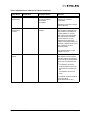
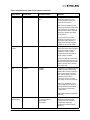
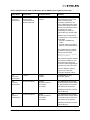
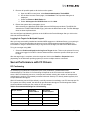
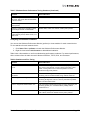
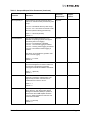
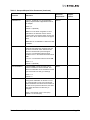
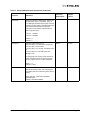
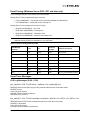
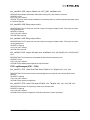
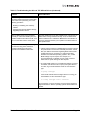
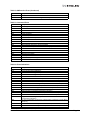
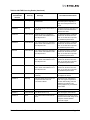
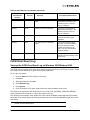
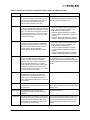
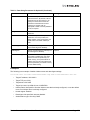
Table 2: Windows Server 2003 Driver Options (Continued)
Option Name
Default Value
Acceptable Values
Definition
TCP Offload
Optimization
Optimize Throughput
Optimize Latency
Optimize Throughput
This parameter only applies to
TCP connection offload, which
must be enabled in the “Protocol
Offloads” section.
Most applications perform better
with TCP Offload Optimization set
to "Optimize Throughput" which
handles large data transfers with
minimal CPU impact.
Setting this parameter to
“Optimize Latency” causes
receive data to be delivered to
the application without waiting for
a TCP PSH. This causes
additional receive indications that
typically decrease total
throughput.
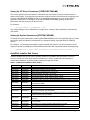
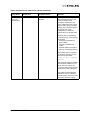
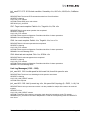
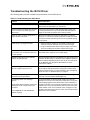
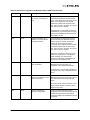
Transmit
Buffers
256
64 through 256, inclusive
Transmit Buffers sets the number
of Ethernet transmits that may be
posted to the hardware at any
given time.
The default value is sufficient to
achieve maximum performance.
Reducing this value conserves
system memory.
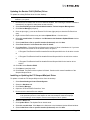
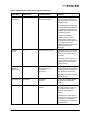
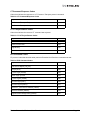
UDP
Checksum
Offload (IPv4)
RX and TX Enabled
Disabled
RX and TX Enabled
RX Enabled
TX Enabled
User Datagram Protocol (UDP)
offload checksum settings.offload
the transmit and/or receive IPv4
UDP checksum computation.
Offloading checksums increases
system efficiency.
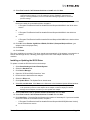
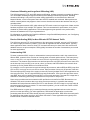
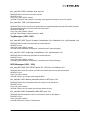
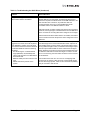
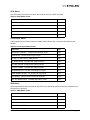
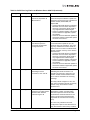
VLAN Identifier
Not Present
Not Present
1 to 4095
If selected, the adapter adds a
VLAN tag to all transmitted
packets.
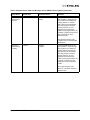
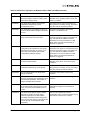
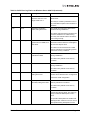
Wake on LAN
Disabled
Disabled
Enabled
Enabling “Wake on LAN” allows
the network device to wake up
the computer when a magic
packet is received during
standby.
In Blade server configurations,
“Wake On Lan” is only supported
on two primary adapters per
device. Additional PCI functions
appear disabled.
Emulex Drivers for Windows User Manual
Page 34