1
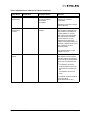
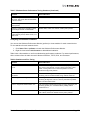
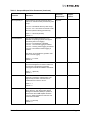
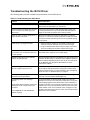
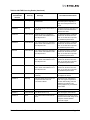
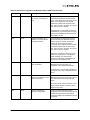
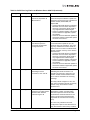
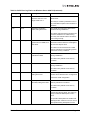
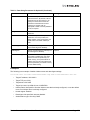
Table 3: Windows Server 2008 and Windows Server 2008 R2 Driver Options (Continued)
Option Name
Default Value
Acceptable Values
Definition
Flow Control
RX and TX Enabled
Disabled
RX and TX Enabled
Rx Enable/Tx Disable
Tx Enable/Rx Disable
Flow control is almost always
advantageous to avoid packet
drops on the network. The switch
or network peer must also have
flow control enabled.
The IEEE 802.3x Ethernet
specification defines a control
frame between peers that can
request a pause in packet
transmissions. This allows one
system to request a temporary
halt of all incoming traffic when
receive buffer space is
exhausted.
The network device may be
configured to respond to pause
frames (Rx Enable) and/or to
send pause frames (Tx Enable).
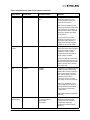
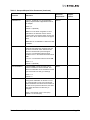
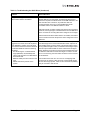
Interrupt
Moderation
Default Adaptive
Aggressive Adaptive
Default Adaptive
Minimal Adaptive
Minimal Static
None
The network device uses interrupt
moderation algorithms to reduce
the total amount of CPU cycles
spent processing interrupts which
increases efficiency for the
system. However, interrupt
moderation increases the latency
of each send and receive. It
should only be disabled when
short latencies are more
important than efficient CPU
utilization.
The “None” setting disables all
delays to minimize latency.
The “Minimal Static” uses a
constant interrupt delay to avoid
any spikes in interrupt rate.
The adaptive settings cause the
driver to dynamically maintain a
target interrupt rate. If CPU usage
is too high, choose a higher
adaptive value to increase the
interrupt delays (and reduce the
rate of interrupts).
Emulex Drivers for Windows User Manual
Page 36