1
CNC-Calc Tab
9
4. CNC-Calc Tab
In this section, the functions under the CNC-Calc tab are described.
The functions in CNC-Calc v7 are activated using the appropriate icons on the Ribbon.
The commands are organized into different menus under the CNC-Calc tab.
If the function can be activated through the Ribbon bar or a keyboard shortcut, the icon or
the shortcut is displayed next to the command name.
The CNC-Calc add-on is optional and will be present in the Editor only if you also
purchased it.
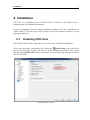
If the CNC-Calc tab is not available, please refer to Installation to read about how to
start CNC-Calc.
4.1. File
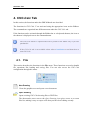
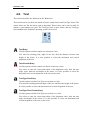
This section describes the functions in the File menu. These functions are used to handle
file operations like loading and saving files. You can also access the CNC-Calc
configuration through this menu.
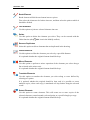
The File menu.
New Drawing
Clears the graphics area and opens a new document.
Open Drawing
Opens existing CNC-Calc drawing files or DXF files.
The downwards arrow next to the Open Drawing icon gives access to a recent
files list, making it easy to reopen a file that you have been editing recently.