1
Overview
6
1.2. User Interface
CNC-Calc v7 can draw 2D geometry, and generate NC code in ISO and Heidenhain
conversational format for contours and drilling cycles. The main program window (with
an empty drawing pane) looks like this:
CNC-Calc main window.
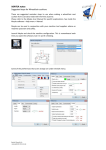
To the left of the drawing pane, you see the CNC-Calc and Element Info panes. The
CNC-Calc pane shows coordinate entry fields and other information about the activity
you are performing at any given time, while the Element Info pane shows the statistics of
any element hovered over by the mouse. Below an example of the Element Info pane
display is shown.
CNC-Calc pane with entry fields.
Element Info pane with information.