1
INTREPID User Manual
Library | Help | Top
Multi-scale edge detection wizard (T44a)
3
| Back |
How to use this chapter
Parent topic:
Multi-scale edge
detection wizard
(T44a)
This chapter describes the operation of the Multi-scale edge detection wizard. You
can use the it both interactively and in INTREPID batch processing mode, using
INTREPID task specification (.job) files.
At V5.0 Intrepid, support for GOOGLE protobuf *.task batch files is also available,
and therefore the complete datamodel language is published and distributed by
Intrepid. Initially, this functionality is a straight duplication of the older Intrepid
datamodel technology.
Where needed in this chapter, there are separate Interactive and Task files sections.
Some sections may be marked Interactive only or Task files only.
You can find out how to use the tool and also get background information as follows:
•
For instructions on using the tool interactively see Using the Multi-scale edge
detection wizard—overview (interactive only).
•
For details about task specification (.job) files, see Task specification (.job) files
•
For batch mode instructions, see Creating and using task specification files.
•
For relevant information in other chapters, see Finding out more about spectral
domain operations.
Overview of the Multi-scale edge detection wizard process
Parent topic:
Multi-scale edge
detection wizard
(T44a)
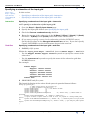
The Multi-scale edge detection wizard process consists of the following steps:
Prepare input dataset
1
Load the input grid dataset (see Specifying the input grid)
2
(Optional) Create subset of input grid dataset (see Specifying a subsection of the
input grid).
3
Transform input grid to the spectral domain using Fast Fourier Transform (FFT),
saving products if required (see Pre FFT grid conditioning and Saving FFT
products ).
4
(Optional) Apply a reduction to the pole filter (see Specifying reduction to pole).
5
Specify upward continuation levels (see Specifying upward continuation levels).
Process data for each continuation level
6
(Optional, for high continuation levels) Rarefy the cell sampling (see Rarefying
cell sampling).
7
Apply the upward continuation filter, producing a filtered grid in the spectral
domain (see "Continuation filters (reference)" in INTREPID spectral domain
operations reference (R14)).
8
Produce total horizontal derivative, X derivative and Y derivative grids (see
"Compound derivative filters" in INTREPID spectral domain operations reference
(R14) and "Single derivative filters" in INTREPID spectral domain operations
reference (R14)) (and keep copies if required—see Saving derivative grids). Note,
as these are measured quantities in a tensor grid, there is no need to calculate
these gradients. In terms of an FTG signal, we use the Tzx and Tyz gradients
components, as these are functionaliy equivalent.
9
Find edge points in the derivative grids (see Step 3—Calculate edge points).
10 (Optional) Save edge points to a line dataset (see Step 3—Calculate edge points)
Library | Help | Top
© 2012 Intrepid Geophysics
| Back |