1
Appendix A: Challenger programming
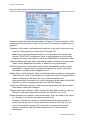
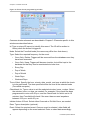
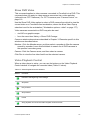
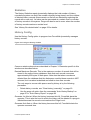
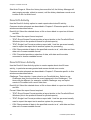
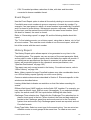
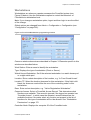
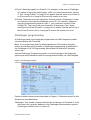
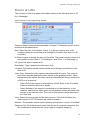
Door/Lift Options
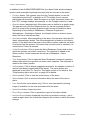
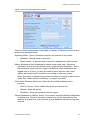
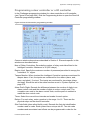
Common window elements are described in Chapter 3. Elements specific to this
window are described below.
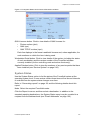
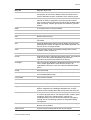
Card Format. Specifies the data format of the reader and card, key or token
being used. Click the arrow, and then select the required card format.
LED. Specifies the status that the reader LEDs will indicate.
Override Timezone. This timezone controls the times when a door can be
opened without the need to use a valid card or PIN. Free access is allowed
when the timezone is valid.
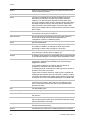
Authorise RAS. Allows the selection of a RAS on the Challenger LAN. When a
valid card is presented and access is granted to this door, then the LCD RAS
selected here will have had the code entered automatically, allowing functions
to be given to that user. Effectively, this will simulate a user entering their
code on the nominated RAS.
Random Event Percentage. Enter a percentage value between 0 and 100%. For
example, if the value is 20%, the door random bit event would be generated
an average of once every five times a valid card/code is used at the reader
(this function is not currently enabled in Challenger).
Time & Attendance Reader. This function is not currently enabled in Challenger.
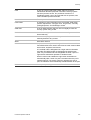
Door Input Holds Door Unlocked. When checked the door lock will not operate to
re-lock until the door is closed. This is used where the lock mechanism, when
locked, will stop the door closing.
Inhibit Override Until User Enters. When checked prevents the door from
unlocking when the override timezone becomes active until a valid card/code
is presented at the reader.
Report Door Open & Close. When checked the system reports to printer and/or
computer whenever the door is unsealed and re-sealed.
Report Forced Door. When checked the system reports to printer and/or
computer whenever the door is forced.
Report DOTL. When checked the system reports to printer and/or computer
whenever the door is in Door Open Too Long (DOTL) state.
Pulse Lock Unlock Relays. When checked the system pulses the lock unlock
relay.
Disable Duress. When checked the system disables the duress PIN code from
reporting a duress condition.
Hold Door Unlocked Until Door Open. When checked the door will not lock until
the door is opened.
Report (Un)Secured. When checked the door will report secure and unsecure
events.
Forcefield Operators Manual
281