1
Content
SilverFast® Software-License Agreement
Introduction
Change of system requirements
Contents of the Upgrade
2
5
5
6
SilverFast ColorServer
7
Hotfolder7
What is the ColorServer (Hotfolder)?
Which SilverFast Versions include the ColorServer?
Launching the ColorServer
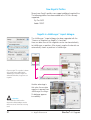
ColorServer Overview
Working with the ColorServer
Select / Generate a Hotfolder
Setting Input Parameters for a Hotfolder
Setting the Hotfolder’s Output Parameters Practical uses of ColorServer
7
7
7
8
9
9
9
11
13
Multi-Exposure15
Enhancing the Dynamic Range of Scanners
15
Function15
Supported Scanners
16
Supported SilverFast Versions
16
Usage of Multi-Exposure
17
Scanning 48 Bit
Scan-Type „48 Bit Color“
Scan-Type „48 Bit HDR Color“
NegaFix Improvement
Automatic Colour Cast Removal (CCR)
Supported SilverFast Versions
New NegaFix Profiles
NegaFix in JobManager* import dialogue
18
18
18
19
19
19
20
20
Auto-Frames21
Automatic Detection of Frames
Supported SilverFast Versions
Auto-Frame Function
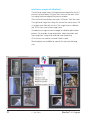
Auto-Frames example with SilverFastAi
Auto-frame for flatbed scanner with transparency unit
Resizing auto-frames*
Automatic frame rotation
Manual frame rotation and alignment
Adjusting the frame size
Adjusting the rotation
Align horizon
Deleting framesets
SilverFast® v.6.6 Upgrade
1 • Introduction
21
21
21
22
23
24
25
26
26
27
28
28
3