1
572
ISDN Overview
Method 2: (North America only)
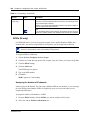
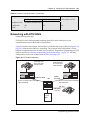
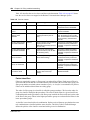
Use incoming Call by Call (CbC) Service routing to map the call type to the DISA DN. Refer
to “Configuring Call Routing” on page 117 for more information.
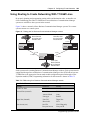
With FX, INWATS, 900, and SDS service types, either a Service Id (SID) or a CDN is mapped
to Target Line Receive Digits. This is programmed under “Configuring Call by Call Limits” on
page 186. DISA may be accessed by having the SID or CDN map to the DISA DN. This
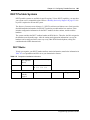
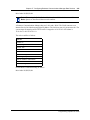
example has a Receive Digit Length = 4, DISA DN = 1234, and CbC Routing with (Service
Type = FX, Map from SID = 2, Map to digits = 1234).
A call presented to the Business Communications Manager system with service type FX and
SID 2 will be handled as follows:
•
•
The ISDN setup message will specify FX with SID = 2
The FX SID = 2 will be mapped to DISA DN digits 1234
The call will be answered with DISA.
Program ISDN Equipment
PRI modules support various applications that are enabled by PRI. For a list of the type of
applications that are supported, refer to the <Emphasis>Business Communications Manager
Feature Programming Telephone Guide<Emphasis>.
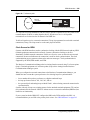
Terminal equipment for BRI Cards
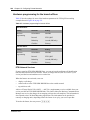
ISDN devices and terminals connected to the Business Communications Manager system must be
configured under Services, Telephony Services, Loops. You choose directory numbers for ISDN
equipment from a predetermined range of DNs (597 to 694). Any of the ISDN DNs can be
assigned to an S loop, but each can only be assigned to one loop and a single device. If you require
more than the default 32 devices, you can use the NA Portable range of DNs (565 to 596). If you
need these extra DNs, change the DN type from NA Portable to ISDN and DECT.
Devices on an S loop (BRI cards only)
Terminal equipment using an S loop must be assigned an ISDN directory number (ISDN DN).
This allows the TE to be assigned lines and to communicate with other devices connected to the
Business Communications Manager system. Each DN can be assigned to only one TE and one
loop.
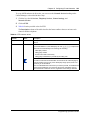
You assign ISDN DNs to S loops from the Telephony Services subheading, under Loops, DNs on
Loop, Assign DNs. Each S loop can be programmed with eight ISDN DNs, but you cannot exceed
a total of 58 ISDN DNs for the Business Communications Manager system.
P0937241 02.1